
Summary of Palm Arduino Board V3
I designed the Palm Arduino V3 prototype PCB to fit inside Lego Technic-compatible enclosures, avoiding repeated perf‑board wiring. V3 reorders pins (grouping I2C, serial, SPI on one side; digitals/analogs on the other), adds 5V and 3.3V regulators, and uses enlarged holes for Lego studs. I created the PCB in EagleCAD, produced sample boards, modeled the board and Lego cases in 3DS Max using accurate virtual components, and planned multiple connector and switch orientation options for flexible use with XBee and other breakouts.
Parts used in the Palm Arduino V3:
- ATmega328 microcontroller
- 5V voltage regulator
- 3.3V voltage regulator
- Reset pin and circuitry
- XTAL1 crystal
- XTAL2 crystal
- Power rails (VCC and GND)
- Analog pins A0–A5 (including A4 SDA and A5 SCL)
- Digital pins D0–D13 (including TX/RX and SPI pins SCK, MOSI, MISO, SS)
- Serial communication rail (TX, RX, VCC, GND) compatible with XBee/breakout
- Right-angle or straight female connector options
- Straight or right-angle power switch options
- PCB with four enlarged Lego stud mounting holes
- Silkscreen labeling (from PCB fabricator render)
I design and create this Palm Arduino V3 prototype PCB, as I was tired of recreating Arduino Compatible on perf board every time I prototyping a new project, especially when I had to spend a lot of time tracing the wiring to see that I made the right connection.
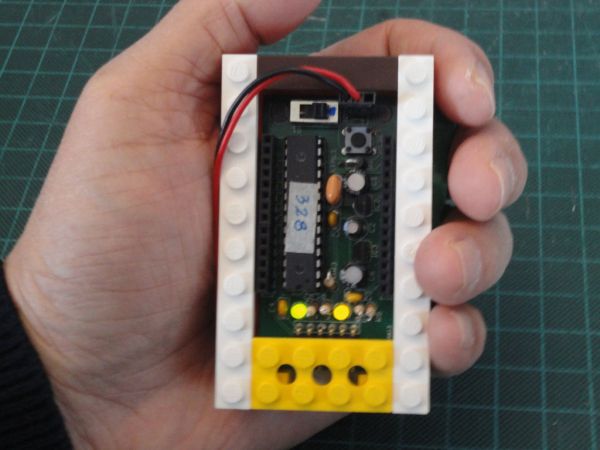
I design this Palm Arduino (version 3) prototype PCB to be encased by Lego bricks, especially Lego Technic Bricks, for the reason that I was hooked by the Lego after my first Lego project – R/ C Lego Car. And I am working on a couple projects that are using Lego Technic components with Arduino. (I will post instructables as the project is ready to post.)
Also, I want to be able to use Palm Arduino in wide variety fashions. For example I could use either right angle female connectors or straight female connectors. or could use straight power switch or right angle power switch. etc. By doing this, I would facing the challenge of the enclosure designs to fit all of the mentioned criterial, and not very cost effective since we have to make 3D Print for each individual case.
For these reason Lego bricks are the best option to be used as the case of Palm Arduino Version 3.
Step 1: Schematics and Pin Configurations
Palm Arduino and Palm Arduino II
Original Palm Arduino and Palm Arduino II, have a straight forward pin configurations. The order of the pin configuration were the same as the order of the pins of ATmega328 micro controller (28 pins)
1 – RESET 28 – A5 (SCL)
2 – D0 (RX) 27 – A4 (SDA)
3 – D1 (TX) 26 – A3
4 – D2 25 – A2
5 – D3 24 – A1
6 – D4 23 – A0
7 – VCC 22 – GND
8 – GND 21 – AREF
9 – XTAL1 20 – AVCC
10 – XTAL2 19 – D13 (SCK)
11- D5 18 – D12 (MOSI)
12 – D6 17 – D11 (MISO)
13 – D7 16 – D10 (SS)
14 – D8 15 – D9
Both Palm Arduino and Palm Arduino II requires an addition of power regulator (5V and 3.3V).
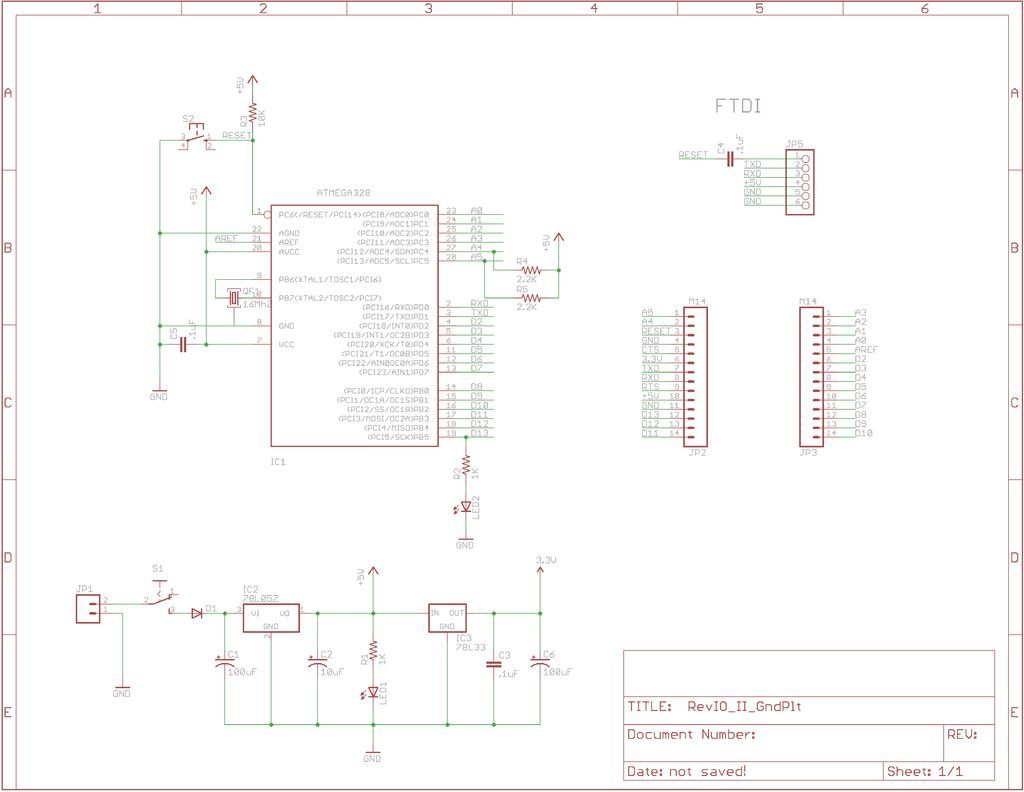
Palm Arduino Version 3
In Palm Arduino Version 3, I used the same pin configuration that I designed for my other Arduino compatible board, RevIO, by grouping the communication ports (I2C, Serial Comm. Ports and SPI) on one side of the board, and leave the rest of the pins (Digitals, and Analogs) line up on the other side of the board sequentially (image 1).
I also group the serial comm. pins (TX, RX, VCC, GND) on the rail to to be compatible with the XBee breakout board, such as XB-Buddy Basic Kit, Adafruit’s XBee Adapter Board (ID-126), or Sparkfun’s Bluetooth Mate Gold (WRL-09358), etc.
Palm Arduino V3, added voltage regulators (5V and 3.3V) circuitry onto the PCB.
I designed the Palm Arduino Version 3 to have its dimension compatible with the Lego’s modular system.
Instead of using an ordinary standoff holes on four corner of the PCB, I added four larger holes that can accommodate the Lego’s stud, so the PCB could hold on to the Lego’s bricks or plates.
Step 2: Design Processes
PCB and Case Design
Lego Modular System has been in my interest long before I created my first Lego project, R/C Lego Car. I have been researching on Lego bricks and components for a while, I also build my own Virtual Lego Bricks and Plates, and components according to the real dimensions, now I have good amount of components in my Lego Bricks and Plates library.
Since I planned to build Palm Arduino V3, I could use the Virtual Lego Bricks and Plates from my library to good use.
First, I design (virtual) Palm Arduino PCB in EagleCAD, using exactly the same components as in my other Arduino compatible board, RevIO. The RevIO PCB is larger than Palm Arduino V3.
I planned the layout of Palm Arduino V3 to have the dimension fit with the Lego Modular System, and created the PCB in EagleCAD.
Then send the Gerber files to make the sample PCBs (I ordered four of them).
After I finished with the PCB layout I created Virtual PCB with CAD program (Autodesk’s 3DS Max 8). To make a complete virtual PCB, I also created all the (virtual) electronics components that were necessary in Palm Arduino exactly with the real dimensions. And placed them on the virtual PCB.
The silkscreen on the PCB came from the rendered image from PCB fabricator. I used the image as a texture map on the Virtual PCB.
To design the case, I imported the necessary Lego Bricks and Plates into the virtual PCB and design the variations of the components configurations and different case styles, as presented in the following Steps..
ATMEGA328
For more detail: Palm Arduino Board V3
- What is the main purpose of Palm Arduino V3?
To provide a compact Arduino-compatible prototype PCB designed to be encased by Lego bricks and avoid repetitive perf board wiring. - Which microcontroller does Palm Arduino V3 use?
It uses the ATmega328 microcontroller. - Does Palm Arduino V3 include voltage regulators?
Yes, it includes both 5V and 3.3V voltage regulator circuitry on the PCB. - How are the pins arranged on Palm Arduino V3?
Pins are grouped with communication ports (I2C, serial, SPI) on one side and digital and analog pins lined up sequentially on the other side. - Is Palm Arduino V3 compatible with XBee and similar breakouts?
Yes, the serial communication pins (TX, RX, VCC, GND) are grouped on a rail to be compatible with XBee breakout boards and similar adapters. - How is the PCB mounted to Lego bricks?
The PCB has four larger holes sized to accommodate Lego studs so it can attach to Lego bricks or plates. - What CAD tools were used to design Palm Arduino V3 and its case?
The PCB was designed in EagleCAD and virtual PCB and case models were created in Autodesk 3DS Max 8. - Were sample PCBs produced for Palm Arduino V3?
Yes, Gerber files were sent to a PCB fabricator and sample PCBs were ordered (four of them). - Can connector and switch orientation be changed on Palm Arduino V3?
Yes, the design allows using right angle or straight female connectors and straight or right-angle power switches for different enclosure needs.
