
Summary of MultiSerial Mega using Arduino
This project utilizes an Arduino Mega to manage multiple serial connections simultaneously. It routes incoming data from a secondary serial port (Serial 1) directly to the main serial monitor, enabling communication with external devices while maintaining visibility in the primary terminal window. This setup is ideal for systems requiring interaction with multiple serial-enabled peripherals like XBee radios or Bluetooth modules.
Parts used in the MultiSerial Mega Project:
- Arduino Mega Board
- Serial enabled device (such as an Xbee Radio, Bluetooth module, RFID reader, or another Arduino)
- USB cable for computer connection
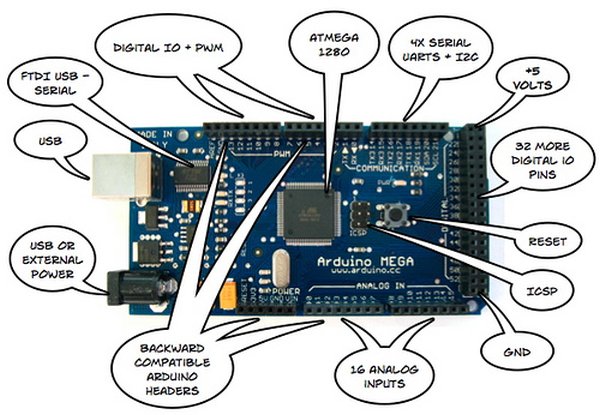
Sometimes, one serial port just isn’t enough! When trying to communicate with multiple serial enabled devices, while also sending info back to the main serial window, a few extra RX/TX ports can be a welcomed thing. This example makes use of one of Arduino Mega’s 3 auxiliary serial ports, routing any incoming data read on that connection straight to the main TX line, and, in turn, to the main serial window for you to view.
Circuit
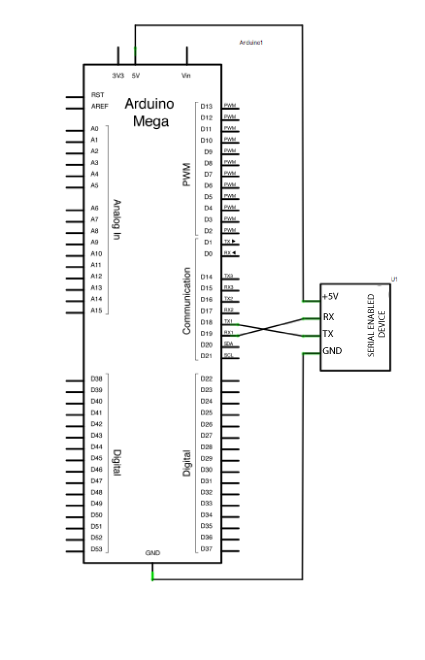
After checking the data sheet of whatever serial enabled device you choose to use for this example, make sure that it is both properly wired and powered. Connect the RX pin and TX pins of your device to the TX and RX pins of your Mega, as shown in the schematic below.
Make sure that your Mega is connected to your computer, via USB, to enable serial communication.
image developed using Fritzing. For more circuit examples, see the Fritzing project page
Schematic
Code
Mega multple serial test
Receives from the main serial port, sends to the others.
Receives from serial port 1, sends to the main serial (Serial 0).
This example works only on the Arduino Mega
The circuit:
* Any serial device attached to Serial port 1
* Serial monitor open on Serial port 0:
created 30 Dec. 2008
modified 20 May 2012
by Tom Igoe & Jed Roach
This example code is in the public domain.
*/
Hardware Required
- (1) Arduino Mega Board
- (1) serial enabled device (a Xbee Radio, Bluetooth module, or RFID reader, or another Arduino, for instance).
- What is the primary function of this example?
The example routes incoming data read on an auxiliary serial port straight to the main TX line and serial window. - Can this code work on any Arduino board?
No, this example works only on the Arduino Mega because it uses one of its three auxiliary serial ports. - How should the RX and TX pins be connected?
Connect the RX pin of your device to the TX pin of the Mega and the TX pin of your device to the RX pin of the Mega. - Does the Mega need to be connected to a computer?
Yes, the Mega must be connected to your computer via USB to enable serial communication. - What types of devices can be used as the serial enabled component?
You can use an Xbee Radio, Bluetooth module, RFID reader, or another Arduino. - Which serial port does the code receive data from initially?
The code receives from Serial port 1 and sends it to the main serial port (Serial 0). - Who created the original example code?
The code was created by Tom Igoe and Jed Roach. - Is the example code proprietary or open source?
This example code is in the public domain.
