
Summary of LINUSBot – Line Follower Robot using Arduino
The project builds a simple Arduino-based line-follower robot using a Pololu QTRx8RC infrared reflectance sensor array (five sensors used), an H-bridge driving two geared DC motors, and a rounded acrylic chassis on a white cardstock track with black tape. The robot reads the sensor array to stay on a black line, steering left or right when sensors detect white. A basic (raw) control keeps it following the track; motion may be jerky. The guide includes chassis, wiring pinouts, and component recommendations.
Parts used in the Line Follower Robot:
- Arduino UNO, Mega, Duemilanove or Teensy 2.0
- Prototype shield (optional)
- Pololu QTRx8RC infrared reflectance sensor array (using five QRE1113GR sensors)
- Dual H-bridge motor driver
- 2 x Gearbox with 30:1 ratio and DC motors
- 2 x 3 inch wheels
- 2 x 9V batteries (400 mAh)
- 2 x 9V battery clips
- Ball caster (third wheel)
- Wires and cables for connections
- Screws, nuts, washers, spacers for mounting
- 2 x acrylic parts for chassis
- White cardstock and black electrical tape for the track
- Tools for assembly
The operation of this Robot is quite simple.
Infra-red sensors placed at the front of the chassis will monitor when our Robot is over a black line or when it is over a white background.
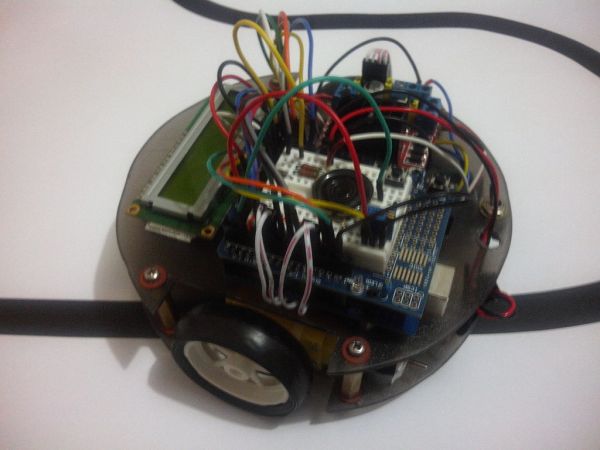
In this project we will use the appropriate rounded chassis to the Robot.
In case the robot being on the black line, it will always go ahead, and in the case of out of line and fall into a white area, it will determine whether to correct to the left or right, and thus remain on the black line.
The sensors that will be used is the array infrared sensor Pololu (also called reflectance sensors) QTRx8RC, that consists of eight sensors (only five are used) QRE1113GR.
This array has a digital output and can easily be managed using the appropriate library of Pololu, for determine the position of the line relative to the sensors.
This array of sensors can be broken in a array with 6 sensors and another with 2 sensors.
For more information about the sensors array , visit:
http://www.pololu.com/catalog/product/961
In this first project, we will use a raw control for our robot, ie we are concerned to keep the robot following the line …
The Robot will run in a track and we will note that the motions of the robot will be somewhat “robotic”, ie: not very smooth, but jerky.
See http://arduinobymyself.blogspot.com.br for more projects
Step 1: The track
The track will be made of a piece of white cardstock and black electrical tape.
The bend ought to a minimum diameter 6″ or greater.
Below we have two examples of track
Step 3: Chassis Project
The chassis was constructed with a 3 mm piece of acrylic in a rounded format with slots for the wheels.
See the screenshots below (sorry but is in Portuguese) but can have a general idea.
Step 4: Schematic Diagram
Lets go to the pinouts:
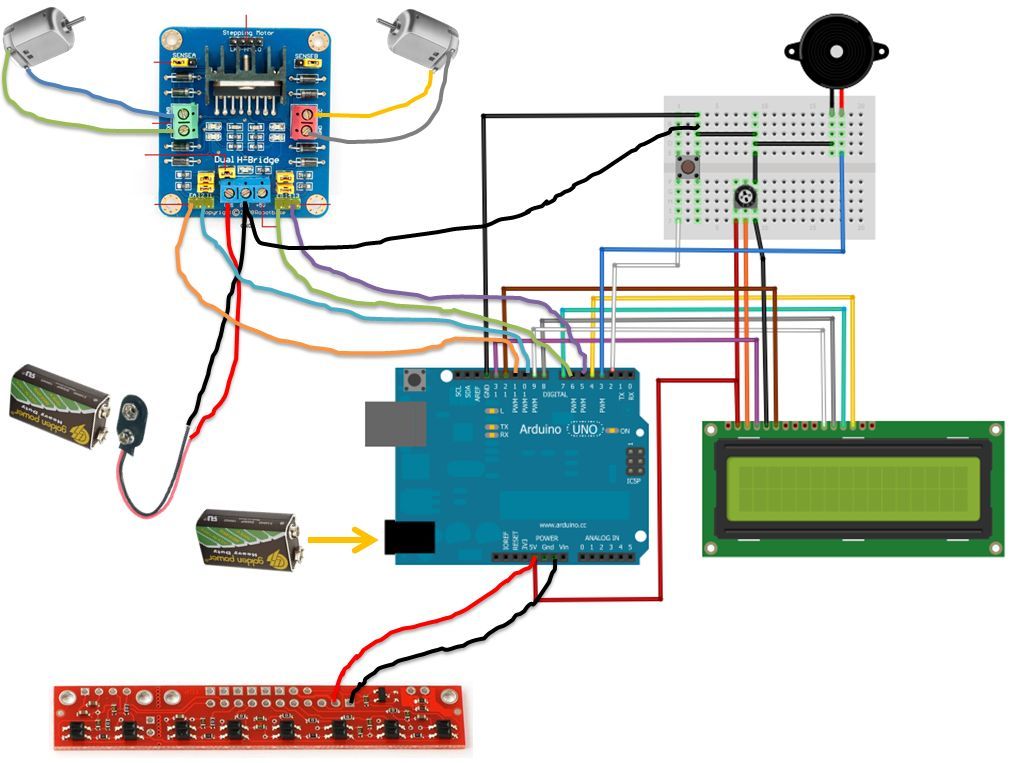
1 – The motors are connected to the output pins of the H-Bridge (care about to the polarity);
2 – The 9V battery is connected to VCC (+) and GND (-) of the H-Bridge;
3 – Pins in1, in2, in3 and in4 of H-bridge are connected to the arduino pins: 10, 11, 5 and 6 respectively;
4 – Pins 1, 2, 3, 4 and 5 of the QTR sensor, are connect to the pins A0, A1, A2, A3 and A4 (notice that the sensor 1 should be the most left);
5 – The LCD is connect as showed in the diagram: pins R / W – 13, Enable – 12, data – 9, 8, 7 and 4 (it dependent of the type of yours display);
1 x prototype shield (optional) (highly recommended)
1 x dual H-BRIDGE
2 x Gear Box with 30:1 of ratio transmission and associated DC motor
2 x wheels 3″
2 x 9V Batteries 400 mA / h
2 x 9V battery clip
1 x Ball caster (third wheel)
wires and cables for connections
screws, nuts, washers, spacers for mounting
2 x acrylic parts for cutting the chassis
tools in general
For more detail: LINUSBot – Line Follower Robot using Arduino
- What sensor array is used for detecting the line?
The project uses the Pololu QTRx8RC infrared reflectance sensor array with QRE1113GR sensors. - How many sensors from the array are used in this project?
Five sensors from the QTRx8RC array are used. - How does the robot decide to correct left or right?
The robot monitors sensors for black or white; when it detects white it determines whether to correct left or right to remain on the black line. - Which Arduino pins connect to the H-bridge inputs?
H-bridge in1, in2, in3, and in4 connect to Arduino pins 10, 11, 5, and 6 respectively. - Where are the QTR sensor pins connected on the Arduino?
QTR sensor pins 1–5 connect to analog pins A0, A1, A2, A3, and A4; sensor 1 should be the most left. - How should the motors be connected to the H-bridge?
Motors are connected to the output pins of the H-bridge, observing correct polarity. - What power source is used for the H-bridge?
A 9V battery is connected to VCC and GND of the H-bridge. - What materials make the track for the robot?
The track is made from white cardstock with black electrical tape for the line; bends should be 6 inches diameter or greater. - What is said about the robot motion quality?
The guide notes the robot will run with raw control and its motions will be somewhat robotic and jerky, not very smooth.
