
Summary of Juuke RFID card music player jukebox
Summary: Juuke is a simple digital jukebox built with an Arduino Uno that uses RFID cards to play specific MP3s from an SD card. Designed for children and the elderly, it offers easy controls: RFID cards for song selection, a green button for random play, and a red button for play/pause. The project includes code and full build instructions on Instructables.
Parts used in the Juuke:
- Arduino Uno
- RFID reader
- RFID cards
- SD card module
- SD card
- Audio playback module (MP3 decoder)
- Speaker or audio output
- Green push button (random play)
- Red push button (play/pause)
- Power supply (for Arduino and audio module)
- Wires and connectors
- Enclosure or box for the jukebox
Using an Arduino Uno micro-controller together with RFID Cards a unique digital jukebox has been created aptly named Juuke. Watch the demonstration video below to learn more about the easy-to-use system designed specifically children and the elderly to be able to play their favourite music.
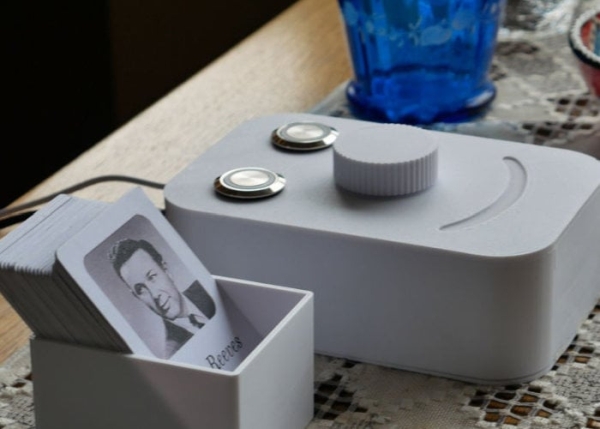
The Juuke Box works by using RFID cards to play specific songs from an SD card. You could also play the songs randomly using the green button, or play and pause with the red button.
Instructables member “Ananrods” explains more about the inspiration behind the unique Juuke box.
“This is the Juuke box. The Juuke box is your own musical friend, made to be as easy as possible to use. It is especially designed to be used by elderly and kids, but can of course be used by all other ages. The reason we created this, is because of my girlfriend’s grandmother.
She told me that her and her grandma sitting in the kitchen, listening to music, dancing and laughing. Sadly, through the last years, her grandma has been in and out from hospital. On her worst days, however, music is one of the few things that still makes her smile. And music players like CD players are just too hard to use for her. That’s why we created the Juuke.”
For more information on the build including component list, code and full instructions, jump over to the official project page on the Instructables website by following the link below.
Source: Juuke RFID card music player jukebox
- How does the Juuke play specific songs?
It uses RFID cards read by an RFID reader connected to the Arduino to trigger specific songs stored on an SD card. - Can the Juuke play songs randomly?
Yes, the green button triggers random playback of songs. - Does the Juuke have play and pause controls?
Yes, the red button is used for play and pause. - What hardware is the Juuke built around?
The project is built around an Arduino Uno microcontroller. - Who is the Juuke designed for?
It is designed specifically for children and the elderly to be easy to use. - Where are the project details like code and instructions available?
The full build instructions, component list, and code are available on the project page at Instructables. - What storage does Juuke use for music files?
Music files are stored on an SD card accessed by an SD card module. - Is an audio output required for the Juuke?
Yes, a speaker or audio output connected to the audio playback module is required.
