
Summary of IR REMOTE TESTER HELPS YOU CRACK THE CODE
This article describes an IR Remote Tester/Decoder project that diagnoses non-functioning infrared remotes. Using a TSOP4838 receiver, it provides visual feedback via an LED and decodes transmitted data when connected to an Arduino with the IRremote library. This setup helps users verify remote signals, clone codes, or automate devices by making invisible infrared pulses visible for debugging purposes.
Parts used in the IR Remote Tester / Decoder:
- TSOP4838 integrated IR receiver/decoder device
- Visible LED
- Resistor (for current-limiting)
- Capacitor (to make flickering easier to see)
- Arduino microcontroller
- IRremote library
Even though some devices now use WiFi and Bluetooth, so much of our home entertainment equipment still relies on its own proprietary infrared remote control. By and large (when you can find them) they work fine, but what happens when they stop working? First port of call is to change the batteries, of course, but once you’ve tried that what do you do next? [Hulk] has your back with this simple but effective IR Remote Tester / Decoder.
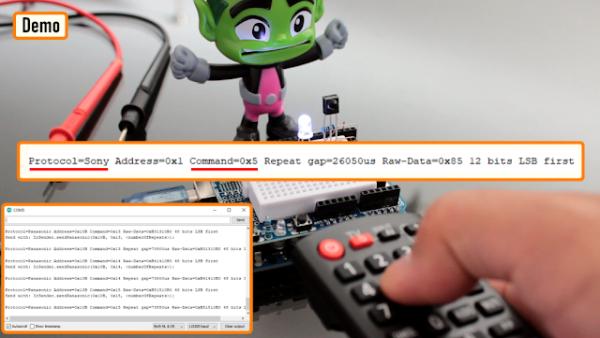
By using a cheap integrated IR receiver/decoder device (the venerable TSOP4838), most of the hard work is done for you! For a quick visual check that your remote is sending codes, it can easily drive a visible LED with just a resistor for a current-limit, and a capacitor to make the flickering easier to see.
For an encore, [Hulk] shows how to connect this up to an Arduino and how to use the “IRremote” library to see the actual data being transmitted when the buttons are pressed.
It’s not much of a leap to imagine what else you might be able to do with this information once you’ve received it – controlling your own projects, cloning the IR remote codes, automating remote control sequences etc..
It’s a great way to make the invisible visible and add some helpful debug information into the mix.
We recently covered a more complex IR cloner, and if you need to put together a truly universal remote control, then this project may be just what you need.
Source: IR REMOTE TESTER HELPS YOU CRACK THE CODE
- What is the first step if an IR remote stops working?
The first port of call is to change the batteries. - How can you visually check if a remote is sending codes?
You can use a cheap integrated IR receiver like the TSOP4838 to drive a visible LED. - Which component limits current for the LED in this project?
A resistor is used for current-limiting the LED. - What is the purpose of the capacitor in the circuit?
The capacitor makes the LED flickering easier to see. - How do you view the actual data transmitted by buttons?
Connect the setup to an Arduino and use the IRremote library. - Can this project be used to clone IR remote codes?
Yes, receiving the data allows for cloning IR remote codes. - What is one way to utilize the decoded information?
You can use it to control your own projects or automate remote control sequences. - Does this project work with devices using WiFi or Bluetooth?
No, the article states that much home entertainment equipment still relies on proprietary infrared remote controls.
