
Summary of Instagram Inspired DIY Photo-Booth using Arduino
This article details the construction of a DIY photo booth for events, transforming wood into a functional unit. The process involves cutting an MDF sheet, creating access holes for a camera and monitor, adding a trim frame, rounding corners with a jigsaw, and assembling side panels and corner structures using wood strips, glue, screws, and brackets. A red dome push button is installed at the bottom to trigger photos.
Parts used in the Photo-Booth:
- Square sheet of MDF
- Red Dome Push Button
- Camera lens
- Tv monitor
- Wooden frame
- Jigsaw
- Screws
- 90 degree brackets
- Short strips of wood
- Glass
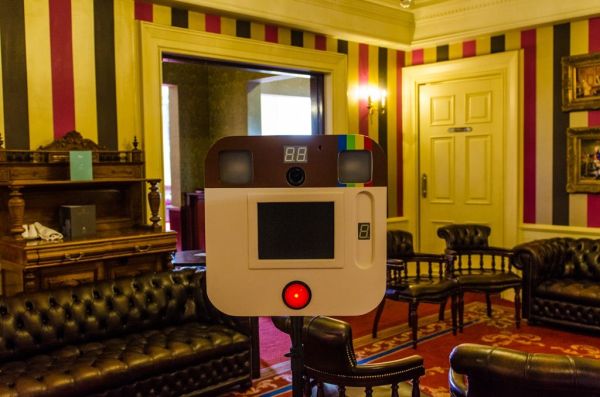
I decided to build a simple photo-booth as a fun addition for events, this goes through the basic steps of how i went from a few pieces of wood to a fully functional booth. I have also included a photo of what the images look like!
Step 1: Cutting Wood
Square sheet of MDF, 600mm x 600mm with a Red Dome Push Button recessed at the bottom.
Step 2: Access Holes
Holes were then cut out for camera lens and tv monitor.
Step 3: Monitor Trim
A wooden frame was then fitted to surround the hole for the tv to add depth.
Step 4: Rounding Edges
Corners were then curved using a jigsaw.
Step 5: Fitting Sides
Sides were then cut just short of where the corners start to bend. Screws and 90 degree brackets temporarily attached them to the back piece.
Step 6: Building Corners
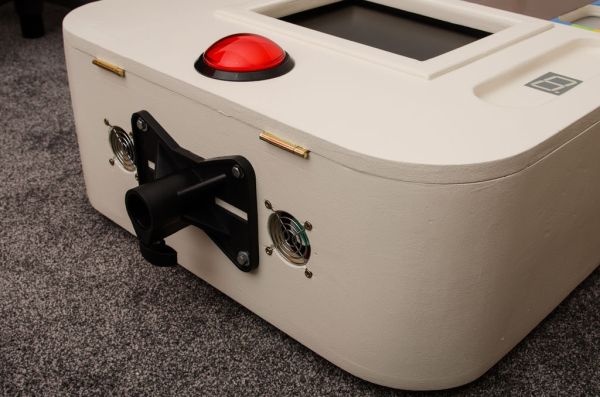
The rounded corners were made from short strips of wood, glued to form the rough shape of the corner. These were also temporarily screwed and attached using 90 degree brackets while the glue dried.
For more detail: Instagram Inspired DIY Photo-Booth using Arduino
- What material was used for the main structure?
A square sheet of MDF measuring 600mm x 600mm was used. - How were the corners finished?
Corners were curved using a jigsaw. - What components were cut out for the camera and screen?
Holes were cut out specifically for the camera lens and tv monitor. - How was depth added around the monitor hole?
A wooden frame was fitted to surround the hole for the tv. - What fasteners were used to temporarily attach the sides?
Screws and 90 degree brackets were temporarily attached to the back piece. - How were the rounded corners constructed?
They were made from short strips of wood glued to form the rough shape. - When were the corner strips screwed and attached?
They were temporarily screwed and attached using 90 degree brackets while the glue dried. - Where was the push button recessed?
The Red Dome Push Button was recessed at the bottom.
