
Summary of HOW TO USE LEGO BRICKS FOR DATA STORAGE
This project recreates the educational value of punch cards using LEGO bricks to store machine code for a 65C816 CPU. White studs represent logic zeros and black studs represent logic ones on an 8×20 board. A stepper motor moves the card under reflectance sensors connected to an MSP430 microcontroller, which transfers data to a WDC W65C265SXB board for execution.
Parts used in the LEGO Punch Card Data Storage System:
- White 8x20 stud board
- Small black LEGO pieces (for logic one)
- Reflectance sensor array
- Stepper motor
- LEGO train tracks
- MSP430 series microcontroller
- Stepper motor driver
- WDC W65C265SXB board
- 65C816 CPU
- LED
Those old enough to have encountered punch cards in their lifetime are probably glad to be rid of their extremely low data density and the propensity of tall stacks to tip over. But obsolete as they may be, they’re a great tool to show the basics of binary data storage: the bits are easily visible and can even be manipulated with simple tools. As an experiment to re-create those features in a more modern system, [Michael Kohn] made a punch card-like system based on LEGO bricks that stores machine code instructions for a 65C816 CPU, the 16-bit successor to the venerable 6502.
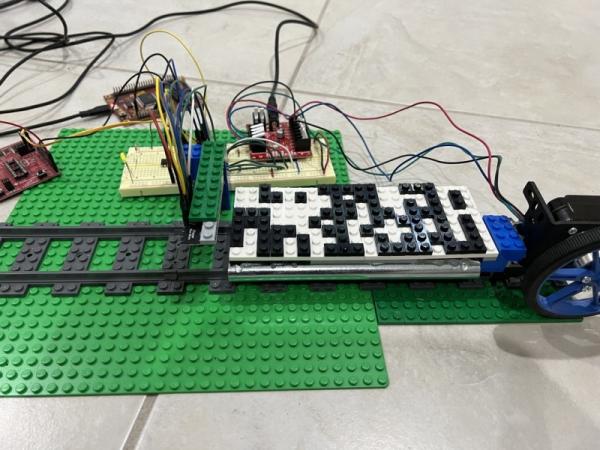
Bits are stored on a white 8×20 stud board, onto which small black pieces are placed. A white background stud encodes a logic “zero”, while a black stud encodes a logic “one”. The bits are read out by an array of reflectance sensors, which conveniently has the same 8 mm pitch as standard LEGO studs. A big wheel driven by a stepper motor slides the data card under the readout circuit along a short stretch of LEGO train tracks.
The optical sensors are read out by an MSP430 series microcontroller, which also drives the motor through a stepper motor driver. Once the data is read out, the bytes are transferred into a WDC W65C265SXB board, which executes them as machine code instructions on its 65C816 CPU. In the video below, you can see a program being loaded that blinks an LED.
We’ve featured educational punch-card systems before, like this Raspberry Pi-based model. If you’ve got a bunch of actual punch cards that need reading out, check out this Arduino-powered readout system.
Source: HOW TO USE LEGO BRICKS FOR DATA STORAGE
- What do white and black studs encode?
A white background stud encodes a logic zero while a black stud encodes a logic one. - How is the data read out from the LEGO board?
An array of reflectance sensors reads the bits as the card slides under them. - What component drives the movement of the data card?
A big wheel driven by a stepper motor slides the data card along LEGO train tracks. - Which microcontroller controls the sensors and motor?
The MSP430 series microcontroller reads the optical sensors and drives the motor through a stepper motor driver. - Where are the bytes transferred after being read?
The bytes are transferred into a WDC W65C265SXB board to be executed. - What type of CPU executes the stored instructions?
The system uses a 65C816 CPU, which is the 16-bit successor to the 6502. - What was demonstrated in the video example?
A program was loaded that blinks an LED. - Does the sensor pitch match standard LEGO dimensions?
Yes, the reflectance sensor array has the same 8 mm pitch as standard LEGO studs.
