
Summary of How to use ESP8266 ESP-01 as a SENSOR web client
This article guides users through setting up an ESP8266 board by flashing Lua firmware and establishing Wi-Fi connectivity. It details the necessary hardware connections, software tools for flashing, and basic coding steps to configure the device as a Wi-Fi station client using the NodeMCU environment.
Parts used in the ESP8266 Setup:
- ESP8266 Board
- FTDI Module (3V3 output)
- Coolterm Software
- ESP8266 Flasher Tool
- Lua Firmware (NodeMCU)
- CH_PD Pin
- GPIO0 Pin
I’m not going to explain in detail what is ESP8266 because if you have found this post I’m sure you already know it. But just in case, it is an awesome cheap board (less than 4$) with built-in wifi communication (802.11 b/g/n), and SPI, UART. You can also use its processor to run your code.
Wiring:
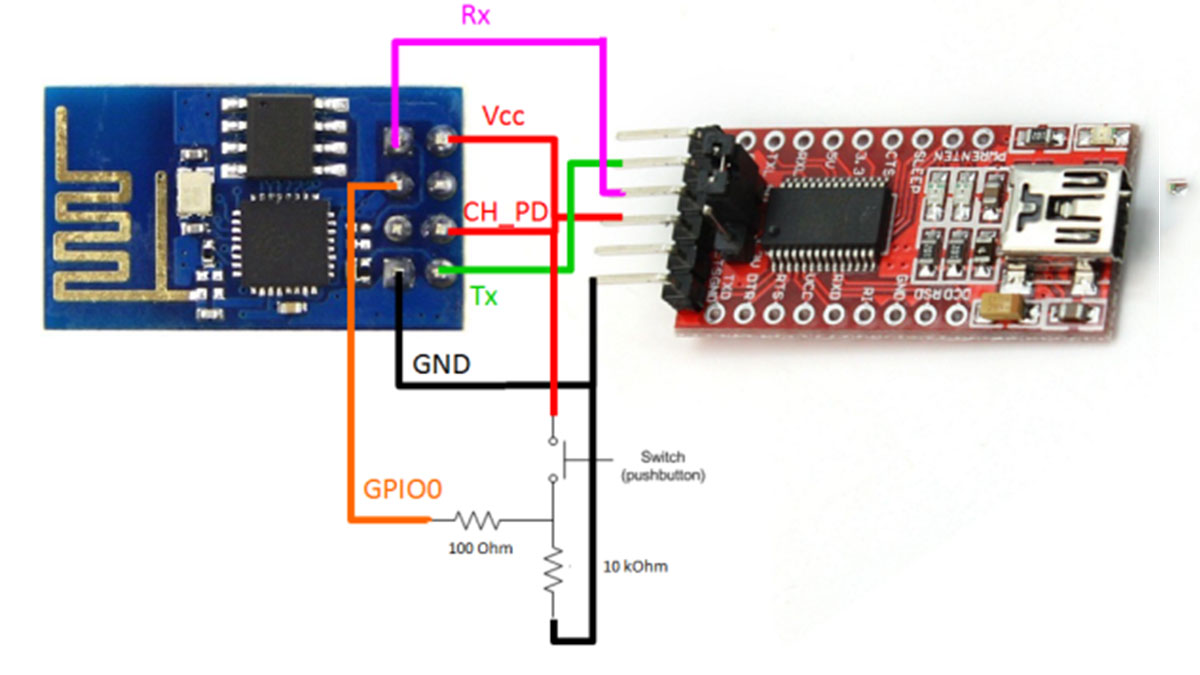
Burning LuaFirmware
Download Coolterm http://freeware.the-meiers.org/ (putty like app but much cooler)
Check that your ESP8266 has some firmware through coolterm
Enter with coolterm at 115200 (most probable default speed)
Once in, type AT+GMR, my firmware was based on 00160901
Congrats, you’ve got a working ESP8266 with a espressif firmware in it. If you want to play with this firmware check this out: http://www.electrodragon.com/w/Wi07c#Other_firmware
Now to burn LUA firmware:
To Burn a firmware: CH_PD pin must be always connected to HIGH and GPIO0 pin to GROUND (LOW)
Download ESP8266 flasher: https://docs.google.com/file/d/0B3dUKfqzZnlwVGc1YnFyUjgxelE/edit
Download LUA Firmware: https://github.com/nodemcu/nodemcu-firmware
Execute ESP8266_flasher.exe and burn the bin inside LUA Firmware
After burning it, GPIO0 pin should be disconnected from ground in order to reboot in normal mode. Otherwise it will be reboot in UPLOAD mode. So power it OFF, disconnect GPIO0 pin from ground… and voilà! you’ve got a ESP8266 with LUA Firmware
BasicCoding
Now with a burned LUA Firmware, we should reconfigure CoolTerm at 9600bps to be able to communicate with the board.
Connect and type this basic code to check the wifi connectivity:
|
1
2
3
4
5
6
|
print(wifi.sta.getip())--0.0.0.0wifi.setmode(wifi.STATION)wifi.sta.config("SSID","password")print(wifi.sta.getip())--192.168.18.110 |
Congrats, now each time you power it on back again, it will remember last wifi connection wifi setup.
For more detail: How to use ESP8266 ESP-01 as a SENSOR web client
-
What is the cost of an ESP8266 board?
The board costs less than 4 dollars. -
How do I check if the ESP8266 has firmware installed?
Connect via Coolterm at 115200 baud rate and type AT+GMR. -
Which pins must be configured before burning Lua firmware?
The CH_PD pin must be connected to HIGH and the GPIO0 pin to GROUND. -
Why should the GPIO0 pin be disconnected from ground after flashing?
Disconnecting it allows the board to reboot in normal mode instead of UPLOAD mode. -
At what baud rate should Coolterm be reconfigured after burning firmware?
Coolterm should be set to 9600bps to communicate with the board. -
How can you verify Wi-Fi connectivity on the ESP8266?
Type print(wifi.sta.getip()) in the console to see the IP address. -
Which Wi-Fi mode is set when using wifi.setmode(wifi.STATION)?
This sets the board to STATION mode. -
Does the ESP8266 remember the last Wi-Fi connection setup?
Yes, each time you power it on, it will remember the last Wi-Fi connection setup.
