
Summary of Fading using an Arduino
This article demonstrates fading an LED using Pulse Width Modulation (PWM) on an Arduino. It explains how PWM simulates analog behavior by rapidly switching a digital output. The project connects an LED to pin 9 via a 220-ohm resistor and uses the `analogWrite()` function in the code to control brightness levels.
Parts used in Fading using an Arduino:
- LED
- Digital output pin 9
- 220-ohm resistor
- Arduino board
Demonstrates the use of analog output (Pulse Width Modulation (PWM)) to fade an LED. PWM is a technique for getting an analog-like behavior from a digital output by switching it off and on very fast.
Circuit
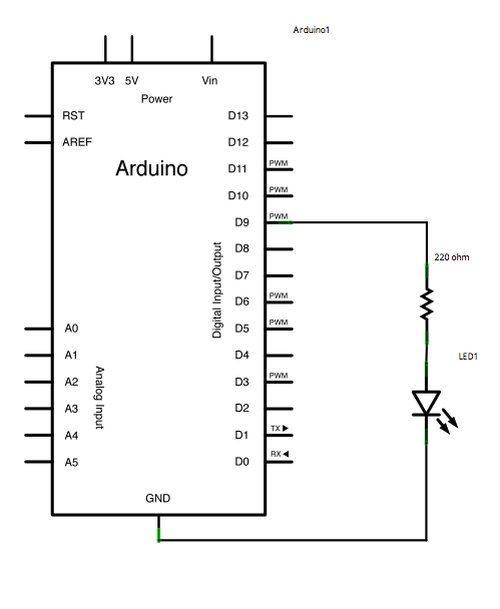
An LED connected to digital output pin 9 through a 220-ohm resistor.
Schematic
image developed using Fritzing. For more circuit examples, see the Fritzing project page
Code
Fading
This example shows how to fade an LED using the analogWrite() function.
The circuit:
* LED attached from digital pin 9 to ground.
Created 1 Nov 2008
By David A. Mellis
modified 30 Aug 2011
By Tom Igoe
http://arduino.cc/en/Tutorial/Fading
This example code is in the public domain.
*/
int ledPin = 9; // LED connected to digital pin 9
void setup() {
// nothing happens in setup
}
For more detail: Fading using an Arduino
- How does PWM create analog-like behavior?
PWM achieves this by switching the digital output off and on very fast. - Which function is used to fade the LED?
The analogWrite() function is used to fade the LED. - What component limits current for the LED?
A 220-ohm resistor is connected in series with the LED. - Which digital pin connects the LED?
The LED is attached to digital pin 9. - Does anything happen in the setup function?
No, nothing happens in the setup function. - What software tool developed the schematic?
The schematic was developed using Fritzing. - Is the example code protected by copyright?
No, the example code is in the public domain. - Who modified the code on August 30, 2011?
Tom Igoe modified the code on that date.
