
Summary of DRIVING AN OLED SCREEN WITH A 6502 SINGLE-BOARD COMPUTER
Anders Nielsen demonstrates driving a small OLED display on a vintage 6502-based single-board computer using bare-metal assembly code. The project features a 6507 CPU at 1 MHz, a 6532 RIOT chip, and 128 bytes of RAM, mirroring the Atari 2600 architecture. This setup enables smooth scrolling text and functions as a serial terminal for a Raspberry Pi without any compilers.
Parts used in the 6502 OLED Project:
- 6507 chip
- 6532 RIOT chip
- 128 bytes of RAM
- OLED display
- Raspberry Pi (for serial terminal usage)
Twenty years ago, if you wanted an LCD for a project, you’d probably end up with something salvaged from a mobile phone or an HD44780 character display. These days, little OLEDs can be had for a few bucks and they’ve taken the maker world by storm. [Anders Nielsen] has recently been experimenting with driving these displays from the vintage 6502 CPU, and he’s even got scrolling operation down pat.
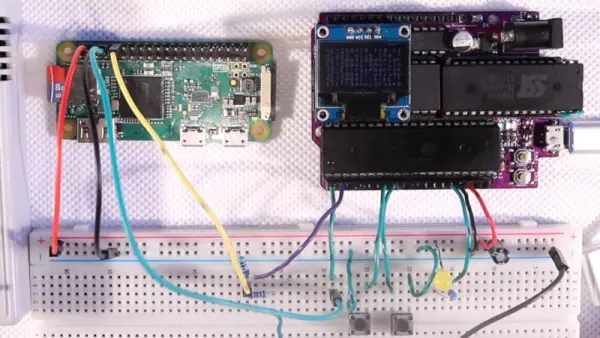
The best part is that [Nielsen] is doing all this on a single-board computer running his own assembly code. That’s right – there’s no compilers here. It’s bare metal coding at it’s best. The build uses a 6507 chip running at 1 MHz, paired with a 6532 RIOT and just 128 bytes of RAM—a similar setup to the Atari 2600.
The video explains how the code stacks up and drives the display, achieving the scrolling effect. It makes a huge difference to usability, especially compared to chunking pages at a time to the postage stamp-sized screen. He demonstrates a legitimate usage case too, using the setup as a serial terminal for a Raspberry Pi.
The 6502 architecture still looms large in the collective consciousness; we’ve been talking about programming it in assembly for years. Video after the break.
Source: DRIVING AN OLED SCREEN WITH A 6502 SINGLE-BOARD COMPUTER
- What type of display does the project use?
The project uses a small OLED display. - How fast is the 6507 chip running in this build?
The 6507 chip runs at 1 MHz. - Does the code require a compiler?
No, the build uses bare metal coding with no compilers. - What specific effect is achieved on the small screen?
The system achieves a scrolling operation effect. - Can this setup be used as a serial terminal?
Yes, it can be used as a serial terminal for a Raspberry Pi. - How much RAM does the single-board computer have?
The setup includes just 128 bytes of RAM. - Which other famous device uses a similar setup?
The setup is similar to the Atari 2600. - What programming language is used for the code?
The code is written in assembly.
