
Summary of DIY STREAMDECK HELPS YOU PROFESSIONALIZE YOUR TWITCH SHOW
This article describes a DIY stream deck project that enhances Twitch production quality by controlling stream features via custom keycodes. The build uses an Arduino Micro as a USB macro keyboard paired with a Nextion LCD touchscreen for visual controls. Additional components include standard buttons for quick actions like muting, addressable RGB LEDs managed by a second Arduino, and a 3D printed housing. By sending F13-F24 keycodes, the device avoids conflicts with existing software hotkeys, offering a professional alternative to commercial stream decks or repurposed phones.
Parts used in the DIY Stream Deck:
- Arduino Micro
- Nextion LCD touchscreen
- Regular buttons
- Addressable RGB LEDs
- Second Arduino (for LEDs)
- 3D printed housing
The one thing that separates the pros on Twitch from the dilettantes is the production values. It’s all about the smooth transitions, and you’ll never catch the big names fiddling with dodgy software mid-stream. The key to achieving this is by having a streamdeck to help control your setup, like this straightforward design from [Electronoobs]. (Video, embedded below.)
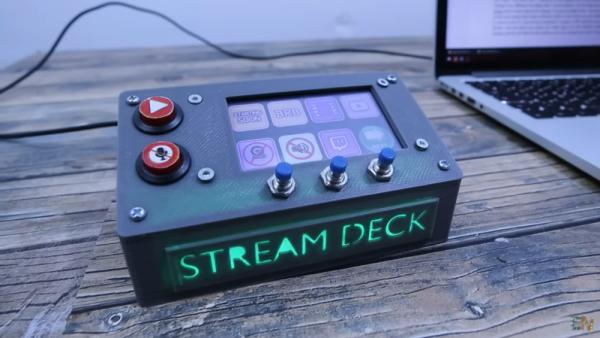
The build relies on an Arduino Micro, which is a microcontroller board perfectly equipped to acting as a USB macro keyboard. It’s paired with a Nextion LCD touchscreen that displays buttons for various stream control features, like displaying a “Be Right Back” screen or cuing up video clips. The build also features bigger regular buttons for important quick-access features like muting a mic. It’s all wrapped up in a 3D printed housing, with some addressable RGB LEDs running off another Arduino to add some pizazz. The neat trick is that the build sends keycodes for F13-F24, which allows for the streamdeck’s hotkeys to avoid conflicting with any other software using conventional keyboard hotkeys.
It’s a useful tool that would be of use to anyone streaming on Twitch or other platforms. Alternatively, you could repurpose an old phone to do a similar job. Video after the break.
Source: DIY STREAMDECK HELPS YOU PROFESSIONALIZE YOUR TWITCH SHOW
- What separates pros from dilettantes on Twitch?
The production values, specifically smooth transitions and reliable control software. - How does the microcontroller function in this build?
The Arduino Micro acts as a USB macro keyboard to send commands. - What display component is used for stream control features?
A Nextion LCD touchscreen displays buttons for features like Be Right Back screens. - Which keycodes does the build send to avoid conflicts?
The device sends keycodes for F13 through F24 to avoid clashing with conventional hotkeys. - What is used to manage the addressable RGB LEDs?
A separate Arduino runs the addressable RGB LEDs to add visual effects. - Can an old phone be used for a similar purpose?
Yes, an old phone can be repurposed to perform a similar job. - What material wraps the electronics in this design?
The components are wrapped up in a 3D printed housing. - Why are regular buttons included in the build?
Bigger regular buttons provide important quick-access features like muting a mic.
