
Summary of Digital Dice using Arduino
This project demonstrates a digital dice simulation using an Arduino Uno board. Instead of physically rolling dice, users press a button to generate random numbers between 1 and 6 on a seven-segment display. The system utilizes two push buttons: one to trigger the roll and another to reset the display. The circuit connects the display directly to specific Arduino pins and uses resistors for proper voltage regulation, effectively replicating traditional board game mechanics digitally.
Parts used in the Digital Dice Project:
- Arduino UNO
- Seven segment display (Common Anode)
- Push buttons
- Connecting wires
- Bread board
- 1 k resistor
- Power supply
We all are familiar with dice and often played LUDO or SANP SIDI (Snake & Ladders) game by using dice. Dice is a squire type solid box which contains 6 different numbers on all of its sides. We throw dice on a surface to get a random number while playing the games. In this project we have tried to replicate it with a digital dice using arduino uno board. In place of throwing the dice, here we need to press a button to get a random number between 0 to 6.
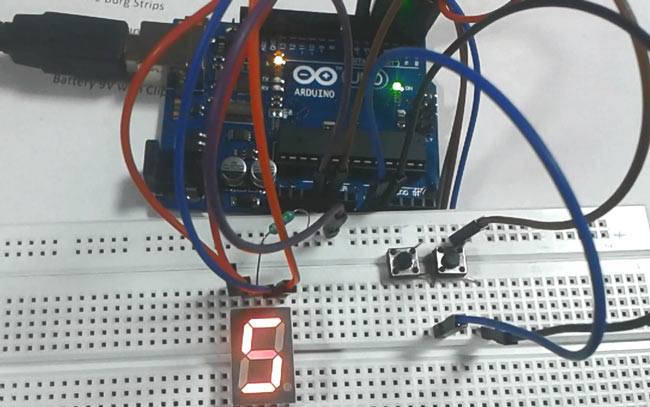
Required Components
- Arduino UNO
- Seven segment display (Common Anode)
- Push buttons
- Connecting wires
- Bread board
- 1 k resistor
- Power supply
Circuit Diagram and Explanation
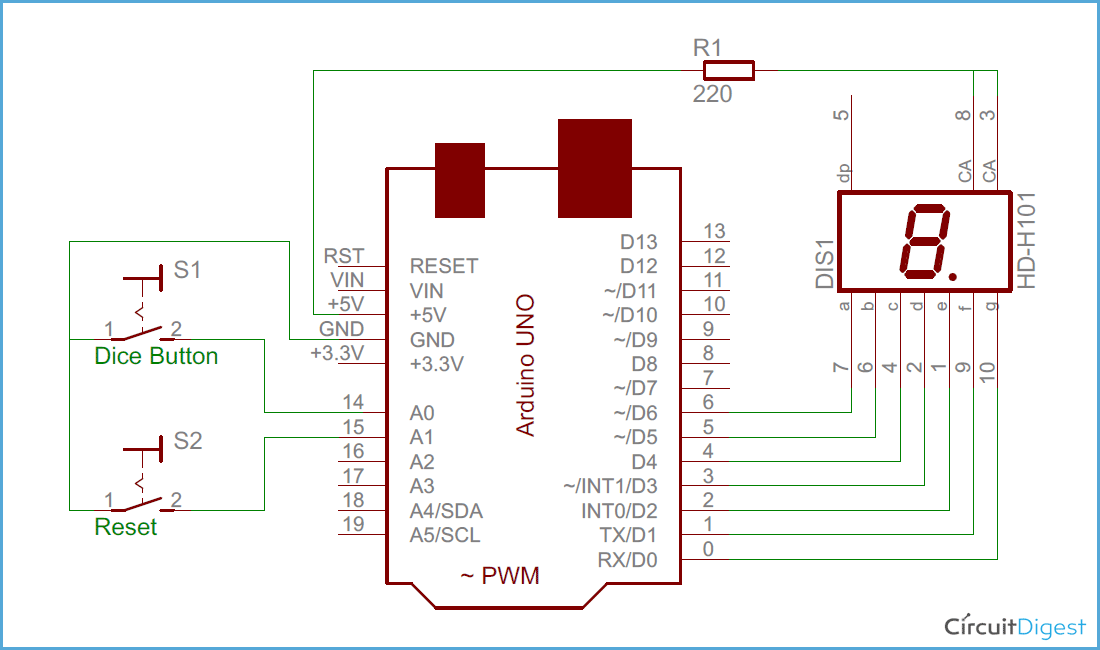
As shown in the above digital dice circuit, arduino is used for controlling whole the process. Two push buttons are used in the circuit – one to start the dice and other for resetting the dice. Arduino reads these two buttons and perform the operation. A seven segment display is used to display the dice result.
Arduino is continuously executing rand() function and stored its value in to a temporary variable. When dice button is get pressed stored value calculated and display on seven segment by using appropriate method (see programming part of article).
Here in this dice circuit, a common anode seven segment display is used for displaying dice numbers, which is directly connected to arduino digital pin numbers 6, 5, 4, 3, 2, 1, 0. And common anode pin of seven segment is connected with +5 volt 220 Ohm resistor. Two push button are also connected namely dice button and reset button which are connected to digital pin 14 (A0) and 15 (A1) with respect to ground.
- How does this digital dice differ from a physical one?
Instead of throwing the dice, you press a button to get a random number. - What range of numbers does the digital dice generate?
The device generates a random number between 0 to 6. - How many push buttons are required for this project?
Two push buttons are used: one to start the dice and another for resetting it. - Which type of seven segment display is utilized?
A common anode seven segment display is used to show the results. - How are the seven segment display pins connected to the Arduino?
The display is directly connected to Arduino digital pin numbers 6, 5, 4, 3, 2, 1, and 0. - Where are the push buttons connected in the circuit?
The dice button connects to digital pin 14 (A0) and the reset button to digital pin 15 (A1). - What function does the Arduino continuously execute?
Arduino continuously executes the rand() function and stores its value in a temporary variable. - How is the common anode pin of the display powered?
The common anode pin is connected with +5 volt through a 220 Ohm resistor.
