
Summary of Build A Voice-Controlled Robot Using Arduino
This article outlines a voice-controlled robot project integrating hardware and cloud services. Users command an Echo device, triggering an Alexa Skill that sends messages via Google Cloud Messaging to an Android app. The app relays commands via Bluetooth to an Arduino, which drives the robot's motors. All components are open-sourced for assembly.
Parts used in Voice-controlled Robot:
- Alexa Skill
- Heroku cloud platform
- Android application
- Google Cloud Messaging service
- Arduino microcontroller
- Robot kit
- HC-06 or HC-05 serial Bluetooth module
- 2xDC motors
- L293D motor driver
- Echo device
Story
Voice-controlled Robot
Voice-controlled robot is both hardware and cloud solution in one piece. The main components are:
1. Alexa Skill – to interpret voice commands and translate them to Google Cloud Messaging messages – deployed to Heroku cloud
2. Android application – to receive messages from Google Cloud Messaging and send them over Bluetooth to Arduino – deployed to your Android phone
3. Arduino – to read messages over Bluetooth and control the robot
4. The robot kit and robot circuit – any robot kit will do, you need HC-06 or HC-05 for serial Bluetooth communication and 2xDC motors attached to L293D to move it
It’s not an entry-level tutorial, but… everything is ready. All key components are open-sourced. It’s just a matter of assembling & integrating it all together. So let’s start.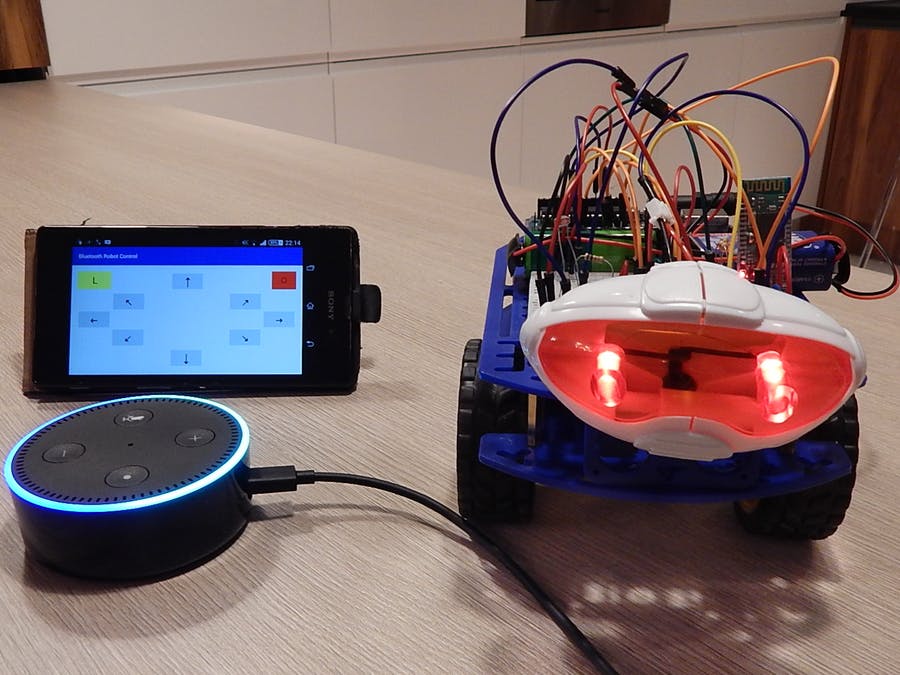
The Control Flow
Here is how all the pieces are working together:
1. You speak to Echo device
2. Echo connects to Alexa Service
3. Alexa Service opens Alexa Skill called Robot
4. Robot skill interprets voice commands and translates them to proper digital messages. Messages are sent to Google Cloud Messaging service
5. Android application is setup to listen for messages from Google Cloud Service
6. Android application receives an incoming remote message and relays it over Bluetooth to Arduino
7. Arduino using HC-06 Bluetooth serial module is reading the messages and moving the robot accordingly
Simple 🙂
Google Cloud Services & Running Android Application
This is a first step of my tutorial. We will setup services which are prerequisites for the rest of the solution.
In this step you will learn how to setup & generate the following:
- Google Cloud Messaging server key – secret key used by Robot skill to authenticate itself.
- Google Firebase registration token – phone-specific token which Robot skill uses to send remote messages to a phone.
You will need Google account. If you don’t have one already, create it. Google Firebase and Google Cloud Messaging are free to start.
Checkout code section of this tutorial and fetch a copy of my Bluetooth Robot Control project.
Deploying Alexa Skill to Heroku
Now that we have Google Cloud Messaging server key and phone’s registration token we can deploy the Robot skill application.
In this step you will learn how to:
- Create heroku application
- Setup Robot skill
- Deploy it to heroku
You need a Heroku account. If you don’t have it already create one at: https://heroku.com. It’s for free. You can run simple apps on Heroku for free. Also, majority of add-ons provides free plans. I love it 🙂
Navigate to code section of this tutorial and fetch a copy of my alexa-robot-control project. Then watch the second part of my tutorial.
Read More: Build A Voice-Controlled Robot Using Arduino
-
What is the main purpose of the Alexa Skill?
The Alexa Skill interprets voice commands and translates them into Google Cloud Messaging messages. -
How does the Android application receive commands?
The Android application listens for incoming remote messages from Google Cloud Service and relays them over Bluetooth to the Arduino. -
Which Bluetooth modules are required for the robot circuit?
You need either an HC-06 or HC-05 module for serial Bluetooth communication. -
What hardware is needed to move the robot?
The project requires 2xDC motors attached to an L293D driver to move the robot. -
Can I run the Heroku application for free?
Yes, you can run simple apps on Heroku for free, and most add-ons provide free plans. -
Do I need a Google account for this project?
Yes, you need a Google account to set up Google Firebase and Google Cloud Messaging. -
Are all key components open-sourced?
Yes, all key components are open-sourced, requiring only assembly and integration. -
What happens after the Echo device connects to the Alexa Service?
The Alexa Service opens the Robot skill, which interprets the voice command and sends digital messages to Google Cloud Messaging.
