
Summary of Bubble Alarm Clock Makes Waking Up Fun using Arduino
This article describes a DIY project to create an Arduino-based bubble alarm clock that wakes users with bubbles instead of noise. The build involves modifying a toy bubble machine and an "Easy Button" snooze switch, connecting them to an Arduino microcontroller, LCD display, LED, transistor, relay, and various electronic components.
Parts used in the Bubble Alarm Clock:
- Bubble generating toy (Super Miracle® Bubbles Bubble Factory)
- Microcontroller (Arduino or Seeduino)
- LCD display (Sparkfun Basic 16x2 Character LCD)
- Snooze button (Staples Easy Button)
- LED (ThingM BlinkM)
- Transistor (TIP-120)
- Relay (5V SF COM-00100)
- Assorted buttons/switches to adjust time
- Potentiometer
- Perfboard
- Diode (1N4001)
- Resistor (2.2K)
- Wire
- Power adapter for Arduino
- Pin headers
Waking up to a buzzing alarm clock sucks. I’m one of those people who doesn’t like to wake up before the sun is out (or has been out for many hours). So what better way to make waking up fun than having a bubble party in bed!
Using an arduino and a commonly available bubble machine toy, you too can wake up to the joy of bubbles.
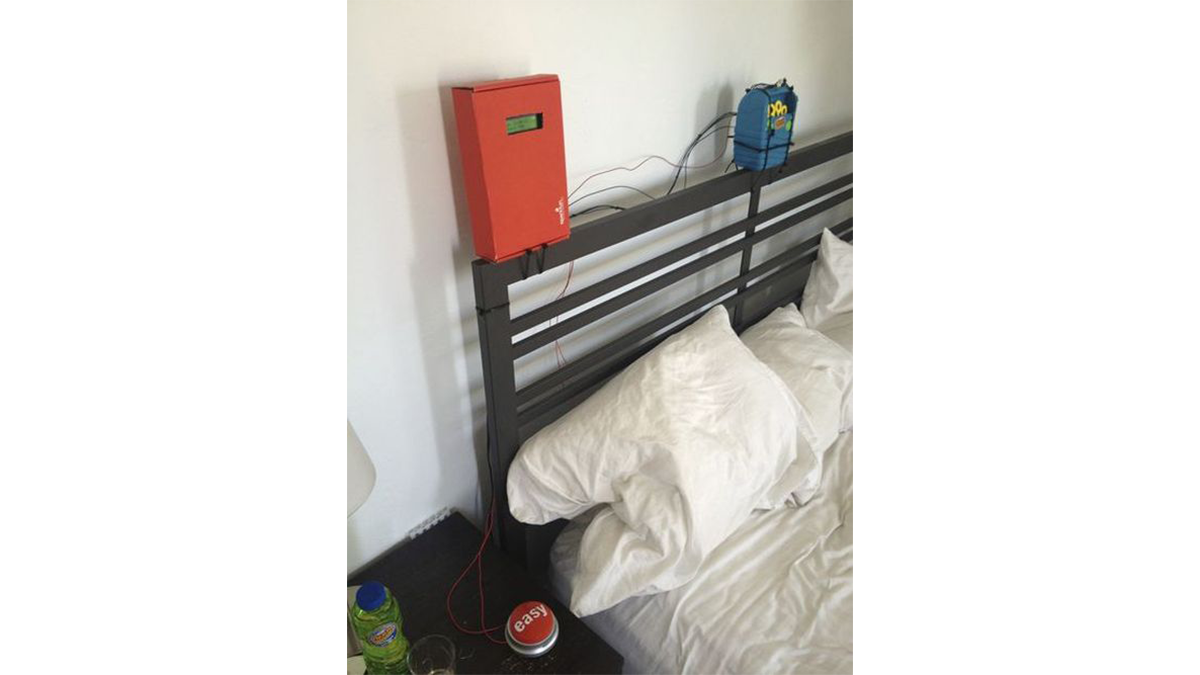
Step 1: Tools & Materials
The Parts (you can definitely substitute for stuff you have around the house):
Bubble generating toy: Super Miracle® Bubbles Bubble Factory (purchased at Michaels for 12 bucks)
Microcontroller: Arduino (old Seeduino in my case)
LCD display: Sparkfun Basic 16×2 Character LCD
Snooze button: Staples Easy Button
LED: ThingM BlinkM
Transistor: TIP-120 (Radio Shack 276-2068)
Relay: 5V SF COM-00100
Assorted buttons/switches to adjust time: SF COM-09190 & SF COM-00102
Potentiometer: SF COM-09806
Perfboard
Diode (1N4001)
Resistor 2.2K
Wire
Power adapter for arduino
Pin headers
Tools
Soldering iron
Wire Strippers
Zip Ties
Dremel
Multimeter
Breadboards
Step 2: Break Open the Bubble Machine
First you’ll need to open up the bubble machine. The one I found was easy to open, just four philips head screws.
Once inside, disconnect the battery and motor from the switch and solder wires for both the motor and the battery pack long enough to feed outside of the machine.
Next, use a Dremel tool to make an opening in the plastic to feed the wires out.
If you like colorful bubbles, attach the LED or ThingM BlinkM on the top of the machine.
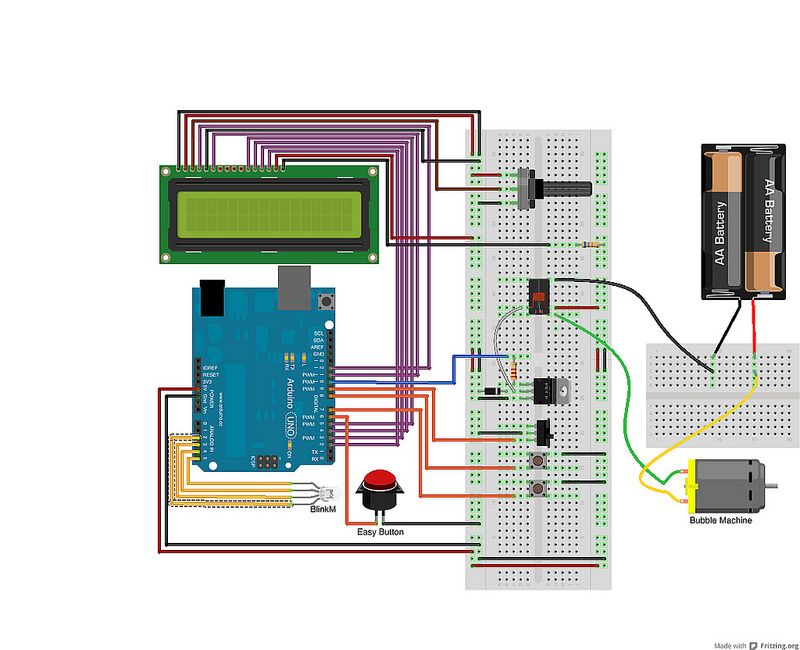
Finally, I opted to place a mini-breadboard on the back of the bubble machine to collect all the wires. This made it easier to adjust the distance between the controller and the unit.
Step 3: Prepare the Easy Snooze Button
The easy button is, uh, easily opened by removing the plastic feet to access the four philips head screws. Be sure to hang onto the feet.
Big buttons rock.
- How can I make waking up fun?
You can wake up to the joy of bubbles by building an alarm using an Arduino and a bubble machine toy. - What tools are needed to open the bubble machine?
You need four philips head screws to open the machine and a Dremel tool to make an opening in the plastic. - Can I add colorful bubbles to the machine?
Yes, you can attach an LED or ThingM BlinkM on the top of the machine to create colorful bubbles. - How do I modify the Easy Button for snoozing?
You must remove a capacitor and resistor from inside the button and attach your own wires after removing the plastic feet. - Where should I place the mini-breadboard?
The author placed a mini-breadboard on the back of the bubble machine to collect all the wires. - What specific bubble machine model was used?
The project used a Super Miracle® Bubbles Bubble Factory purchased at Michaels. - Why is a transistor included in the parts list?
A TIP-120 transistor is listed as a required component to help control the circuit within the project. - What wire type is recommended for the battery pack?
You should solder wires long enough to feed outside of the machine for both the motor and the battery pack.
