
Summary of AUDIO TAPE INTERFACE REVIVES MICROCASSETTES AS STORAGE MEDIUM
In the early 1980s, cassette tapes were standard for home computers. Zack Nelson recreated this experience using a Pearlcorder L400 microcassette player with an Arduino Nano. He designed a custom interface using differential Manchester encoding to handle speed variations and signal noise. The circuit employs an op-amp and comparator to convert audio signals into clean digital data at 3000 baud. Full schematics and source code are available for enthusiasts wishing to build their own retro storage system.
Parts used in the Cassette Interface Project:
- Pearlcorder L400 microcassette player
- Arduino Nano
- Op-amp
- Comparator
- Discrete components
In the early 1980s cassette tapes were the standard storage medium for home computer users; readers of a certain age will remember fiddling with audio jacks, tape counters and signal levels, then waiting for several minutes while a program (hopefully) loaded correctly. While most people happily upgraded to much more reliable floppy disks, [Zack Nelson] decided to go back in time and add a suitably classic storage medium to a retrocomputing project, in the form of a cassette interface. The cassette player he had available was a Pearlcorder L400, which uses the smaller microcassette instead of the familiar audio tapes used in your Walkman or boombox.
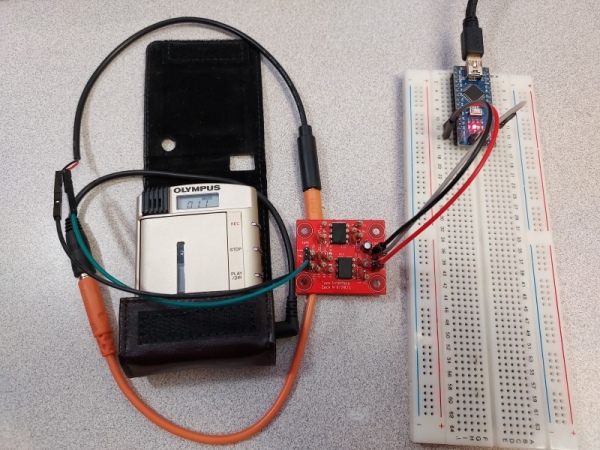
[Zack] designed the entire thing from the ground up: first he decided to use differential Manchester encoding, which provides immunity against common disturbances like speed variations (which cause wow and flutter). The data is encoded in the frequency range from 1 kHz to 2 kHz, which suits the bandwidth of the cassette player. Next, he designed the interface between the computer and the tape recorder; built from an op-amp and a comparator with a handful of discrete components, it filters the incoming signal and clips it to provide a clean digital signal to be read out directly by the computer.
The system is demonstrated by hooking it up to an Arduino Nano, which reads out the data stream at about 3000 baud. The noise it makes should bring back memories to anyone brought up with the “PRESS PLAY ON TAPE” message; if it inspires you to make your own, we’re happy to report that full schematics and source code are available. [Zack] is not the first one to make his own cassette interface; we’ve seen a somewhat more complicated analog design before, as well as one based on an FPGA.
Source: AUDIO TAPE INTERFACE REVIVES MICROCASSETTES AS STORAGE MEDIUM
- What storage medium did [Zack Nelson] use for his retrocomputing project?
[Zack Nelson] used a Pearlcorder L400 microcassette player as the storage medium. - How does the system handle common disturbances like speed variations?
The system uses differential Manchester encoding which provides immunity against speed variations that cause wow and flutter. - What frequency range is used for the data encoding?
The data is encoded in the frequency range from 1 kHz to 2 kHz. - Which computer component reads out the data stream in the demonstration?
An Arduino Nano is used to read out the data stream. - At what speed does the system transmit data?
The system reads out the data stream at about 3000 baud. - What electronic components make up the interface circuit?
The interface is built from an op-amp, a comparator, and a handful of discrete components. - Does the article mention other similar projects?
Yes, the article mentions a more complicated analog design and one based on an FPGA. - Where can someone find resources to build their own interface?
Full schematics and source code are available for those inspired to make their own.
