
Summary of Arduino-STM32 Bluepill LED Blink using BluePill with Proteus Simulation
The Arduino-STM32 BluePill LED Blink project demonstrates a basic STM32F103C8T6 BluePill setup that toggles an LED on PA1 through a 330Ω resistor with a 500 ms delay, tested in Proteus simulation. It verifies GPIO control, timing, and firmware logic, serving as an entry-level embedded systems and Arduino-STM32 learning example.
Parts used in the Arduino-STM32 Bluepill LED Blink project:
- STM32 BluePill STM32F103C8T6 development board
- LED (Blue LED)
- 330Ω resistor
- Proteus simulation design environment
- Arduino-STM32 / Visual Designer for Arduino STM32 project setup
Introduction
The Arduino-STM32 Bluepill LED Blink project is a simple but useful microcontroller project built around the STM32 BluePill development board and tested in Proteus simulation. Its purpose is straightforward: make an LED blink at a fixed interval so you can verify that the board, pin control, and firmware logic are working correctly. Even though it is a beginner-friendly example, it is still an important foundation in embedded systems and practical electronics. Projects like this help users understand GPIO control, timing, and hardware interfacing before moving to more advanced DIY electronics applications. In short, this is one of the best starting points for learning the working principle, circuit diagram, and firmware structure of an STM32-based design.
How the Project Works
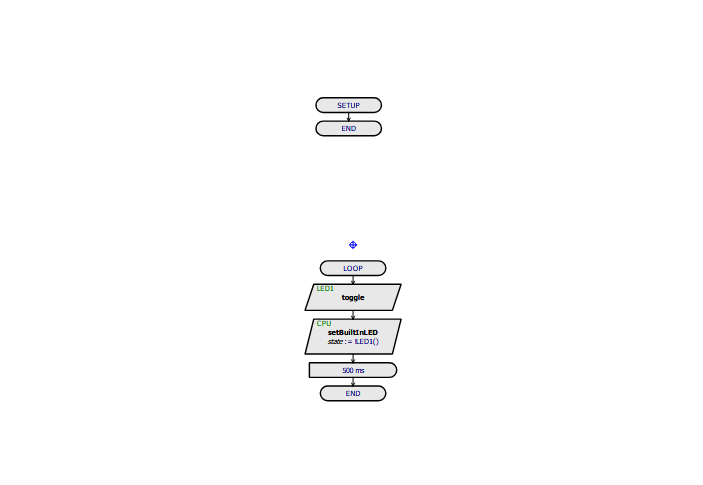
This project uses an STM32 BluePill board to drive a single LED connected through a current-limiting resistor. According to the provided flowchart, the program enters the main loop, toggles the LED state, updates the output pin, waits for 500 ms, and then repeats continuously.
As a result, the LED turns ON and OFF repeatedly, producing the classic blink effect. This basic behavior is commonly used in embedded systems as an initial hardware test because it confirms that the microcontroller, output pin, timing logic, and simulation setup are all functioning as expected.
Workflow Explanation
Workflow Based on the Flowchart
The provided flowchart shows a very clean execution sequence:
-
Setup
-
The project initializes the required hardware state for the LED output.
-
-
Loop starts
-
The controller enters the continuous execution loop.
-
-
LED toggle
-
The LED state changes from ON to OFF or from OFF to ON.
-
-
CPU updates LED output
-
The microcontroller writes the new state to the LED pin.
-
-
500 ms delay
-
The program waits for half a second.
-
-
Repeat
-
The same cycle continues forever.
-
Circuit-Level Behavior
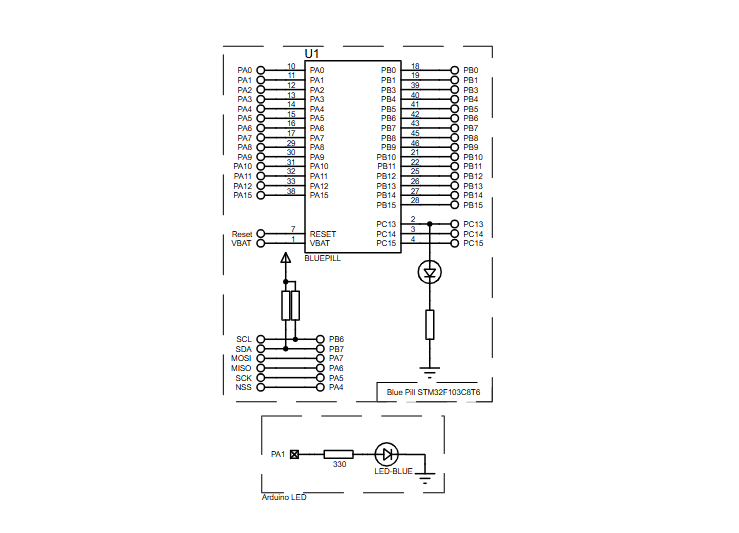
From the schematic, the LED is connected to PA1 through a 330-ohm resistor. The BluePill board controls this GPIO pin, and each output state change determines whether the LED glows or remains off.
Key Features
-
Uses the STM32 BluePill development board
-
Simple LED blinking demonstration for beginners
-
LED connected through a 330Ω current-limiting resistor
-
Output controlled from PA1
-
Continuous ON/OFF operation with 500 ms timing
-
Useful for testing GPIO functionality in Proteus simulation
-
Good entry-level example for Arduino-STM32 development
-
Helps verify the microcontroller setup before larger embedded systems projects
Components Used
Based on the provided schematic and description, the project uses:
-
STM32 BluePill STM32F103C8T6
-
LED (Blue LED)
-
330Ω resistor
-
Proteus simulation design environment
-
Arduino-STM32 / Visual Designer for Arduino STM32 project setup
Applications
Although this is a basic demonstration, the same logic is widely used in real projects. Some practical uses include:
-
Microcontroller GPIO testing
-
Board health and startup verification
-
Status indication in embedded products
-
Learning platform for DIY electronics
-
Timing and delay routine testing
-
Basic output control before adding sensors, displays, or communication modules
-
Debug indication in larger firmware projects
Explanation of Code
No actual source code was provided, so the explanation below is based only on the supplied description, schematic, and flowchart.
The firmware appears to be a very small control program designed for LED output handling. Its main tasks are:
Initialization Module
This part would configure the LED pin as an output so the BluePill can drive the LED properly.
LED Control Logic
The main loop toggles the LED state repeatedly. This means the firmware changes the output from HIGH to LOW and back again in every cycle.
Timing / Delay Logic
The flowchart clearly shows a 500 ms delay, which controls the blink speed. This creates a visible, stable blinking pattern.
Output Update
After changing the LED state, the controller writes the new value to the assigned GPIO pin, which in this project is PA1.
There is no provided evidence of ADC, UART, LCD, timers, sensors, DSP, or communication modules in this design. This is a pure GPIO blink demonstration.
Flowchart
Proteus Simulation
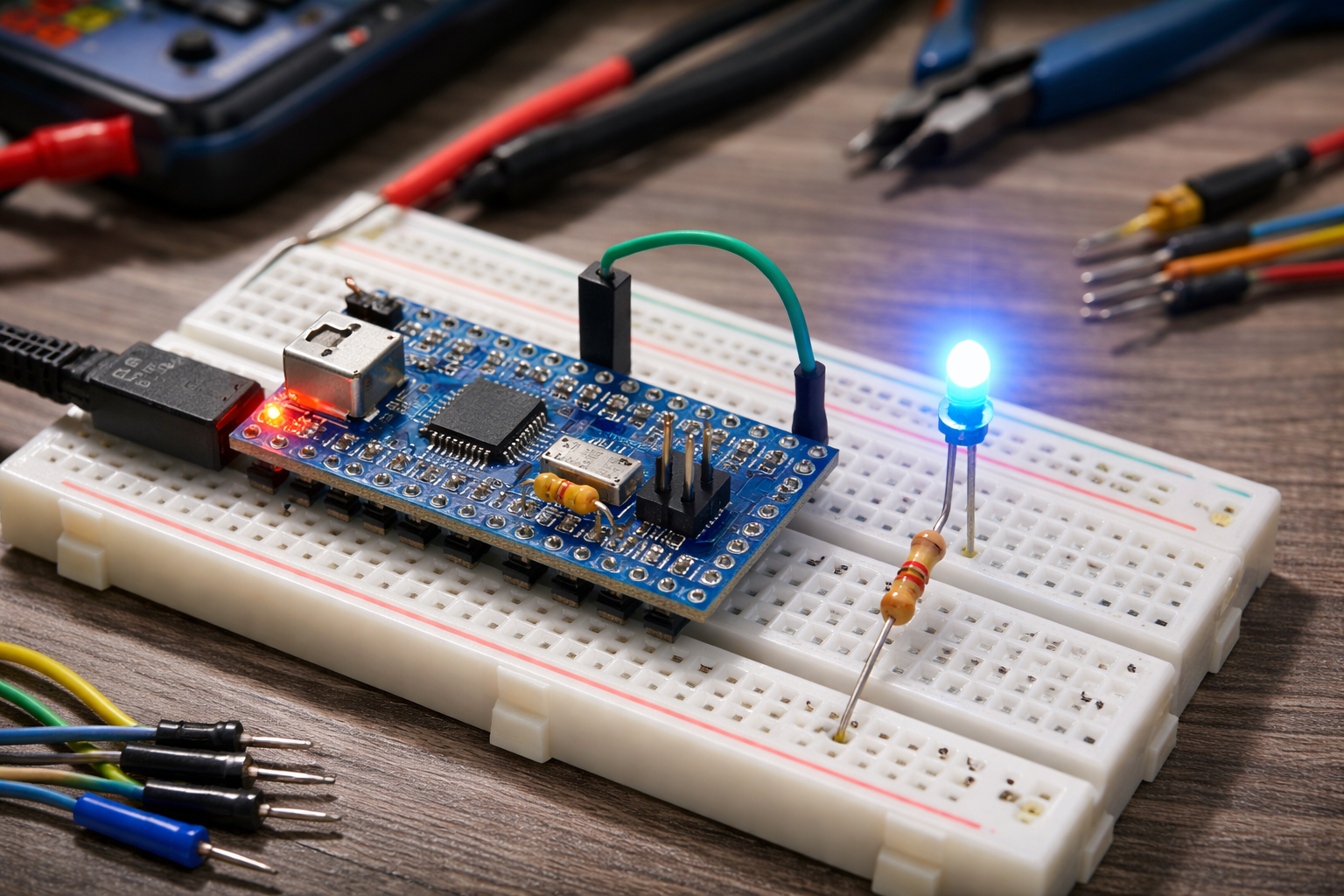
In the Proteus simulation, the STM32 BluePill STM32F103C8T6 controls an LED connected to PA1 through a 330Ω resistor. When the simulation runs, the firmware continuously toggles the output state every 500 ms, causing the LED to blink at a steady rate. This makes the project ideal for checking basic pin control, output logic, and BluePill behavior inside a virtual circuit diagram environment before moving to physical hardware.
Conclusion
The Arduino-STM32 Bluepill LED Blink using BluePill with Proteus Simulation project is a simple but valuable learning example for anyone getting started with microcontroller projects, Proteus simulation, and embedded systems. It demonstrates the core idea of GPIO output control in a very clear way and builds a strong foundation for more advanced practical electronics and DIY electronics designs. Even a basic LED blink project has real learning value because it proves that the hardware mapping, firmware logic, and simulation setup are all working together correctly.
Complete File
Arduino-STM32 Bluepill LED Blink using BluePill with Proteus Simulation
- What microcontroller board is used in this project?
The project uses the STM32 BluePill STM32F103C8T6 development board. - Which GPIO pin controls the LED?
The LED output is controlled from PA1. - What resistor value is used with the LED?
A 330Ω current-limiting resistor is used. - How long is the LED on or off between toggles?
The program uses a 500 ms delay between toggles. - What is the main purpose of this blink project?
To verify GPIO functionality, pin control, timing logic, and simulation setup on the BluePill. - Is the project tested in hardware or simulation?
The project is tested in the Proteus simulation environment. - Does the project include communication modules or sensors?
No, there is no evidence of ADC, UART, timers, sensors, or communication modules; it is a pure GPIO blink demonstration. - What development setup is mentioned for the Arduino-STM32 project?
Arduino-STM32 or Visual Designer for Arduino STM32 project setup is mentioned.
