
Summary of Arduino & RGB Common Cathode LED Rainbow using ATmega328P with Proteus Simulation
This project uses an ATmega328P (Arduino-compatible) to drive a common-cathode RGB LED with PWM, producing smooth rainbow-style color transitions via a simple state machine and dimming functions. It is implemented for Proteus simulation and demonstrates PWM, timing, and multi-channel brightness control for learning and prototyping embedded LED effects.
Parts used in the Arduino RGB Proteus simulation:
- ATmega328P microcontroller
- Common cathode RGB LED
- Current-limiting resistors
- Power supply (+5V)
- Proteus simulation environment
Introduction
This microcontroller project demonstrates how to create smooth RGB color transitions using an Arduino-compatible ATmega328P and a common cathode RGB LED.
By leveraging PWM (Pulse Width Modulation), the project generates a continuous rainbow-style lighting effect that cycles through multiple color combinations.
It’s a great example of how embedded systems handle LED brightness control in practical electronics.
The design is simple, visual, and ideal for learning PWM, state machines, and timing in a Proteus simulation environment.Arduino RGB Proteus simulation demonstrates how an ATmega328P microcontroller controls a common cathode RGB LED using PWM to create smooth rainbow lighting effects.
This project fits well into DIY electronics, microcontroller projects, and beginners exploring embedded systems.
How the Project Works (Overview)
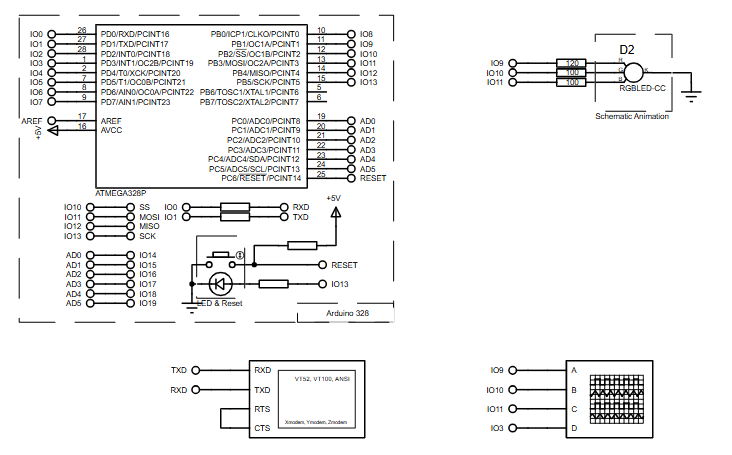
The ATmega328P controls three PWM pins connected to the red, green, and blue channels of a common cathode RGB LED.
Each color channel is driven independently using analogWrite(), allowing precise brightness control.
A simple state machine inside the loop() function determines which color or color combination is currently active.
The program gradually increases or decreases brightness values to create smooth fading effects rather than abrupt color changes.
By combining different brightness levels across RGB channels, multiple colors and transitions are produced automatically.
Block Diagram / Workflow Explanation
-
ATmega328P Microcontroller initializes PWM output pins.
-
PWM Signals are generated on three output pins for Red, Green, and Blue LEDs.
-
State Machine Logic selects which color or color mix to display.
-
Dimming Functions gradually adjust brightness values over time.
-
RGB LED Output visually displays smooth color transitions in the Proteus simulation.
Key Features
-
Smooth RGB color fading using PWM
-
State-based color transition logic
-
Independent brightness control for Red, Green, and Blue channels
-
Easily adjustable transition speed
-
Compatible with Arduino AVR toolchain
-
Fully testable in Proteus simulation
Components Used
-
ATmega328P microcontroller
-
Common cathode RGB LED
-
Current-limiting resistors
-
Power supply (+5V)
-
Proteus simulation environment
Applications
-
Decorative RGB lighting systems
-
Mood lamps and ambient lighting
-
Learning PWM and LED control
-
Embedded systems training projects
-
DIY electronics demonstrations
-
Microcontroller simulation practice
Explanation of Code (High-Level)
The code defines PWM pins for the RGB LED and uses a state variable to manage different lighting effects.
-
Setup Section
Initializes PWM pins and serial communication. -
Main Loop
Acts as a state machine that cycles through different RGB combinations, including single colors and mixed colors. -
Dimming Functions
dimRed(),dimGreen(), anddimBlue()are helper functions that call a genericdim()function. -
Generic
dim()Function
Handles gradual brightness increase or decrease for one or more LED channels using timed PWM updates.
This modular structure makes the firmware easy to extend with additional color patterns.
Source Code
Download
/* Main.ino file generated by New Project wizard
 *
 * Created:   Thu Sep 5 2013
 * Processor: ATmega328P
 * Compiler:  Arduino AVR
 */

int REDPin   = 9;  // RED pin of the LED to PWM pin 9
int GREENPin = 10; // GREEN pin of the LED to PWM pin 10
int BLUEPin  = 11; // BLUE pin of the LED to PWM pin 11
int SYNCPin = 3; // Used to synchronize the oscilloscope.Proteus Simulation
In Proteus, the RGB LED smoothly cycles through individual colors and mixed color combinations.
PWM outputs dynamically adjust brightness, producing a continuous rainbow-like animation.
The simulation accurately reflects real hardware behavior, making it ideal for testing and learning.
FAQs
[ultimate-faqs Include_category=”arduino-&-rgb-common-cathode-led-rainbow”]Conclusion
This project is a clean and practical example of RGB LED control using PWM on the ATmega328P.
It demonstrates embedded systems fundamentals like state machines, timing, and multi-channel output control.
Running entirely in Proteus simulation, it’s perfect for learning, experimenting, and expanding into more advanced LED projects.This project is a complete Arduino RGB Proteus simulation that demonstrates PWM-based RGB LED control using the ATmega328P microcontroller.
Arduino & RGB Common Cathode LED Rainbow using ATmega328P with Proteus Simulation
- How does the project create smooth color transitions?
By using PWM to gradually increase or decrease brightness values for each color channel controlled by a state machine. - Can this be tested without physical hardware?
Yes, the project is fully testable in the Proteus simulation environment. - What microcontroller is used in the project?
The ATmega328P microcontroller is used. - How are the RGB channels controlled?
Each RGB channel is driven independently via PWM pins using analogWrite or equivalent PWM output. - Does the project include adjustable transition speed?
Yes, transition speed is easily adjustable according to the article. - What functions handle dimming in the code?
The article describes dimRed, dimGreen, dimBlue helper functions that call a generic dim function. - What output pins are used for PWM in the example code?
PWM example pins shown are 9 for red, 10 for green, and 11 for blue; pin 3 is used for synchronization. - What applications are suggested for this project?
Suggested applications include decorative RGB lighting, mood lamps, embedded systems training, and DIY demonstrations.
