
Summary of Arduino Sketch Rock Paper Scissors
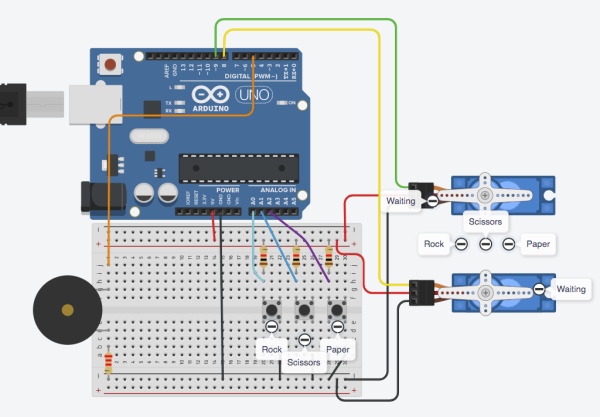
This project implements a rock-paper-scissors game on an Arduino using three pushbuttons for user input, two hobby servos to display countdown and choices for player and computer, and a speaker for tone feedback. The sketch uses a non-blocking event loop, a switch-case state machine, timers for scheduled events, symbolic constants, and simple melody arpeggios. The computer can force a win when the player presses early; otherwise a countdown leads to computer random move and a short response window for the player.
Parts used in the RockPaperScissors:
- Arduino-compatible microcontroller (Arduino board)
- 3x pushbutton switches (wired active-low)
- 2x hobby servos
- Speaker (piezo or tone-capable speaker)
- Wires and breadboard (for Tinkercad reference circuit)
- Power source for Arduino and servos
This drawing showcases a rock-paper-scissors game that utilizes three pushbuttons for user input, two hobby servos instead of a human hand to show the countdown and selections, and tone feedback through a speaker.
The code is designed to showcase a variety of techniques.
- non-blocking event polling loop to simultanously process input and output
- switch-case state machine structure to manage game control flow
- timer variables to schedule future events
- symbolic numeric constants
Tinkercad Circuit
Full Source Code
The full code is all in one file RockPaperScissors.ino.
// RockPaperScissors.ino : play ro-sham-bo using buttons.
// No copyright, 2020, Garth Zeglin.  This file is
// explicitly placed in the public domain.

// This example implements a rock-paper-scissors game
// using two hobby servos to indicate the computer and
// user choices, three pushbuttons for the user to
// indicate a choice, and a speaker for tone outputs
// for game feedback.
//
// The player sees a countdown movement sequence, then
// has a short window of time to press a button after
// the computer starts moving or the match is invalid.
// If the player moves first, the computer always wins.
// The game automatically cycles back to resting.

#include <Servo.h>

// The input switches are wired as active-low
// pushbuttons.  The 'analog' input pins are used here
// in the digital input mode.
const int ROCK_SWITCH_PIN     = A0;
const int SCISSORS_SWITCH_PIN = A1;
const int PAPER_SWITCH_PIN    = A2;

// The speaker outout.
const int SPEAKER_PIN = 5;

// Hobby servos for the player and computer move
// indicator outputs.
const int P_SERVO_PIN = 8;
const int C_SERVO_PIN = 9;

// servo hardware
Servo player_svo;
Servo computer_svo;

// ================================================
// const values to define game states (could also have
// used enum)
const int WAITING  = 0;
const int ROCK     = 1;
const int SCISSORS = 2;
const int PAPER    = 3;

// calibration tables to maps a game state to a servo angle
const int computer_angles[] = {  0, 63, 93, 123 };
const int player_angles[]   = {  0, 123, 93, 63 };
const int countdown_angle = 30;

// winning move table to return the winning state for a given state
const int win_table[] = {WAITING, PAPER, ROCK, SCISSORS};

// state machine indices, defined using enum
enum { IDLE, COUNTDOWN, MOVING, COMPUTER_WIN, PLAYER_WIN,
  DRAW, FAULT, RESET };

// time constants in milliseconds
const long countdown_wait   = 500;
const long valid_input_wait = 400;
const long idle_wait        = 2000;
const long resolution_wait  = 1500;
const long reset_wait       = 1500;
const long melody_wait      = 250;

// state variables for the game
int game_state = IDLE;
int game_counter = 0;
int computer_state = WAITING;
int player_state = WAITING;
long game_timer = 1000;

// state variables for the audio player
int melody_note = 60;
int melody_interval = 7;
int melody_count = 0;
long melody_timer = 0;

// ================================================
void setup()
{
  player_svo.attach(P_SERVO_PIN);
  computer_svo.attach(C_SERVO_PIN);

  // issue an initial servo command to the reset condition
  player_move(WAITING);
  computer_move(WAITING);

  Serial.begin(115200);
  Serial.println("Welcome to rock, scissors, paper.");
}

// ================================================
void loop()
{
  // The timestamp in milliseconds for the last polling
  // cycle, used to compute the exact interval between
  // output updates.
  static unsigned long last_update_clock = 0;

  // Read the millisecond clock.
  unsigned long now = millis();

  // Compute the time elapsed since the last poll.
  // This will correctly handle wrapround of the 32-bit
  // long time value given the properties of
  // twos-complement arithmetic.
  unsigned long interval = now - last_update_clock;
  last_update_clock = now;

  // Always advance the game timer; when it becomes
  // negative the current phase has expired.
  game_timer = game_timer - interval;

  // Always keep advancing the pseudorandom generator.
  long next_random = random(1,4);

  // Advance the melody player if needed.
  if (melody_count >= 0) {
    melody_timer = melody_timer - interval;
    if (melody_timer < 0) {
      melody_timer = melody_wait;
      play_next_note();
    }
  }

  // Always read the player switches.  This provides a
  // single location to perform input validation.  The
  // hardware is wired for active-low logic.
  bool rock_pressed     = !digitalRead(ROCK_SWITCH_PIN);
  bool scissors_pressed = !digitalRead(SCISSORS_SWITCH_PIN);
  bool paper_pressed    = !digitalRead(PAPER_SWITCH_PIN);

  // Reduce the switch selection input to a single
  // value, rejecting multiple pushes.
  int user_input_state = WAITING; // default neutral value
  if ( rock_pressed && !scissors_pressed && !paper_pressed) user_input_state = ROCK;
  if (!rock_pressed &&  scissors_pressed && !paper_pressed) user_input_state = SCISSORS;
  if (!rock_pressed && !scissors_pressed &&  paper_pressed) user_input_state = PAPER;

  // Run one update cycle of the game state machine.
  switch(game_state) {

  case IDLE: // no one is moving
    if (user_input_state != WAITING) {
      // player has played early, let's win!
      player_state = user_input_state;
      computer_state = win_table[player_state];
      computer_move(computer_state);
      player_move(player_state);
      game_state = COMPUTER_WIN;
      game_timer = resolution_wait;
      Serial.println("Player played early, computer wins.");
      start_arpeggio(60, 7, 3);

    } else if (game_timer < 0) {
      // time to start the countdown
      Serial.println("Starting countdown.");
      game_timer = countdown_wait;
      game_counter = 3;
      countdown_beat(true);
      game_state = COUNTDOWN;
    }
    break;

  case COUNTDOWN:
    // both are moving 1, 2, .. in preparation
    if (user_input_state != WAITING) {
      // player has played early, let's win!
      player_state = user_input_state;
      computer_state = win_table[player_state];
      computer_move(computer_state);
      player_move(player_state);
      game_state = COMPUTER_WIN;
      game_timer = resolution_wait;
      Serial.println("Player played early, computer wins.");
      start_arpeggio(60, 7, 3);

    } else if (game_timer < 0) {
      // time to continue the countdown animation
      game_counter = game_counter - 1;
      if (game_counter < 0) { // time to choose a move
	game_timer = valid_input_wait;
	computer_state = next_random;
	computer_move(computer_state);
	game_state = MOVING;
	Serial.println("Computer moved.");
      } else {
	// continue the countdown animation
	countdown_beat((game_counter % 2) == 1);
	game_timer = countdown_wait;
      }
    }
    break;

  case MOVING:
    // computer is moving, wait for user input within a
    // short interval
    if (user_input_state != WAITING) {
      player_state = user_input_state;
      player_move(player_state);
      game_timer = resolution_wait;
      Serial.println("Player responded.");
      // decide the winner
      if (computer_state == player_state) {
	game_state = DRAW;
	Serial.println("Draw, no winner.");
	start_arpeggio(66, -6, 2);
      }	 else if (computer_state == win_table[player_state]) {
	game_state = COMPUTER_WIN;
	Serial.println("Computer wins.");
	start_arpeggio(60, 7, 3);

      } else {
	game_state = PLAYER_WIN;
	Serial.println("Player wins.");
	start_arpeggio(55, 12, 3);
      }

    } else if (game_timer < 0) {
      // if the user did not respond in time
      game_timer = resolution_wait;
      game_state = FAULT;
      Serial.println("Player did not respond, game fault.");
      start_arpeggio(60, -12, 3);
    }
    break;

    // In every game outcome, wait for servos to finish
    // moving, then reset.
  case COMPUTER_WIN:
  case PLAYER_WIN:
  case DRAW:
  case FAULT:
    if (game_timer < 0) {
      game_timer = reset_wait;
      computer_state = WAITING;
      player_state = WAITING;
      computer_move(computer_state);
      player_move(player_state);
      game_state = RESET;
    }
    break;

  case RESET: // returning to start
    if (game_timer < 0) {
      game_timer = idle_wait;
      game_state = IDLE;
    }
    break;
  }

  // add a short delay to not overwhelm the Tinkercad simulator
  delay(20);
}
// ================================================
// movement primitives
void player_move(int state)
{
  player_svo.write(player_angles[state]);
  Serial.print("Player move: ");
  Serial.println(state);
}

void computer_move(int state)
{
  computer_svo.write(computer_angles[state]);
  Serial.print("Computer move: ");
  Serial.println(state);

}
void countdown_beat(bool forward)
{
  if (forward) {
    player_svo.write(countdown_angle);
    computer_svo.write(countdown_angle);
    Serial.print("beat forward...");
  } else {
    player_svo.write(0);
    computer_svo.write(0);
    Serial.println("back...");
  }
}

// ================================================
// sound primitives
void start_arpeggio(int start, int interval, int length)
{
  melody_note = start;
  melody_interval = interval;
  melody_count = length;
  melody_timer = melody_wait;
  play_next_note();
}

// choose and play the next note in the melody sequence
void play_next_note(void)
{
  if (melody_count > 0) {
    float freq = midi_to_freq(melody_note);
    tone(SPEAKER_PIN, freq);

    // advance the arpeggio
    melody_note = melody_note + melody_interval;
    melody_count = melody_count - 1;

  } else if (melody_count == 0) {
    // when melody_count is zero, silence the speaker
    // and set it to -1 to represent the idle state
    melody_count = -1;
    noTone(SPEAKER_PIN);
  }
}

float midi_to_freq(int midi_note)
{
  const int   MIDI_A0 = 21;
  const float freq_A0 = 27.5;
  return freq_A0 * pow(2.0, ((float)(midi_note - MIDI_A0)) / 12.0);
}
// ================================================
Source: Arduino Sketch Rock Paper Scissors
- How does the game detect button presses?
The buttons are read on analog pins A0, A1, A2 in digital mode and are wired active-low so the code inverts digitalRead results. - Can the player win if they press early during IDLE or COUNTDOWN?
No; if the player presses early the code treats that as an early move and sets the computer to the winning move, so the computer wins. - What outputs indicate the computer and player choices?
Two hobby servos indicate player and computer moves by moving to preset angles for ROCK, SCISSORS, PAPER, and WAITING. - How is timing handled without blocking?
The sketch uses a non-blocking event polling loop that updates a game_timer by subtracting the elapsed interval each loop and schedules events when timers expire. - Does the project produce sound, and how?
Yes; a speaker on pin 5 plays arpeggio notes using tone and noTone driven by a melody state machine and timers. - What determines the computer move?
During MOVING state the computer selects a random move from 1 to 3 (rock, scissors, paper) using random(1,4) and applies the corresponding servo angle. - What happens when the player and computer choose the same move?
The game sets the state to DRAW and plays a short arpeggio, then resets servos to WAITING and returns to IDLE after timed delays. - How are servo positions mapped to game states?
Lookup arrays computer_angles and player_angles map game state indices WAITING, ROCK, SCISSORS, PAPER to specific servo angles, and movement functions write those angles to servos.
