
Summary of Arduino GPS Tracking System
This tutorial guides users in building an Arduino-based GPS tracking system to log latitude and longitude data over time using an SD card. It details the necessary hardware, software libraries like TinyGPS, and methods to visualize the collected data on Google Earth or Fusion Tables. The project involves assembling shields for GPS and storage, coding the microcontroller, and managing power with a battery holder.
Parts used in the Arduino GPS Tracking System:
- Arduino Mega2560
- USB Cable
- Arduino Software
- TinyGPS Arduino GPS Library
- Google Earth
- Spreadsheet Software (Microsoft Excel or Open Office)
- Jumper Kit
- Cooking Hacks GPS Shield
- Cooking Hacks GPS Antenna
- Cooking Hacks SD Card Shield with SD Card
- Enclosure
- 9V Battery Holder
- Power Button or Toggle Switch
This was easily the most time I’ve spent producing an Arduino Tutorial. I’ve been sporadically walking around NYC with this Arduino GPS for weeks as I’ve tweaked the code and gotten it just right.
If it wasn’t obvious from the title, this tutorial will teach you how to use an arduino paired with a GPS Module and an SD Card Module to log your latitude and longitude over the course of a day. As a bonus, I’ll also show you how to easily overlay this data onto a map using services like Google Earth and Google Fusion Tables. I added a short “history lesson” to this episode to explain how Arduino GPS came to be; it’s the first time I’ve done that, so please let me know if you like the extra knowledge. Grab some popcorn and your Arduino, because this tutorial is pretty long – GPS is complicated! The schematics, programs, parts list, sample data, and important links are available for below.
I used the tinyGPS library to decode the NMEA GPS Data. Cooking-Hacks generously supplied both the GPS shield and SD Card shield that I used in this tutorial.
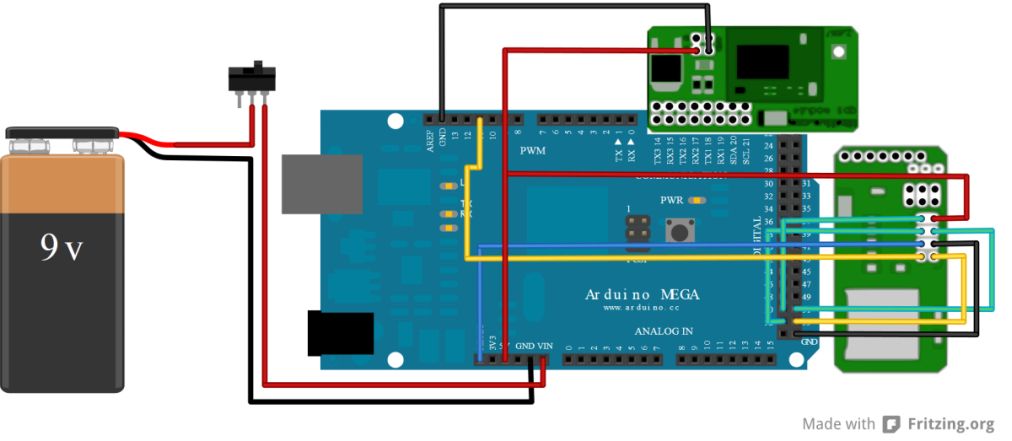
You can download the files associated with this episode here: Arduino Tutorial 15 Files
This video can also be viewed at element14.com.
Major Components in Project
PARTS /SOFTWARE LIST
1. Arduino Mega2560: http://www.newark.com/arduino/a000047/arduino-mega2560-board/dp/13T9286
2. USB Cable: http://www.newark.com/pro -signal/usb2 -102b/cable -usb2 -0-a-b -blue -2m/dp/38K9260
3. Arduino Software: http://arduino.cc/en/Main/Software
4. TinyGPS Arduino GPS Library: http://arduiniana.org/libraries/tinygps/
5. Google Earth: http://www.google.com/earth/index.html
6. Spreadsheet Software: Microsoft Excel or Open Office: http://www.openoffice.org/
7. Jumper Kit: http://www.newark.com/3m/923351- i/pcb-accessories/dp/65F2290
8. Cooking Hacks GPS Shield: http://www.cooking- hacks.com/index.php/gps-module-for-arduino.html
9. Cooking Hacks GPS Antenna: http://www .cooking -hacks.com/index.php/internal-gps-antenna.html
10. Cooking Hacks SD Card Shield w/ SD Card: http://www.cooking-hacks.com/index.php/microsd-2gb-module-for-arduino.html
11. Enclosure: http://www.newark.com/enclosures_enclosures
12. 9V Battery Holder: http://www.sparkfun.com/products/10512
13. Power Button or Toggle Switch: http://www.sparkfun.com/products/9276
Source: Arduino GPS Tracking System
- What is the primary function of this Arduino project?
The project logs latitude and longitude data over the course of a day. - How can I overlay the logged GPS data onto a map?
You can use services like Google Earth and Google Fusion Tables. - Which library is used to decode NMEA GPS Data?
The TinyGPS library is used to decode the NMEA GPS Data. - Can I use Microsoft Excel for this project?
Yes, Microsoft Excel or Open Office can be used as spreadsheet software. - Where did the GPS shield and SD Card shield come from?
Cooking-Hacks supplied both the GPS shield and SD Card shield. - What type of microcontroller board is required?
An Arduino Mega2560 board is required for this project. - Is a battery included for powering the device?
A 9V Battery Holder is listed as a component, implying external battery power is needed. - What software is needed to run the Arduino code?
The official Arduino Software must be installed.
