
Summary of Arduino-Controlled Physics Lab Fan-Cart
This article describes a modified "fan cart" for physics labs, enabling students to study force and energy by controlling the fan's operation at specific track positions. The project uses an Arduino to automate motor activation via a reed switch triggered by magnets, replacing manual switching with programmable power settings.
Parts used in the Arduino-Controlled Physics Lab Fan-Cart:
- Fan (model airplane propeller on a brushed DC motor)
- Low-friction cart
- Quad-AA battery holder
- Switch (original cart component)
- Arduino (8MHz ATMega168 3.3V version)
- Quad H-bridge (utilizing one quarter of the bridge)
- Three LEDs
- Pushbutton
- Reed switch (salvaged from a bike computer)
- Magnet
A “fan cart” is a roughly constant-force device used in introductory physics labs. It consists of a fan (usually a model airplane propeller on a brushed DC motor) mounted on top of a low-friction cart. Students use it to pretend they’re learning something about force, acceleration, energy, etc. If you’ve ever taken an introductory physics lab, there’s a good chance you’ve seen one.
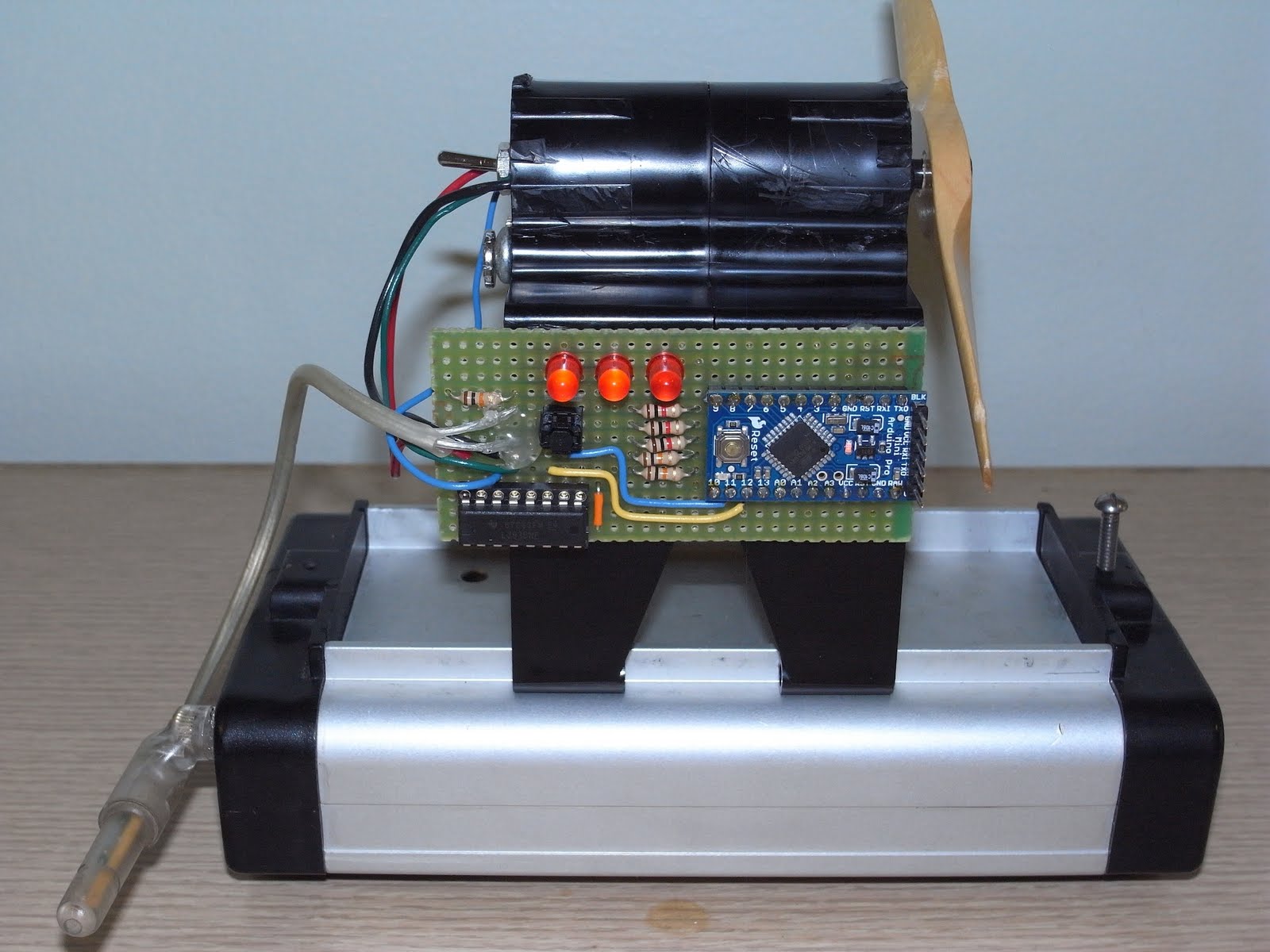
A couple weeks ago I was at a physics teachers’ conference where Mark Masters and Tim Grove, from Indiana Purdue Fort Wayne, suggested modifying a fan cart so that it turned on or off at certain positions on its track. This would allow some interesting lab exercises in which students could look at the change in kinetic energy of the fan cart over a distance interval, relate it to the force applied by the fan, and pretend to learn even more about force and energy.
So here’s my take on it.
The fan cart comes with a quad-AA battery holder and a switch, which I used for the power supply. The Arduino used was a 8MHz ATMega168 3.3V version, not that it matters much. I used 1/4 of a quad H-bridge to drive the motor —a single MOSFET would have worked fine— because I didn’t have a MOSFET handy that would turn completely on with a 3.3V input.
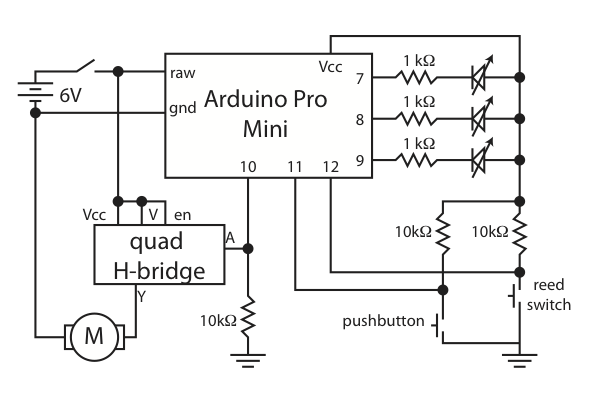
The three LEDs indicate power level. The pushbutton cycles through PWM power settings: 0, 150/255, 200/255, 255/255. The reed switch (salvaged from a bike computer after a fairly spectacular mountain-biking “incident”) toggles the motor on or off each time it passes a magnet.
For more detail: Arduino-Controlled Physics Lab Fan-Cart
-
What is the primary purpose of modifying the fan cart?
To allow the fan to turn on or off at certain positions on its track for lab exercises involving kinetic energy and force. -
How does the system control the motor power levels?
A pushbutton cycles through PWM power settings of 0, 150/255, 200/255, and 255/255. -
Which component triggers the motor to toggle on or off?
A reed switch toggles the motor each time it passes a magnet. -
Why was a quad H-bridge used instead of a single MOSFET?
The author did not have a MOSFET handy that would turn completely on with a 3.3V input. -
What indicates the current power level on the device?
Three LEDs indicate the power level. -
Where was the reed switch sourced from?
The reed switch was salvaged from a bike computer after a mountain-biking incident. -
What type of motor drives the fan propeller?
A brushed DC motor drives the model airplane propeller. -
Can this modification help students learn about energy?
Yes, it allows students to relate the force applied by the fan to the change in kinetic energy over a distance interval.
