
Summary of Arduino based Tic Tac Toe with TV Remote
Parts used in Arduino Tic Tac Toe:
- InduinoX board
- Arduino Uno board
- Processing IDE
- TV Remote (IR)
- 3x3 LED mesh
- Breadboard
- Jumper wires
- IR receiver module
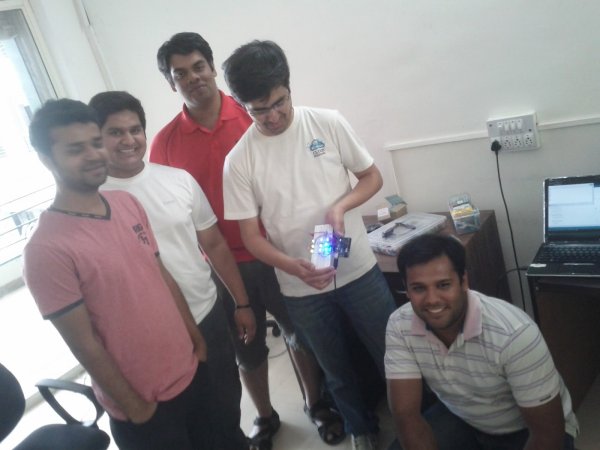
This was my first time attending the Internet of Things Pune Group. It was such a fun learning experience!
At today’s meetup, Dhiraj and Nishant started out by introducing the InduinoX and Arduino Uno boards along with the Processing IDE that is used to write the code.
After playing around with couple of sensors on the InduinoX we thought of doing a micro project together and finally settled on doing a Tic Tac Toe!
All those other ideas would hopefully make it into our next meetups!
Following spec was decided for our micro-project.
- A tic-tac-toe game with a mesh of 3×3 LEDs.
- Controlled via a TV Remote. (IR). 1-9 keys on remote denote the position of the LED.
- A player alternates using the TV Remote.
- The first player’s LED is always bright (solids) and the second player’s LED blinks. (a novel idea considering we had only 1 color LED’s.)
Building It
- We connected pins 2-10 of the Arduino Uno to a breadboard mounted with LED’s. Also the ground PIN was connected using jumpers. (as seen in the below pic.)
-
Code
-
- A video below shows the game play!
-
#include <IRremote.h> int RECV_PIN = 11; IRrecv irrecv(RECV_PIN); decode_results results; int i = 0; int blinkarray[11]; int user=0; void setup() { for(i=2;i<11;i++) { pinMode(i,OUTPUT); } irrecv.enableIRIn(); // Start the Remote receiver Serial.begin(9600); } void loop() { blinkOrNot(); if (irrecv.decode(&results)) { Serial.println(results.value); switch(results.value) // if the ‘+’ button is pressed { case 2320: i=0; break;// 2320 is the value for ‘0’ case 16: i=1; setArray(); break;// 16 is the value for ‘1’ case 2064: i=2; setArray(); break;// 2064 is the value for ‘2’ case 1040: i=3; setArray(); break;// 1040 is the value for ‘3’ case 3088: i=4; setArray(); break;// 3088 is the value for ‘4’ case 528: i=5; setArray(); break;// 528 is the value for ‘5’ case 2576: i=6; setArray(); break;// 2576 is the value for ‘6’ case 1552: i=7; setArray(); break;// 1552 is the value for ‘7’ case 3600: i=8; setArray(); break;// 1552 is the value for ‘7’ case 272: i=9; setArray(); break;// 1552 is the value for ‘7’ } // while(digitalRead(7)==0); // wait till button is released to avoid incrementing the counter again delay(300); // small delay to avoid debounce irrecv.resume(); // Receive the next value } } 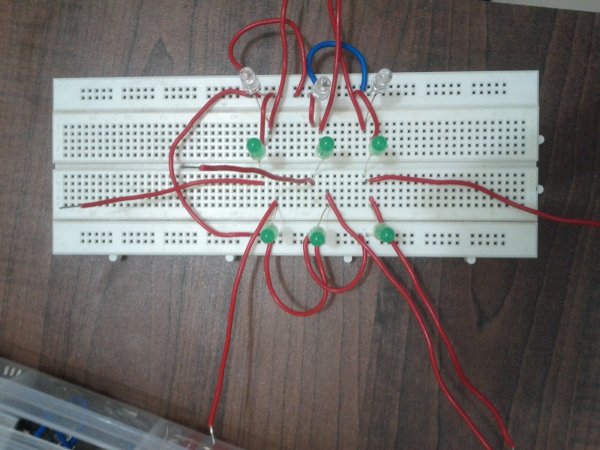
void blinkOrNot(){ for(int j=2;j<11;j++) { if(blinkarray[j]==1) { digitalWrite(j,HIGH); } } for(int j=2;j<11;j++){ if(blinkarray[j]==2) { digitalWrite(j,HIGH); } } for(int j=2;j<11;j++){ if(blinkarray[j]==2) { delay(50); } } for(int j=2;j<11;j++){ if(blinkarray[j]==2) { digitalWrite(j,LOW); } } for(int j=2;j<11;j++){ if(blinkarray[j]==2) { delay(50); } } } void setArray(){ if(user==0){ blinkarray[i+1]=1; user=1; } else{ blinkarray[i+1]=2; user=0; } }
For more detail: Arduino based Tic Tac Toe with TV Remote
- What hardware was used to build the project?
The project uses an InduinoX board, an Arduino Uno board, a 3x3 LED mesh, and a TV remote for control. - How is the game controlled by the user?
Players use a TV remote where keys 1 through 9 denote the specific position of the LED on the grid. - Does the code support two players?
Yes, the system allows players to alternate turns using the same remote. - How does the code differentiate between the first and second player?
The first player's LED lights up solidly while the second player's LED blinks to distinguish them. - Which pin is assigned to the IR receiver?
Pins 2 through 10 are connected to the LEDs, while pin 11 is defined as the RECV_PIN for the infrared sensor. - Can I find the source code online?
Yes, the raw code file tic_tac_toe_arduino_ir.ino is hosted on GitHub. - What library is required to run this sketch?
The program includes the IRremote.h library to handle infrared signal decoding. - Is there a delay implemented in the code?
A small 300-millisecond delay is added to avoid button debounce issues when pressing remote keys.
