
Summary of Arduino 4-Digit 7-Segment LED Display
This article explains how to build a 4-digit 7-segment LED display using an Arduino. It details the components required, including the microcontroller, displays, transistors, and resistors. The text describes the internal structure of 7-segment displays, distinguishing between common anode and common cathode configurations, and provides a method to test which type is being used. It also covers multiplexing techniques for displaying numbers from 0 to 9 on either a compact module or individual units.
Parts used in the Arduino 4-Digit 7-Segment LED Display:
- Arduino UNO
- 4-Digit compact 7-segment LED display (or 4 individual 7-segment LED displays)
- BC547 transistor
- 1KΩ resistor
- 100Ω resistor
7 Segment LED displays are used in many applications as front panel number indicators. The most common applications are calculators, microwave ovens, electronic lab equipment like function generators and frequency counters.
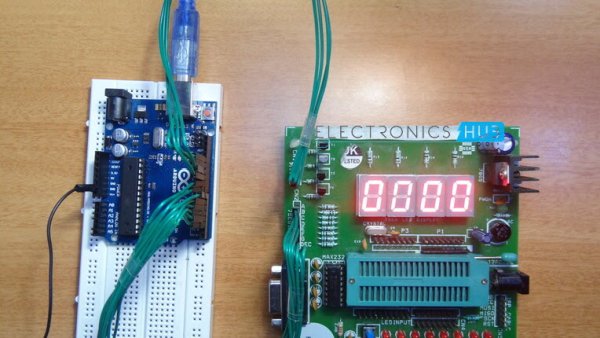
A 7 segment LED display consists of 7 LEDs arranged in such a way that it can display numbers from 0 to 9. The arrangement of LEDs in the display can be either common anode or common cathode.
In this project, a 4 – digit 7 – segment LED display is used to display numbers using Arduino.
Either a compact module containing four 7- segment LED displays can be used or four individual 7 – segment displays can be used by multiplexing them.
Circuit Diagram
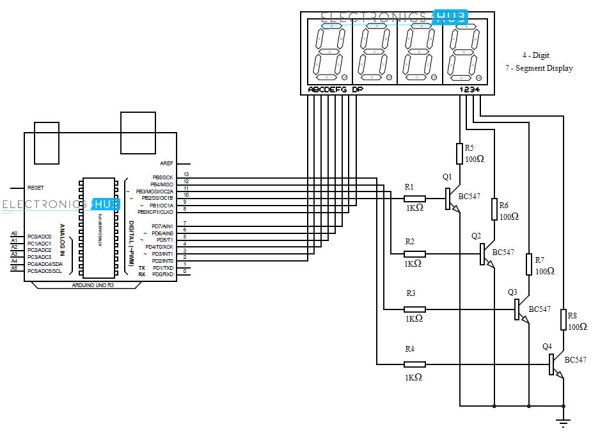
Components Required
- Arduino UNO — 1
- 4 – Digit compact 7 – segment LED display — 1(Or)7 – Segment LED display — 4
- BC547 — 4
- 1KΩ — 4
- 100Ω — 4
Working of 4 – Digit 7 – Segment LED Display
A 7 – Segment LED display, as the name indicates, is an assembly of LED bars, where each bar can be powered individually. Each LED bar is in the form of a hexagon and the overall arrangement will be in the form of ‘8’.
The following figure shows a general representation of 7 – segment LED display with dedicated names to each segment.
Each segment can be powered separately to display digits from 0 to 9. The following figure shows the pattern of digits displayed by a 7 – segment LED display.
As mentioned earlier, in a 7 – segment display, the LEDs can be arranged in common anode or common cathode mode.
The equivalent circuit of a 7 – segment display in common anode and common cathode configuration is shown below.
To determine whether the 7 – segment display is common anode or cathode, a small test circuit can be built. The common terminal of the display is connected to a current limiting resistor.
The resistor is given positive voltage and any of the segments (A to G) is connected to ground. If the segment glows, then it is common anode display.
If the segment doesn’t glow, reverse the polarity of the supply and then it glows. This is a common cathode display.
It is important to determine whether the display is of common anode or common cathode type as the code for Arduino (or any microcontroller) will depend on it.
In this project, we are using a 4 – digit 7 – segment LED display. We can use a compact 4 – digit module or use four individual 7 – segment displays and multiplex them to make a 4 – digit display.
The following figure shows four multiplexed 7 – segment LED displays.
Read More: Arduino 4-Digit 7-Segment LED Display
- What are the most common applications for 7 segment LED displays?
Calculators, microwave ovens, and electronic lab equipment like function generators and frequency counters. - How many LEDs are arranged in a standard 7 segment display?
A 7 segment LED display consists of 7 LEDs arranged to display numbers from 0 to 9. - Can you use four individual displays instead of a compact module?
Yes, four individual 7-segment displays can be used by multiplexing them to create a 4-digit display. - How do you determine if a display is common anode or common cathode?
Connect the common terminal to a positive voltage through a resistor and connect segments to ground; if it glows, it is common anode. - Why is determining the display type important for the code?
The code for the Arduino depends on whether the display is common anode or common cathode. - What is the purpose of the 100Ω resistor in this project?
The 100Ω resistor acts as a current limiting resistor for the segments. - Does the arrangement of LEDs form a specific shape?
Each LED bar forms a hexagon, and the overall arrangement looks like the number 8.
