
Summary of AN AUTOMATED DIGITIZER FOR 35MM SLIDES
This article describes a DIY automated slide digitizer built from a Kodak carousel projector, Arduino Nano, LED strips, and a camera with a zoom lens. The system automatically advances slides, captures images via a hacked shutter remote, and counts progress to process entire collections without manual intervention.
Parts used in the Automated Slide Digitizer:
- Kodak carousel slide projector
- LED strips
- Arduino Nano
- Hacked-up shutter release remote
- Camera with zoom lens
- Carousel system (for advancing slides)
Slides make for great old-timey fun, but it’s awesome to have a digital backup of your old photos, too. An automatic digitizer can make quick work of your collection, and this build from [rbwood53] will do just that.
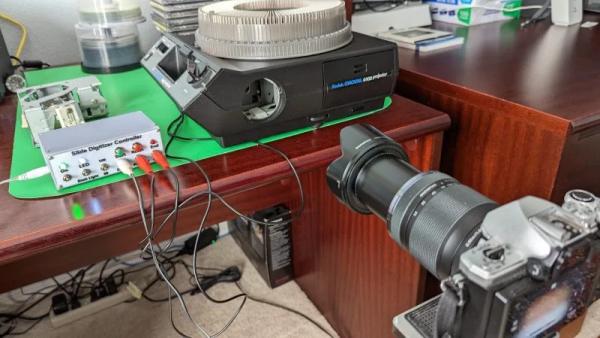
The digitizizer is based on a Kodak carousel slide projector. It’s fitted with LED strips instead of the original light source, which are used to illuminate the slides themselves. An Arduino Nano is used to command a camera to take photos, via a hacked-up shutter release remote. The camera is set up with a zoom lens and relies on auto-focus to get crisp, clear images of the slides. The Arduino is also charged with telling the carousel system to advance to the next slide as required. It keeps count as the slides go by, so it stops when the entire carousel has been imaged.
Overall, it’s a straightforward build that automatically imaged over 40 boxes of slides for [rbwood53] without issue. If you’ve got a smaller collection to digitize, you might find this simple 3D-printed adapter to be useful, too!
Source: AN AUTOMATED DIGITIZER FOR 35MM SLIDES
-
What is the main function of the LED strips in this build?
The LED strips are fitted into the projector to illuminate the slides instead of the original light source. -
How does the system control the camera to take photos?
An Arduino Nano commands the camera to take photos via a hacked-up shutter release remote. -
What type of lens does the camera use for capturing images?
The camera is set up with a zoom lens that relies on auto-focus to get crisp, clear images. -
How does the Arduino manage the slide advancement process?
The Arduino tells the carousel system to advance to the next slide as required and keeps count of the slides. -
When does the digitization process stop automatically?
The system stops when the Arduino counts that the entire carousel has been imaged. -
How many boxes of slides did this build successfully image?
The build automatically imaged over 40 boxes of slides without issue. -
Is there an alternative option mentioned for smaller slide collections?
Yes, a simple 3D-printed adapter is suggested for those with smaller collections to digitize.
