
Summary of ALTIUM’S PCB DESIGN SHARING & VISUALIZATION TOOL HELPS TO VIEW POPULAR CAD FORMATS IN YOUR BROWSER
Altium launched the cloud-based A365 Viewer on the Altium 365 platform, enabling interactive, browser-based viewing and sharing of PCB schematics, layouts, 3D models, and BOMs without downloads. It supports multiple eCAD formats (currently Altium Designer and Autodesk Eagle), allows cross-probing and component/net inspection, and can be embedded into websites (Arduino is an example). The viewer enhances collaboration between designers, suppliers, and manufacturers and will add support for more PCB formats soon.
Parts used in the A365 Viewer Project:
- Altium 365 cloud platform
- A365 Viewer application
- Web browser (desktop, phone, or tablet)
- Autodesk Eagle eCAD format support
- Altium Designer eCAD format support
- Embedded website integration (embed code from www.altium.com/viewer/)
- Schematic visualization component
- PCB layout visualization component
- 3D model visualization component
- BOM (Bill of Materials) visualization component
Altium has launched a new, cloud-based application – the A365 Viewer – that redefines the way that printed circuit board designs are shared between designers, part suppliers, and manufacturers.
Adding the Altium 365 Viewer has significantly enhanced the user experience when navigating the product documentation on our website. Now Arduino users can freely browse schematics, PCB layout and even 3D models of the Arduino boards and modules online, without the need to download or install anything additional. The capability of being CAD-agnostic will shorty allow Arduino to add the online design viewer to every product page, including the ones designed in Autodesk Eagle.” – Fabio Violante, CEO, Arduino
Altium, a global leader in PCB design software, announced the launch of a new cloud-based application that redefines the way that printed circuit board designs are shared between designers, part suppliers, and manufacturers.
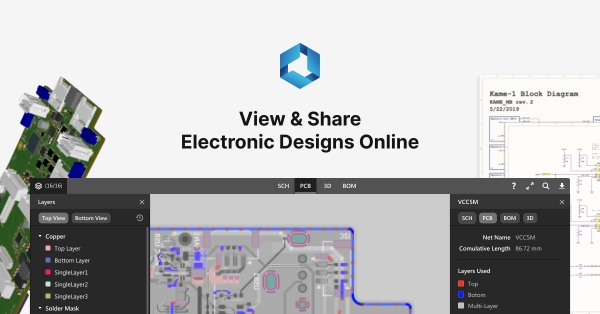
The A365 Viewer, powered by the Altium 365 cloud platform, is a brand new, and innovative way to view and share electronic designs through a browser on any web-enabled desktop, phone or tablet. Schematics, PCB layout, and 3D visualization provide an interactive eCAD experience with no downloads or installations required. The A365 Viewer is part of Altium’s cloud strategy and newly launched Altium 365 cloud platform.
Simplicity Is The Ultimate Sophistication
Until now, designers have been forced to share their PCB designs through PDFs or static images. With the new A365 Viewer, an interactive experience is created that retains all of the key relevant information that’s typically lost when sharing static files. For example, the A365 Viewer allows users to search for, select, cross-probe and inspect components and nets while moving seamlessly between schematic, PCB and 3D views of their board.
Using the A365 Viewer requires no CAD tools or experience. The A365 Viewer is designed to work with multiple eCAD formats, currently supporting Autodesk®️ Eagle™ and Altium Designer™. Other popular PCB design software formats will be supported in the near future.
Visually stunning, interactive CAD centric renditions of user PCBs, including Schematic, PCB, 3D and BOM all easily available through a browser on any web-enabled device.
Easily Embedded On Your Website
Anyone can easily embed the viewer on their website, free of charge, by visiting www.altium.com/viewer/. As an example, a well-known developer of electronics hardware and software kits, Arduino, is helping engineers and makers to easily and quickly visualize the PCB designs and assemblies available in their product kits, by embedding the A365 Viewer on the Arduino website.
Read more: ALTIUM’S PCB DESIGN SHARING & VISUALIZATION TOOL HELPS TO VIEW POPULAR CAD FORMATS IN YOUR BROWSER
- What is the A365 Viewer?
It is a cloud-based application on the Altium 365 platform that lets users view and share PCB schematics, PCB layout, 3D models, and BOMs in a browser without downloads. - Can I view PCB designs without installing CAD tools?
Yes. The A365 Viewer requires no CAD tools or experience and runs in a web browser. - Which eCAD formats does the A365 Viewer support?
It currently supports Altium Designer and Autodesk Eagle, with other formats coming soon. - How does the A365 Viewer improve sharing over PDFs or images?
It provides an interactive experience that preserves searchable, selectable, cross-probing, and inspectable information lost in static files. - Can the viewer be embedded on a website?
Yes. Anyone can embed the viewer free of charge via www.altium.com/viewer/. - Which devices can run the A365 Viewer?
It runs on any web-enabled desktop, phone, or tablet. - Does the A365 Viewer include 3D visualization?
Yes. The viewer provides 3D visualization along with schematic and PCB views. - Who benefits from using the A365 Viewer?
Designers, part suppliers, manufacturers, engineers, and makers benefit from improved sharing and visualization of PCB designs.
