
Summary of Adafruit’s Metro RP2040 Packs a Raspberry Pi RP2040 and Extras Into an Arduino UNO Form Factor
Adafruit announced the Metro RP2040, an Arduino UNO form-factor board built around the Raspberry Pi RP2040 dual-core Cortex-M0+ MCU. It features USB-C, microSD slot, dedicated debug port, STEMMA QT expansion, onboard RGB and Pin 13 LEDs, 16 MB quad-SPI flash, 264 KB SRAM, PIO block, and 24 GPIOs (four analog-capable). Note microSD SDIO has no software support yet, A4/A5 map to digital inputs, and a DPDT Rx/Tx switch adjusts UART pin ordering. The board is finalized and listed for notification at $14.95 on the Adafruit Store.
Parts used in the Metro RP2040:
- Raspberry Pi RP2040 dual-core Arm Cortex-M0+ microcontroller
- USB Type-C connector
- microSD card slot (SPI, hardware SDIO capable)
- Dedicated debug port
- STEMMA QT port
- On-board RGB LED
- Pin 13 status LED
- 16 MB off-chip quad-SPI flash
- 264 KB static RAM (SRAM) on RP2040
- 24 GPIO pins with four analog inputs
- DPDT receive-transmit (Rx/Tx) switch
Adafruit has announced a new entry in its Metro line of Arduino UNO form factor microcontroller development boards, and this time it’s playing host to a Raspberry Pi RP2040 dual-core Arm Cortex-M0+ chip — and it’s called, unsurprisingly, the Adafruit Metro RP2040.
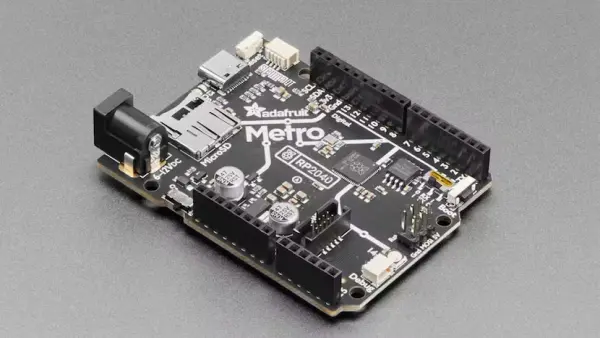
“This is the RP2040 Metro Line, making all station stops at ‘Dual Cortex M0+ mountain,’ ‘264k RAM round-about’ and ’16 Megabytes of Flash town,'” Adafruit enthuses of its latest Metro design. “This train is pile[d] high with hardware that complements the Raspberry Pi RP2040 chip to make it an excellent development board for projects that want Arduino-shape-compatibility or just need the extra space and debugging ports.”
As with other entries in the Metro line, the Metro RP2040 is designed to be pin- and footprint-compatible with the Arduino UNO line of microcontroller development boards. It’s not a clone, though: as well as the new microcontroller at its heart, the board includes a USB Type-C connector rather than full-size USB, a microSD slot for storage, a dedicated debug port, a STEMMA QT port for expansion to external boards, and an on-board RGB LED in addition to the usual Pin 13 LED.
The RP2040 microcontroller gives the board two 32-bit Arm Cortex-M0+ cores running at a stock 133MHz and 264kB of static RAM (SRAM), plus a smart Programmable Input/Output (PIO) block which can run state machines independently of the CPU cores. There’s 16MB of off-chip quad-SPI flash, and 24 general-purpose input/output (GPIO) pins broken out with four doubling as analog inputs.
For those looking to pick a board up, though, Adafruit offers a couple of notes. The first is that the microSD slot, connected over SPI, offers hardware support for SD Input/Output (SDIO) operation, but that there’s no corresponding software support in Arduino, MicroPython, or CircuitPython. The second is a change to the pinout compared with a true Arduino UNO: Pins A4 and A5, the fifth and sixth analog inputs on an Arduino UNO, are on the Metro RP2040 digital inputs instead.
There’s also a receive-transmit switch, not found on an original Arduino UNO. “We added this because traditional Arduino board start counting the GPIO for the digital pins with 0-7 and then 8-13. However, the D0/D1 pins are also traditionally the hardware UART Serial1, where D0 is Rx and D1 is Tx,” the company explains.
“On the RP2040, however, the UART pins are the other around: D0 is Tx and D1 is Rx. Thus a DPDT [Double-Pole Double-Throw] switch: flip one way to have the GPIO go in order of 0-7, flip the other way to have the logical locations of the hardware UART correct but now the pin order is 1, 0, 2, 3…7.”
The board design has been finalized but hardware has not yet launched; those interested can sign up to be notified when the Metro RP2040 goes on sale on the Adafruit Store, where it is listed at $14.95 before volume discounts.
Source: Adafruit’s Metro RP2040 Packs a Raspberry Pi RP2040 and Extras Into an Arduino UNO Form Factor
- What microcontroller does the Metro RP2040 use?
It uses the Raspberry Pi RP2040 dual-core Arm Cortex-M0+ microcontroller. - Does the Metro RP2040 use a USB-C connector?
Yes, the board includes a USB Type-C connector instead of full-size USB. - How much flash and RAM does the Metro RP2040 have?
It has 16 MB of off-chip quad-SPI flash and 264 KB of static RAM. - Is there a microSD slot and does it support SDIO?
There is a microSD slot connected over SPI and it offers hardware support for SDIO, but no software support is available yet in Arduino, MicroPython, or CircuitPython. - How many GPIO and analog inputs are available?
There are 24 GPIO pins broken out, with four of them doubling as analog inputs. - Are A4 and A5 mapped the same as on an Arduino UNO?
No, Pins A4 and A5 on the Arduino UNO are mapped to digital inputs on the Metro RP2040. - What is the purpose of the receive-transmit switch?
The DPDT switch lets you flip between traditional GPIO numbering order and correct logical UART locations because the RP2040 reverses the D0/D1 UART assignment compared to traditional Arduino boards. - Does the board include expansion and debugging ports?
Yes, it includes a STEMMA QT expansion port and a dedicated debug port. - Is the Metro RP2040 available for purchase now?
The hardware design is finalized but it has not launched; you can sign up to be notified on the Adafruit Store. - How much is the Metro RP2040 listed for on the Adafruit Store?
It is listed at $14.95 before volume discounts.
