
Summary of Making sound (noise) machines using Arduino
The author, an Instructables artist in residence, created tangible noise machines and music boxes to explore sound synthesis through physical interfaces. These self-contained projects, including a "Singing Plant" and a "Kaosduino," utilize Arduino boards and Gameduino shields instead of computer software to inspire curiosity. The designs aim to be hackable yet finished, remixing existing concepts into unique, standalone instruments that convert capacitive interactions into sound.
Parts used in the Noise Machines:
- Arduino board
- BreadBoard
- Wires
- 2.2k Resistor
- 100n Capacitor
- 100u Capacitor
- Jack where left and right channel has one wire and one wire to ground
- A pair of computer speakers
As a part of being an artist in residence at Instructables, I took it upon myself to build of couple of noise machines / music boxes. My interest lies in designing objects that would enable people to explore the world of sound synthesis and for me to get a better understanding on how the different interfaces enables different interactions and sound qualities.
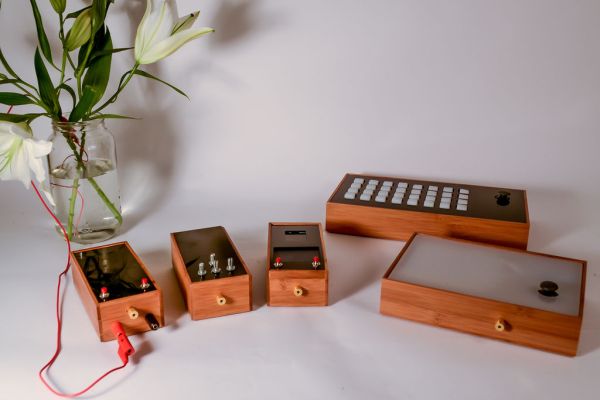
It has been an intense experience. Trying to build as many interfaces as possible within one month. I have tried to make all of them stand-out as finished, while still being hackable pieces. Everything I have done is published here on Instructables for others to experiment with.
All of the projects consists of a few basic components: An interface and sometimes a screen or a led matrix. The basis sound component is either a Gameduino or a synth based on the followinginstructable.
Most of these machines would have been simpler to make as software programs on a computer or even as multitouch applications on a smartphone, but I wanted to have an aesthetic criteria as a frame for my experiments: I wanted to create simple tangible interfaces that would inspire curiosity. The objects themselves should welcome the user to try out and explore their interfaces. Lastly I wanted each experiment to be self contained. Instead of them becoming interfaces for a laptop they should be the ones who created the music.
All of the projects are remixes of earlier experiments and inspirational sources found on the internet. Therefore each project should be considered my own interpretations and evolvements of other inspirational projects. I have done my best to credit my sources in each project.
The software for each experiment is still a little crude and leaves many possibilities open for new people to experiment with. I will update the software as I go along.
I made the following machines:
Step 1: Singing Plant: Make your plant sing with an arduino.
Making a plant sing has been a trick since the Theremin was invented. Here I am going to teach you how to do this with and Arduino board, a gameduino shield and the touch shield from my previousinstructable. With the introduction of the touché frequency principle by Disney Research lab and we can now make a really stable solution that can run entirely on the Arduino platform. The Touché works on a similar principle as a normal Theremin, but does a frequency sweep instead. By hooking the touché up to the plant we can measure the capacitative interaction and convert it into sound.
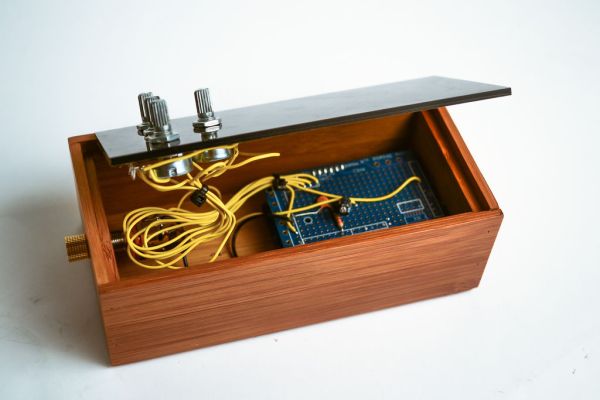
You can find the Instructable here.
Step 2: Kaosduino: Make your own Kaossilator
Inspired by Korgs Kaossilator I took it upon myself to build an opensource version of it. This way people can design new ways of interacting with the touchpad. The basic principle is creating sound via a trackpad. This enables you to create an instrument with quite wobbly possibilities. The challenge is to program something that would enable you to create interesting sounds. This is also a challenge with the Kaossilator which get mixed reviews for the same reason. This is an initial prototype. It uses the an Arduino as basic 8 bit sound engine and uses a capacitative trackpad from adafruit industries as the input device.
You can find the Instructable here.
- Arduino board
- BreadBoard
- Wires
- 2.2k Resistor
- 100n Capacitor
- 100u Capacitor
- Jack where left and right channel has one wire and one wire to ground
- A pair of computer speakers
For more detail: Making sound (noise) machines using Arduino
- What is the main goal of these projects?
The goal is to create simple tangible interfaces that enable people to explore sound synthesis and inspire curiosity. - Can I build these machines without using a computer?
Yes, the author designed them to be self-contained objects that create music independently rather than acting as laptop interfaces. - How does the Singing Plant project work?
It uses a touch shield to measure capacitative interaction from a plant and converts it into sound via a frequency sweep. - What hardware powers the Kaosduino prototype?
It uses an Arduino as a basic 8 bit sound engine combined with a capacitative trackpad from Adafruit Industries. - Is the software for these experiments finalized?
No, the software is described as crude with many possibilities open for new people to experiment with. - Are these original designs or modifications?
They are remixes and interpretations of earlier experiments and inspirational sources found on the internet. - What type of interface principle does the Touché use?
It works on a similar principle as a normal Theremin but performs a frequency sweep based on Disney Research lab findings. - Why did the author choose physical interfaces over smartphone apps?
The author wanted an aesthetic criteria to frame experiments and create objects that welcome users to try out their interfaces.
