
Summary of SEGGER APPWIZARD ENABLING ADVANCED GUI DESIGN IN NEXT GENERATION EMBEDDED APPLICATIONS
SEGGER’s AppWizard is a WYSIWYG tool for building complete, ready-to-run applications with the emWin embedded graphics library. It includes resource management, play-mode simulation, board-level packages, and outputs C source files and a Visual Studio simulation project. AppWizard simplifies GUI creation with signals/slots interactions, supports animations, language management, widgets, and automatic resource conversion for internal or external storage. Target apps require ≥32 KB RAM and ≥128 KB ROM and can use SEGGER’s emFile for external storage like SD cards.
Parts used in the SEGGER AppWizard Project:
- SEGGER AppWizard software
- emWin embedded graphics library
- Built-in resource manager (fonts, images conversion)
- WYSIWYG editor
- Play mode simulation (F5 run)
- Signals and slots/interactions mechanism
- Board-level packages (target hardware and display setup)
- SEGGER emFile file system
- C source output bundle
- MS Visual Studio simulation project
- Target system with at least 32 kByte RAM and 128 kByte ROM
- Optional external media (e.g., SD card) for resources
SEGGER has released AppWizard, presenting engineers with a powerful new tool for creating complete, ready-to-run applications for the company’s popular emWin embedded graphics library. AppWizard is intuitive to operate and comes with its own built-in resource management capabilities. It facilitates the use of all of emWin’s core functions, such as the rendering of animations, language management, widgets, etc.
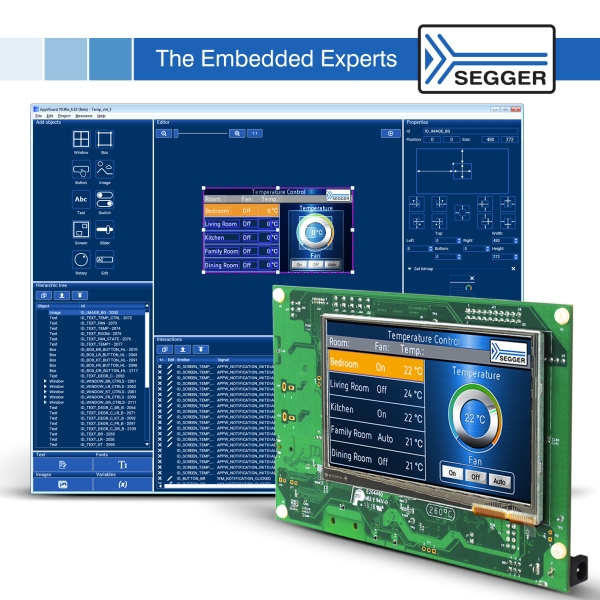
One of AppWizard’s notable features is the ‘What You See is What You Get’ (WYSIWYG) editor. This allows engineers to design application interfaces, along with their related interactions and events, and immediately see what these applications will actually look like. In addition, AppWizard integrates a play mode for easy testing of created applications in a simulated environment. Simply pressing F5 runs the current state of the application, just like debugging in an IDE.
The construction of embedded GUI applications with AppWizard is made very straightforward, requiring little to no prior experience with emWin or even C-programming. By applying signals and slots/interactions, the application’s behavior can be defined with ease. For example, creating a button to change a value is done with just a few clicks.
With its integrated resource management, all resources (such as fonts and images) are automatically converted to internal formats and added to the project. Resources can be stored in internal memory or offloaded to external media.
Support for board-level packages enables AppWizard to generate ready-to-use target applications. These packages include the setup of the target hardware and display for a seamless start, as well as SEGGER’s comprehensive emFile file system to make placing of resources on an SD card or some other form of external memory simple.
AppWizard outputs a bundle of C source files to work with any target system that has at least 32kByte of RAM and 128kByte of ROM. A MS Visual Studio simulation project enables debugging of the application and the adding of custom code to be carried out even if the final target hardware is not (yet) available.
Read more: SEGGER APPWIZARD ENABLING ADVANCED GUI DESIGN IN NEXT GENERATION EMBEDDED APPLICATIONS
- What is AppWizard?
AppWizard is a tool from SEGGER for creating complete, ready-to-run applications using the emWin embedded graphics library. - How does AppWizard let you design interfaces?
It provides a WYSIWYG editor to design interfaces and related interactions while showing the actual appearance. - Can I test applications without target hardware?
Yes, AppWizard includes a play mode and a MS Visual Studio simulation project for testing and debugging without the final hardware. - What resources does AppWizard manage?
AppWizard manages resources like fonts and images, automatically converting them to internal formats and adding them to the project. - Does AppWizard support external storage for resources?
Yes, resources can be stored in internal memory or offloaded to external media such as an SD card using emFile. - What are the minimum target system requirements?
Target systems need at least 32 kByte of RAM and 128 kByte of ROM. - How does AppWizard simplify defining application behavior?
It uses signals and slots/interactions so behaviors like button actions can be created with just a few clicks. - What does AppWizard output for target integration?
It outputs a bundle of C source files and optionally a Visual Studio simulation project for debugging and adding custom code.
