
Summary of TEMPER: SLEEK TEMPERATURE SENSOR BUILT ON ESP8266
Temper is a compact, low-power ESP8266-based temperature and humidity sensor featuring an LED display and MQTT connectivity. It periodically wakes to transmit data via WiFi, supports Home Assistant auto-discovery, and includes a simple web configuration interface. Powered by a rechargeable battery with USB charging, the device offers extended battery life through deep sleep modes and can be wall-mounted using magnets.
Parts used in the Temper Project:
- ESP8266 microcontroller
- SHT30 temperature sensor
- 13×7 pixel LED display
- Three 74HC595 shift registers
- Seven n-fets
- TP4054 battery charger module
- MCP1700T LDO regulator
- PLA case material
- Reset button
Meet Temper, a compact, low power temperature sensor based on ESP8266 and SHT30 with a large 13×7 pixel led display. It accesses WiFi periodically to display temperature and humidity data as well as battery percentage via the MQTT protocol. The device’s display uses three 74HC595 + 7 n-fets, TP4054 to handle battery charging through a USB and MCP1700T LDO to power the ESP.
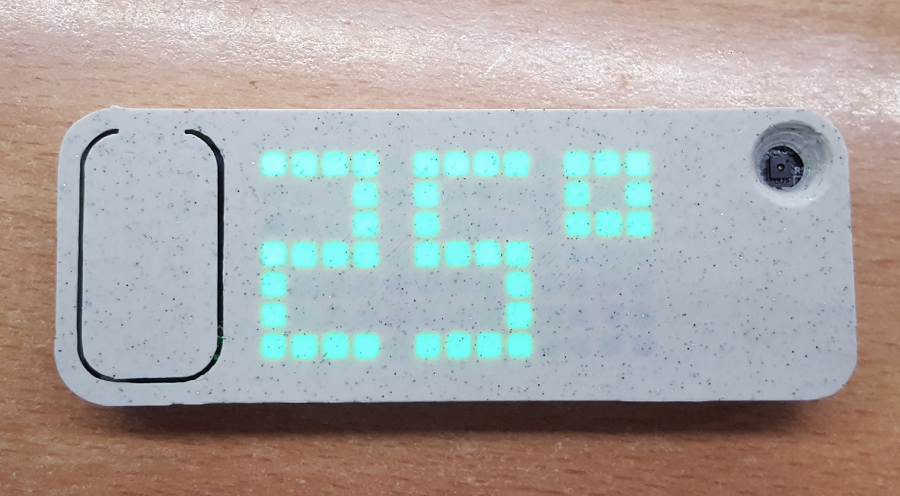
For WiFi setup, Temper comes with a super simple Web config interface and is also compatible with a home assistant and it’s auto-discovery feature. It can also be used with any platform that supports MQTT and can be attached to walls using magnets.
The case for the device is a stone-age light (PLA) from Spectrum filaments. It comes with a large reset button on the left forces the device to request MQTT temperature data and displays it within 5s after the button press.
Explaining the design, Martin Černý said:
The ESP is set to wake up every hour to send the temperature to MQTT. Pushing a button (hard resetting it) will show the temperature on the display and battery status as well. It should be able to make half a year of battery life or more (during deep sleep, it draws 32uA which is beyond awesome). This, of course, is not perfect and an e-ink display would make more sense to keep the values visible but also would quadruple the cost of the thing (but I ordered some e-inks anyway :D).”
There is a simple battery sensing onboard to keep an eye on battery level. Battery sensing is also used as a trigger for the config portal as there was not enough place for more buttons. How it works is after each button push (hard reset), it will check the battery level. If the battery level is above the threshold, it will start the configuration access point (for wifi settings, MQTT, etc.).”
Read more: TEMPER: SLEEK TEMPERATURE SENSOR BUILT ON ESP8266
- How does the device connect to WiFi?
The device uses a super simple Web config interface for WiFi setup. - Can Temper work with Home Assistant?
Yes, it is compatible with Home Assistant and its auto-discovery feature. - What protocol does Temper use for data transmission?
The device accesses WiFi periodically to display data via the MQTT protocol. - How long can the battery last on a single charge?
The device should be able to make half a year of battery life or more during deep sleep. - What happens when the reset button is pressed?
Pushing the button hard resets the device, displays temperature and battery status within 5 seconds, and checks battery level to trigger the config portal if needed. - Why was an e-ink display not chosen initially?
An e-ink display would quadruple the cost of the project despite being better for keeping values visible. - How is the device powered?
The device uses a TP4054 to handle battery charging through a USB and an MCP1700T LDO to power the ESP. - Does the device draw significant power in deep sleep?
No, it draws only 32uA during deep sleep which is described as beyond awesome.
