
Summary of THIS BAROMETER LOOKS MIGHTY FINE, RAIN OR SHINE
Parts used in the Tempestas II Barometer:
- Arduino Nano
- 16-channel PWM driver
- BMP280 barometric pressure/temperature sensor
- Five weather-serving servos
- Nine layers of decorated Plexiglas
Mythological legend has it that Tempestas, the Roman goddess of storms and sudden weather, saved the consul Scipio when his fleet of ships got caught in a storm off of Corsica. In return, she demanded that a temple be dedicated to her.
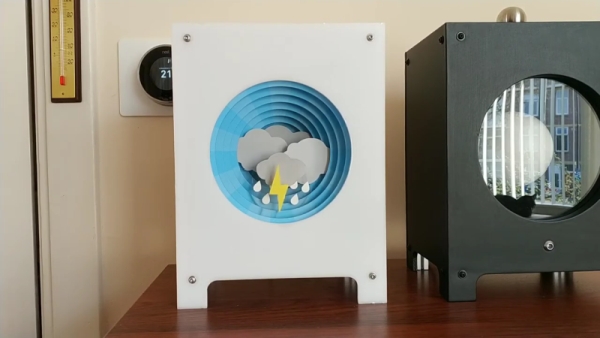
[SephenDeVos]’ beautiful barometer, dubbed Tempestas II, demands nothing of the viewer, but will likely command attention anyway because it looks so cool. If the weather is anything but clear and sunny, the appropriate sun-obscuring weather actor, be it clouds, more clouds, rain, or lightning will swing into place, blocking out the blue sky in layers, just like real life.
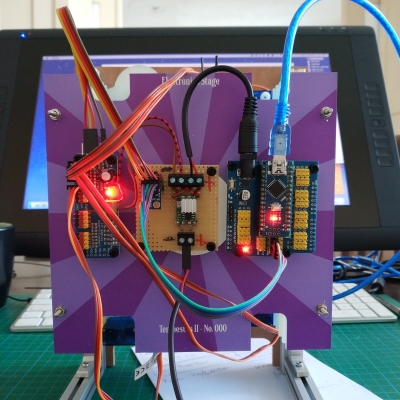
There’s a total of five weather-serving servos, and they’re all controlled by an Arduino Nano through a 16-channel PWM driver. The Nano gets the news from a BMP280 barometric pressure/temperature sensor and drives the servos accordingly.
Nine layers of nicely-decorated Plexiglas® hide the clouds and things in the wings while it’s nice outside. We totally love the way this looks — it’s even pretty on the back, where the sun don’t shine. This one is new and ongoing, so it seems likely that [Sephen] will post the code before the sun sets on this project. In the meantime, check out the demo after the break.
We don’t see too many barometers builds around here — maybe there’s too much pressure. This one tells you to lay off the coffee when the pressure’s too low.
Source: THIS BAROMETER LOOKS MIGHTY FINE, RAIN OR SHINE
-
What triggers the weather effects in the project?
The BMP280 sensor detects changes in barometric pressure and temperature, which then drives the servos. -
How many servos are used to control the weather elements?
There are a total of five weather-serving servos used in the build. -
What component controls the servos?
A 16-channel PWM driver controlled by an Arduino Nano manages the servos. -
What material is used for the nine layers of the device?
The layers are made of nicely-decorated Plexiglas that hide the clouds when the weather is clear. -
Does the device look good from the back?
Yes, the creator notes that it looks pretty even on the back where the sun does not shine. -
Can I find the code for this project yet?
The code has not been posted yet as the project is described as new and ongoing. -
What happens if the pressure is too low according to the article?
The article suggests you should lay off the coffee when the pressure is too low. -
Which microcontroller is used in the system?
An Arduino Nano is used to receive data from the sensor and drive the servos accordingly.
