
Summary of A HIGH-SPEED SLIDE SCANNER BUILD
This article details Bryan Howard's project to automate the digitization of over 200,000 photographic slides. Instead of professional services or a standard flatbed scanner, he modified an existing slide projector by upgrading it with an LED light source and integrating an Arduino Pro Micro for control. The system uses a DSLR camera connected to a PC to capture images sequentially, aiming to complete the massive collection within 2 to 5 days.
Parts used in Automated Slide Scanner:
- Existing slide projector
- LED light source
- Arduino Pro Micro
- DSLR camera
- PC
Photographic slides were popular in the middle part of the 20th century, but are long forgotten now. If you’ve found a handful in a dusty attic, you might consider sending them away to be digitized professionally, or using a flatbed scanner at home. [Bryan Howard] found himself with over 200,000 slides, however, so that just wouldn’t do. Instead, he endeavored to build an automated scanner of his own.
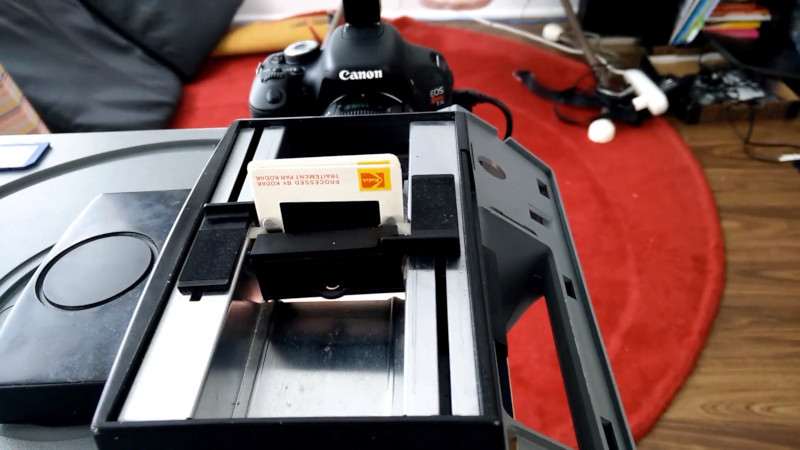
Like many similar projects, [Bryan] started with an existing slide projector as a base. This means that all the difficult work of slide transport is already taken care of. The projector has then been upgraded with an LED light source and other tweaks befitting its new role. An Arduino Pro Micro runs the show, firing off the camera to image each slide before loading the next one into place. The DSLR responsible for imaging is then hooked up to a PC so the incoming images can be checked while the machine is in operation.
Preliminary tests are promising, with the scanner successfully capturing several slides in a row. [Bryan] estimates that, with a capture time of between 1 and 2 seconds per slide, it should take somewhere between 2-5 days to image the entire collection.
We wish [Bryan] the best of luck with the project, and look forward to seeing the final results. We’ve seen similar work before, too. Video after the break.
Source: A HIGH-SPEED SLIDE SCANNER BUILD
-
Why did Bryan Howard build his own scanner?
He had over 200,000 slides, making professional digitization or home flatbed scanning impractical. -
What was the base component for the automated scanner?
The project started with an existing slide projector to handle the difficult work of slide transport. -
How is the image capture process controlled?
An Arduino Pro Micro fires off the camera to image each slide before loading the next one. -
What hardware upgrade was made to the projector?
The projector was upgraded with an LED light source and other tweaks for its new role. -
How long does it take to capture a single slide?
The estimated capture time is between 1 and 2 seconds per slide. -
How much total time is needed to scan the entire collection?
Bryan estimates it will take between 2 to 5 days to image the entire collection of over 200,000 slides. -
Can the user check images while the machine operates?
Yes, the DSLR is hooked up to a PC so incoming images can be checked during operation.
