
Summary of PS/2 Keyboard Or Mouse using Arduino
Arduino can interface with full-size PS/2 or adapted USB keyboards (and AT keyboards) to accept typed input, expanding projects beyond sensor data. Many USB keyboards include PS/2 adapters allowing them to operate in PS/2 mode, which Arduinos can handle despite not being USB hosts. The PS/2 electrical interface is compatible across PS/2 and AT keyboards, enabling use of vintage peripherals. Source code and libraries are available online for PS/2 keyboard and mouse integration.
Parts used in the PS/2 Keyboard Or Mouse using Arduino:
- Arduino Duemilanove, Arduino Pro, Seeeduino, or equivalent
- Prototyping shield
- PS/2 extension cable or 6-pin mini-DIN socket
- PS/2 keyboard or PS/2 mouse
- 10cm hookup wire
Arduino is not restricted to receiving data from sensors only; you have the ability to also link a full-size PS/2 keyboard and type as you would on a traditional computer. Attaching a keyboard to an Arduino may seem strange (since it’s a small microcontroller), however, it should be noted that an Arduino has greater processing power and memory than older desktop computers. Incorporating additional accessories typically found in a full-sized computer can create some intriguing opportunities.
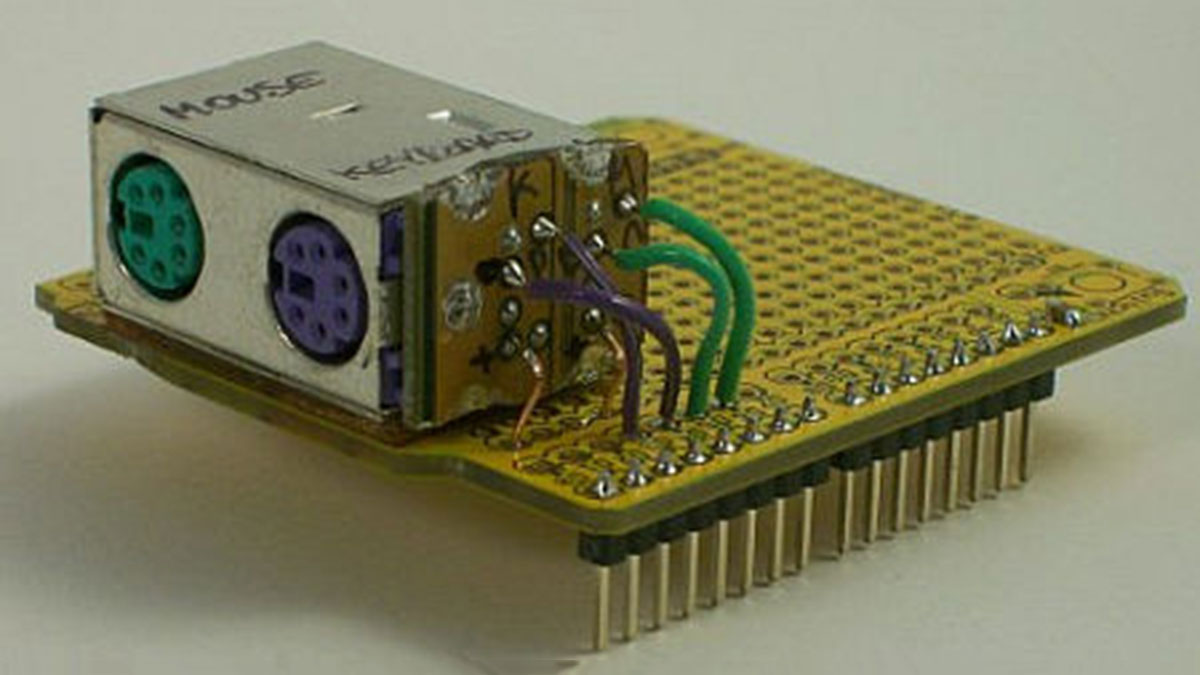
Maybe the PS/2 connection looks old-fashioned to you, so you might prefer to hook up a newer USB keyboard to your Arduino instead. Ultimately, it can be difficult to locate a PS/2 keyboard nowadays, requiring you to search through trash or sift through outdated hardware in the office storage room. Employing a USB keyboard might seem like the logical answer, yet an Arduino is not capable of fulfilling the role of a USB host due to its lack of speed. However, there is still hope as a lot of USB keyboards are made to work with older technology and include a small purple adapter for connecting to a PS/2 port. Keyboards that include these adapters are programmed to recognize if they are connected to a PS/2 port instead of a USB port, and will switch to functioning as a PS/2 device. Therefore, this experiment should be equally successful whether using a modern USB keyboard with an adapter or an authentic antique PS/2 keyboard.
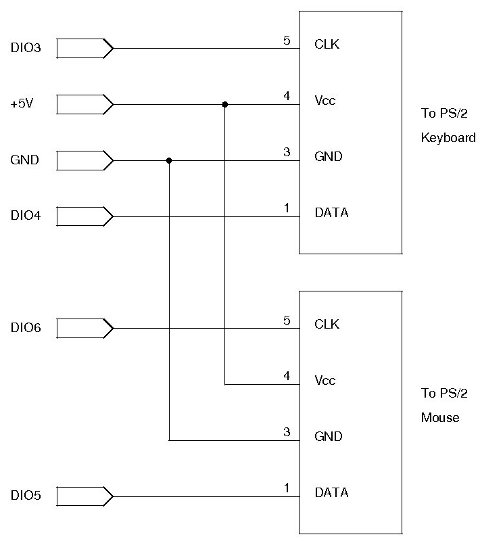
If you desire a more vintage vibe, you can also utilize this circuit with a traditional “AT” keyboard as they share the same electrical interface despite having a different connector.
Source Code
github.com/practicalarduino/Ps2Keyboard
github.com/kristopher/PS2-Mouse-Arduino
www.arduino.cc/playground/uploads/Main/PS2Keyboard_014A.zip
| Qty | Description |
| 1 | Arduino Duemilanove, Arduino Pro, Seeeduino, or equivalent |
| 1 | Prototyping shield |
| 1 | PS/2 extension cable or 6-pin mini-DIN socket |
| 1 | PS/2 keyboard or PS/2 mouse |
| 10cm | Hookup wire |
Source: PS/2 Keyboard Or Mouse using Arduino
- Can I connect a USB keyboard to an Arduino?
Yes, if the USB keyboard includes a PS/2 adapter it can switch to PS/2 mode and be used with Arduino. - Does Arduino need to be a USB host to use a keyboard?
No, Arduino is not a USB host; using a PS/2 interface or a USB keyboard with a PS/2 adapter avoids the need for USB host support. - What keyboards are compatible with this circuit?
PS/2 keyboards, PS/2 mice, USB keyboards that include PS/2 adapters, and traditional AT keyboards (same electrical interface) are compatible. - Can I use a PS/2 mouse with Arduino the same way as a keyboard?
Yes, the project describes using a PS/2 mouse with Arduino and provides relevant source code links. - Why use a PS/2 connection instead of USB?
Because Arduino lacks USB host capability and PS/2 or USB-with-adapter keyboards can operate in PS/2 mode, making connection straightforward. - Are there libraries or source code available for PS/2 devices on Arduino?
Yes, source code and libraries are available at the provided GitHub links and the Arduino Playground zip file. - Do I need additional hardware to connect an AT keyboard?
No additional hardware is required for AT keyboards because they share the same electrical interface as PS/2; only the connector differs.
