
Summary of Big Spectrum Analyzer with Arduino
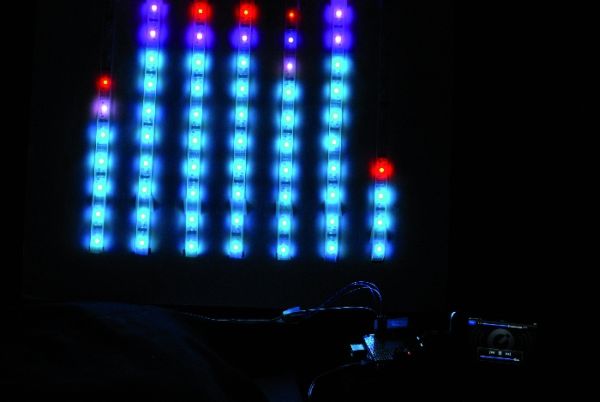
This article details building a seven-band spectrum analyzer using an Arduino UNO, Spectrum Shield with MSGEQ7 chips, and an HL1606-controlled RGB LED strip. The system reads audio frequencies via the shield, processes them into seven bands, and drives a folded 5-meter LED strip to visualize sound levels in real-time without cutting the strip.
Parts used in the Seven Bands Spectrum Analyzer:
- HL1606 Controller
- Arduino UNO
- Spectrum Shield
- MSG EQ7 Chip
- RGB LED Strip (5 meters, 160 LEDs)
- Two Stereo Jacks
- Breadboard Area
- Reset Button
Let’s put together a pixel strip with an HL1606, an Arduino UNO and the Spectrum Shield to build a seven bands “large” Spectrum Analyzer of simple construction.
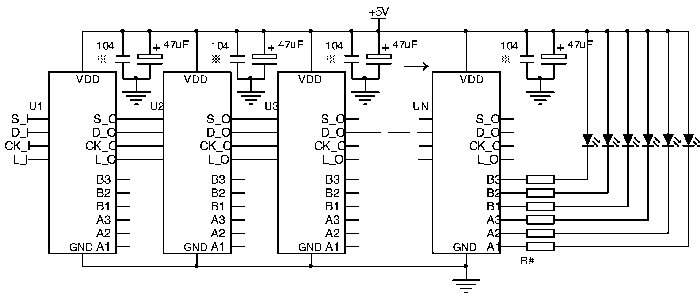
The Strip used uses the HL1606 controller to allow direct management of each of the LEDs. The chip runs two RGB groups and has 4-pin for input/output. The serial communication protocol allows input to output passage whenever the chip receives new data. Data move from one module to another thanks to a clock provided on the control line. Every strip can be composed of a variable number of modules up to a theoretical maximum determined only by the speed with which we want to change the LEDs status.
Each chip continues in the pass through without displaying received data, until the latch pin (L-s) status changes . Then it writes the value from it’s communication registry in registry piloting the six channels.
For the HL1606, data is a bitmap (a one byte word for each RGB LEDS) corresponding to each of the three LEDs, managed according to a truth table having two bits for each LED. The chip does not have autonomous blending management (PWM), but it uses a SI line to give the automatic blending frequency, which is available as a stand-alone function.
The second key component of this project is a MSGEQ7 chip. The chip is designed for seven-band equalizers, for displaying the peak level of each of the bands. With just eight pins it has a “clever” mechanism: this chip offers, on a single pin, a voltage level that is equal to the peak level of one of the seven frequencies managed.
The transition from one frequency to another is managed via a strobe pin, which increments a multiplexer including all seven Bandpass Filters with peak detectors.
Basically, on the same pin on can be read a sequence the seven peak levels for the seven bands centered on 63, 160, 400, 1,000, 2,500, 6,250 and 16,000 Hz.
If we add an Arduino UNO, we have everything we need to read the seven values on different frequency bands, and create a representation of the same on a series of bars, in fact our giant Spectrum analyzer.
Creating seven bands without cutting the led strip
The flexible nature of the strip we’ve chosen allows us to model it as we prefer: in our case, we get seven bands bars simply by folding the strip to form a coil. Between a bar and the other we’ll leave three LEDs (to avoid excessive stress on the Strip).
The height of the bar depends on the total length; firmware adjusts it, using only the LEDs needed. In our case we are using a standard 5 meters strip and 160 LED: we will therefore have six curves by three LEDs (18 LEDs are not used) to have seven 20 LED bars each. Two diodes remain unused at the end of the Strip, that is considered in counts.
With this arrangement, even bars work in a verse and odd ones in another: this is managed by the firmware.
The Spectrum Shield
The peculiar MSGEQ7 chip has attracted the attention of several companies. Bliptronics and Sparkfun, have therefore carried out a Spectrum Shield: a shield for Arduino, mounting two chips and two stereo jacks: one for receiving the input signal and another for the pass through output.
The two MSGEQ7 handle the stereo signal channels, read from the analog A0 and A1 pin by the Arduino. The Reset and the Strobe of MSGEQ7 are, respectively, connected to D5 and D4 of Arduino.
The shield has a button to reset the Arduino connected through lateral connectors, while a large Breadboard area allows you to add any accessory components.
You don’t need a library specific for this shield: acting on Reset and Strobe you have the sequence of levels on Arduino analog inputs in an endless loop. A cycle that feeds a seven values vector you can then pass the data to the graphic representation.
For more detail: Big Spectrum Analyzer with Arduino
- How does the HL1606 controller manage the LED strip?
The chip runs two RGB groups with 4-pin input/output, passing data from one module to another via a clock on the control line until the latch pin changes status. - What frequency bands does the MSGEQ7 chip analyze?
The chip manages seven bands centered on 63, 160, 400, 1,000, 2,500, 6,250, and 16,000 Hz. - Can I build seven bars without cutting the LED strip?
Yes, the flexible strip can be folded into a coil, leaving three LEDs between each bar to avoid excessive stress. - How many LEDs are used for each of the seven bars?
Each of the seven bars uses 20 LEDs, while 18 LEDs are unused in the middle and two remain at the end. - Which Arduino pins connect to the Spectrum Shield?
The analog inputs A0 and A1 read stereo channels, while Reset and Strobe connect to digital pins D5 and D4 respectively. - Does the project require a specific library for the Spectrum Shield?
No, you do not need a specific library; the code acts on the Reset and Strobe pins to read levels in an endless loop. - How does the firmware handle the direction of the bars?
The firmware manages even bars to work in one verse and odd bars in another. - What is the theoretical limit for the number of modules in the strip?
The maximum number of modules is determined only by the speed required to change the LED status.
