
Summary of Project: Auto Intensity Control Of Street Light Using Arduino
This project demonstrates an Arduino-based system that automates street lighting by adjusting LED intensity based on time and ambient light. Using an LDR and PWM, the lights dim at night, reach full brightness around 8 PM, maintain it until midnight, then gradually dim and switch off by 6 AM. Indicator LEDs signal evening and midnight transitions. The system saves approximately 30% energy and can be modified with a Real-Time Clock for precise timing.
Parts used in Auto Intensity Control Of Street Light Using Arduino:
- Arduino Nano
- DC Adapter 12 volt
- LDR (Light Dependent Resistor)
- Green LED
- Red LED
- Power LED 12 Volt
- Transistor BC 547
- Resistor 330 Ohm
- Resistor 10K
- Resistor 1K
- Diode 1N4007/ 1N4004
Auto Intensity Control Of Street Light Using Arduino
In this project, I am going to show you how to control the intensity of LED lights according to the time and the light intensity of outer atmosphere.
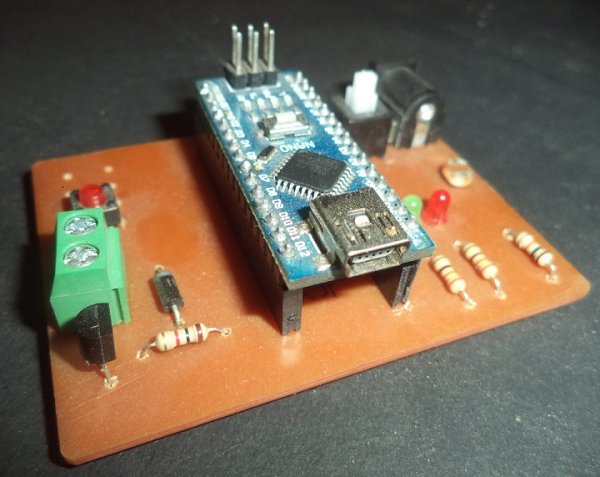
This is an amazing and very useful project because it prevents the wastage of electricity.
This project automatically turns on the streetlight at evening and turns off in the morning. It also controls the intensity of light. Light intensity is automatically adjusted according to the time and traffic. The number of vehicles is very low after 12AM. For example, the intensity of light is low in the evening and it starts increasing until 8PM After 8PM the light glows at full intensity and this intensity will not change. It glows on full intensity until 12AM and intensity starts decreasing after 12AM, and the lights are fully turned off after 6AM. This approach saves about 30 percentage energy.
In the circuit two LEDs are also used, one is Green and other is Red. The Red LED indicates the evening and the Green Led indicates midnight time 12AM. The Arduino is not programmed for the real time, because we cannot observe the changes in live. Therefore, time delay is very low (1hr is equal to 3 second). You can change the time delay according to your use. You can make many modifications in the project according to your use, you can also use RTC (Real Time Clock) in this project.
Working
In the circuit a LDR (Light Dependent Resistor) is used, which detect the intensity of the lights, when the intensity of light comes under a fixed values the led Light is turn ON. But at the starting intensity of the light is low because the time is 5PM. Now the intensity is increasing with the time and light glows on full intensity at 8 PM.
Intensity of the light is controlled by using PWM (pulse width modulation). The Arduino and other digital devices cannot give analog output; they can only give the digital output (High or Low). Means they can only turn OFF and turn ON the device, but sometimes we need the voltage between Vcc and GND. PWM can fulfill this requirement. PWM simply Turn On and Turn Off the output device at the high frequency. In this way the output voltage becomes under Vcc. Value of the output voltage depends upon “Turn On” time and “Turn Off” time, which can be calculated by the given function below
Duty Cycle = Ton / (Ton + Toff)

Vout = Duty Cycle * Vcc
The Arduino Nano have six PWM pins, they all are 8 bit. In other words, we can change the output value from 0 to 255 where 0 is low and 255 is High.
Two LEDs are also used on Circuit, they indicates the time, RED LED turns on when LDR cross the threshold value, in my case I suppose time is 5 PM, at this time our street light (power LED) also switched on but the intensity is low. The intensity is gradually increasing and it will works on full intensity at 8 PM. Now the intensity is not changed until 12 am.

After 12 AM, the Green LED is turned on and the power LED’s intensity become low this intensity is not changed until 4 AM. After 4AM, the intensity of the light starts gradually decreasing. In addition, it becomes fully turn off at 6 AM.
Components
| Components | Specifications | Quantity |
|---|---|---|
| Arduino | Nano | 1 |
| Power Source | DC Adapter 12 volt | 1 |
| LDR (Light Dependent Resistor) | 1 | |
| LED | Green, Red | 2 |
| Power LED | 12 Volt | 1 |
| Transistor | BC 547 | 1 |
| Resistor | 330 Ohm | 2 |
| Resistor | 10K | 1 |
| Resistor | 1K | 1 |
| Diode | 1N4007/ 1N4004 | 1 |
Circuit
The circuit is very simple, you can make this circuit on breaboard or ZERO PCB using the circuit below.
If you are good in the PCB Etching use the images given below.
Read more: Project: Auto Intensity Control Of Street Light Using Arduino
- How does the system save energy?
The approach saves about 30 percentage energy by automatically adjusting light intensity according to time and traffic. - What determines when the streetlight turns on?
An LDR detects light intensity; when it falls under a fixed value, the LED light turns on. - Can Arduino provide analog output directly?
No, Arduino devices only give digital output (High or Low), so PWM is used to simulate variable voltage. - How is light intensity controlled in this project?
Intensity is controlled using PWM (pulse width modulation) which varies the duty cycle between 0 and 255. - What happens to the light intensity after 12 AM?
After 12 AM, the Green LED turns on and the power LED's intensity becomes low until 4 AM. - When do the lights turn off completely?
The lights are fully turned off after 6 AM following a gradual decrease in intensity starting from 4 AM. - Why is a time delay used instead of real-time programming?
A time delay is used because observing changes in live time is difficult without specific hardware like an RTC. - Can the time delay be changed?
Yes, you can change the time delay according to your use, where 1 hour is currently equal to 3 seconds.
