
Summary of Using the 1.44″ Color TFT display (ILI9163C) with Arduino
This tutorial guides users on interfacing a 1.44″ ILI9163C TFT display with an Arduino Uno. The SPI-based screen offers a 128x128 resolution and supports over 262,000 colors. The project demonstrates displaying text, shapes, and images using standard components like a breadboard and jumper wires.
Parts used in the 1.44 Inch TFT Display Project:
- 1.44 inch TFT Display
- Arduino Uno
- Small Breadboard
- Jumper Wires
Hi guys, over the past few tutorials, we have been discussing TFT displays, how to connect and use them in Arduino projects, especially the 1.8″ Colored TFT display. In a similar way, we will look at how to use the 1.44″ TFT Display (ILI9163C) with the Arduino.
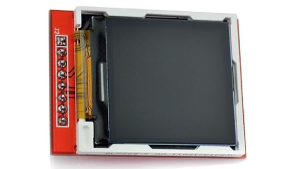
The ILI9163C based 1.44″ colored TFT Display, is a SPI protocol based display with a resolution of 128 x 128 pixels. It’s capable of displaying up to 262,000 different colors. The module can be said to be a sibling to the 1.8″ TFT display, except for the fact that it is much faster and has a better, overall cost to performance ratio when compared with the 1.8″ TFT display. Some of the features of the display are listed below;
- Size: 1.44 inch
- Interface: SPI
- Resolution: 128*128 pixel
- Visual area: 1:1 square
- TFT color screen, the effect is far better than other small CSTN screen
- Drive IC: ILI9163
- Fully compatible and alternative 5110 interface
- Onboard LDO, support 5V/3.3V input voltage, the LED backlight, 3.3V input
For this tutorial, we will focus on demonstrating how to use this display with Arduino to display texts, shapes and Images.
Required Components
The following components are required to replicate this tutorial.
Each of these components can be bought through the links attached to them.
Schematics
TheTFT Display, as earlier stated, communicates with the microcontroller over SPI, thus to use it, we need to connect it to the SPI pins of the Arduino as shown in the schematics below.
Please note that the version of the display used for this tutorial is not available on fritzing which is the software used for the schematics, so follow the pin connection list below to further understand how each pin of the TFT display should be connected to the Arduino.
Read more: Using the 1.44″ Color TFT display (ILI9163C) with Arduino
- What is the resolution of the 1.44 inch TFT display?
The display has a resolution of 128 by 128 pixels. - How does the 1.44 inch TFT display communicate with the Arduino?
The display communicates with the microcontroller over the SPI protocol. - Can the 1.44 inch TFT display show images?
Yes, the tutorial focuses on demonstrating how to display texts, shapes, and images. - What is the drive IC used in this display module?
The drive IC used is the ILI9163. - Does the display support both 5V and 3.3V input voltages?
Yes, the onboard LDO supports 5V or 3.3V input voltage. - Is the 1.44 inch TFT display compatible with the 5110 interface?
Yes, it is fully compatible and serves as an alternative to the 5110 interface. - How many different colors can the display show?
The module is capable of displaying up to 262,000 different colors. - What software was used to create the schematics for this project?
Fritzing is the software used for the schematics.
