
Summary of Pastilda: Open-source Hardware Password Manager
Pastilda is an open-source hardware password manager that acts as a USB intermediary between your computer and keyboard to secure credentials. It stores encrypted KeePass 2.x databases on its internal flash drive and allows users to auto-login by entering a master password via a specific key combination, after which it types the stored credentials directly into the active field.
Parts used in the Pastilda project:
- USB device with two ports (one for keyboard, one for PC)
- Encrypted KeePass 2.x database (.kdbx file)
- KeePass 2.x portable app
- Master password
Open source hardware password manager
Pastilda is an open-source hardware password manager, designed to manage your credentials in a handy and secure way.
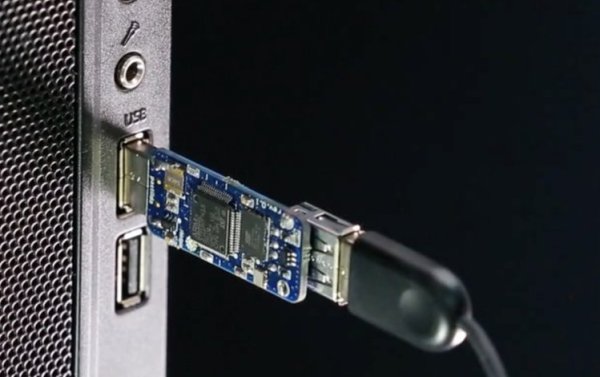
Pastilda works as a middleman between your computer and keyboard. It provides easy and safe auto-login to your OS, bank accounts, mailboxes, corporate network or social media. Pastilda stores encrypted passwords in its memory. You can request a particular password at any time by pressing a special key combination on your keyboard.
Pastilda has two USB ports: one for your keyboard, one to connect to your PC. Your OS will recognize Pastilda as a USB keyboard and a USB flash drive.
The flash drive component stores the encrypted KeePass 2.x database (.kdbx file) and the KeePass 2.x portable app as needed. Your real keyboard is now visible only to Pastilda, your PC won’t see it at all.
In normal working mode, all keystrokes from your keyboard are passed through Pastilda to your PC unchanged.
When you need to sign into an account, you switch to “Pastilda mode”. That’s done by placing your cursor inside the login text box and pressing the “Ctrl + ~” key combination. Pastilda will then ask you to enter the master password for your KeePass database, right in the current text box.
If the password is entered correctly, Pastilda will decrypt and display your database. You can navigate through it with left, right, up, and down arrows or you can just start to input the name of the entry in your database and Pastilda will display matching variants. Once you find the entry you’re looking for, press Enter and Pastilda will automatically enter the corresponding login and password.
If the password is incorrect, Pastilda gives you the option to try again or go back to regular mode by pressing the Esc key on your keyboard.
- How does Pastilda protect my real keyboard?
Your real keyboard is visible only to Pastilda; your PC will not see it at all. - What key combination activates Pastilda mode?
You switch to Pastilda mode by pressing Ctrl + ~ while the cursor is inside the login text box. - What happens if I enter the wrong master password?
Pastilda gives you the option to try again or go back to regular mode by pressing Esc. - Can Pastilda access bank accounts and social media?
Yes, it provides easy and safe auto-login to OS, bank accounts, mailboxes, corporate networks, or social media. - How do I find a specific entry in the database?
You can navigate with arrow keys or start typing the name of the entry to display matching variants. - Does Pastilda store passwords in plain text?
No, Pastilda stores encrypted passwords in its memory. - What files are stored on the flash drive component?
The flash drive stores the encrypted KeePass 2.x database and the KeePass 2.x portable app. - How does Pastilda input the credentials?
Once you press Enter on a selected entry, Pastilda automatically enters the corresponding login and password.
