
Summary of Arduino I/O-Matlab basic tutorial
This article is a beginner's guide to connecting Arduino with MATLAB for control and data acquisition. The author, new to Instructables, provides prerequisites like basic knowledge of MATLAB GUIs and Arduino programming, along with links to external tutorials. The project demonstrates using MATLAB to interact with an Arduino board via a USB connection, utilizing components such as LEDs and light sensors to showcase real-time communication between the two powerful engineering tools.
Parts used in the Arduino-Matlab Control Project:
- PC with Matlab installed
- ArduinoIO package from MathWorks
- Arduino board
- USB cable for the Arduino
- LED
- Photodiode (or Photoresistor)
- Resistors
this is my very first instructables and I was referred by an old member. Follow her link here: (http://www.instructables.com/member/Analogue-Chick/)
Its a simple illustration on how we can connect Arduino to Matlab and actually control and get information on Arduino
using Matlab
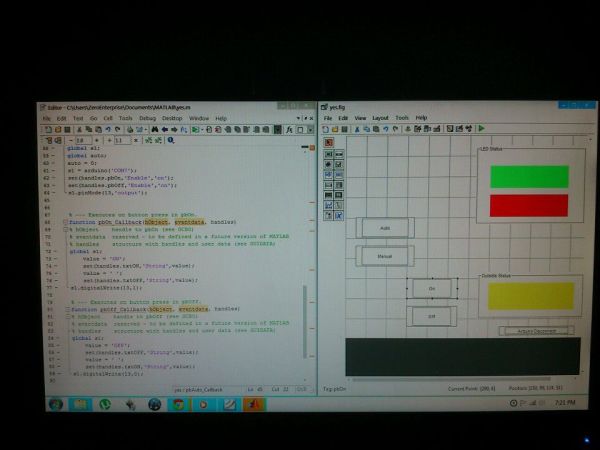
I have seen few tutorials regarding how to control or get data from Arduino using Matlab. Matlab is a very powerful tool for student and engineers a like. That’s why i want to create this tutorial as a start for those, like me want to explore the 2 powerful tools in engineering and techs.
It’s a rough start for me since this is my first post in instructables…. feel free to comment so i can improve it thanks!
here’s the vid for the demo:
http://youtu.be/R50R5ZK_URE
Step 1: Step 1: Things you need to know
In this tutorial you need to know the following:
1. Matlab and creating M-file and GUI (there are tons of tutorials online)
http://www.youtube.com/watch?v=D_hmws6dwgg
2. Arduino and Arduino programming
http://arduino.cc/en/Guide/HomePage
3. Arduino Support with Matlab
http://www.mathworks.com/academia/arduino-software/arduino-matlab.html
tutorials from Giampiero Campa
http://www.mathworks.com/matlabcentral/fileexchange/27843-arduino-io-package-slides-and-examples
Step 2: Step 2: Things you need (materials)
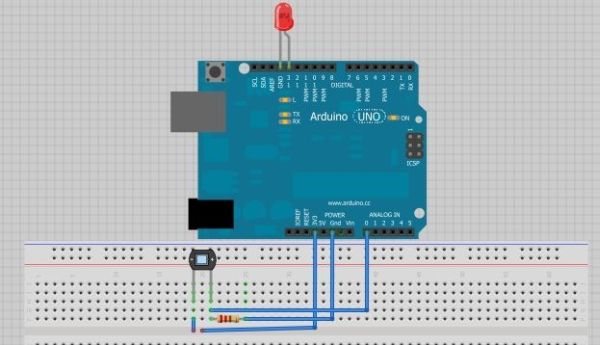
1. PC with Matlab installed and the ArduinoIO package from MathWorks
2. Arduino
3. USB cable for the Arduino
4. LED
5. Photodiode (Photoresistor as an alternative)
6. Resistors
Major Components in Project1. PC with Matlab installed and the ArduinoIO package from MathWorks
2. Arduino
3. USB cable for the Arduino
2. Arduino
3. USB cable for the Arduino
For more detail: Arduino I/O-Matlab basic tutorial
- What are the prerequisites for this tutorial?
You need knowledge of creating M-files and GUIs in Matlab, Arduino programming, and the Arduino Support with Matlab. - How can I learn about Matlab basics mentioned in the text?
The article suggests watching specific YouTube tutorials on creating M-files and GUIs provided by the author. - Where can I find information on Arduino programming?
The text directs users to the official Arduino homepage guide at arduino.cc/en/Guide/HomePage. - Does the project require the ArduinoIO package?
Yes, you need a PC with Matlab installed and the ArduinoIO package from MathWorks. - Can I use a photoresistor instead of a photodiode?
Yes, the article states that a photoresistor can be used as an alternative to a photodiode. - What is the main purpose of this project?
The goal is to demonstrate how to connect Arduino to Matlab to control and get information from the Arduino. - Are there additional resources available for this topic?
Yes, the author links to tutorials by Giampiero Campa and the MathWorks academia page for Arduino software. - Who referred the author to create this instructable?
An old member named Analogue-Chick referred the author to start posting.
