
Summary of Arduino DDNS (Dynamic DNS) by Open-Electronics.org
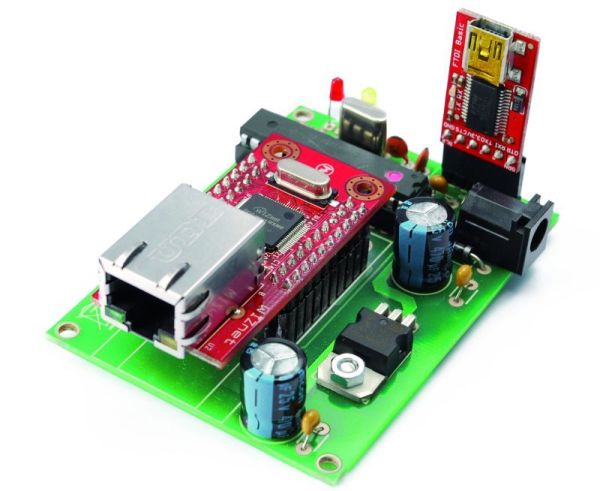
This article describes a standalone device that automatically publishes a network's dynamic IP address to DynDNS.com, enabling remote LAN access without a PC. It uses an Atmega328 microcontroller with an Arduino bootloader and a WIZnet Ethernet module to periodically check for IP changes and update the service. The project can also be replicated using an Arduino UNO with an Ethernet Shield.
Parts used in the Dynamic DNS Device:
- R1, R2: 470 ohm resistors
- R3: 10 kohm resistor
- C1: 100 nF capacitor
- C2: 470 μF 25 VL capacitor
- C3: 100 nF capacitor
- C4: 470 μF 16 VL capacitor
- U1: WIZNET (WIZ811MJ)
- U2: ATMEGA328P with Arduino bootloader
- U3: LD1086V33 voltage regulator
- P1: Microswitch
- LD1: LED 3 mm yellow
- LD2: LED 3 mm red
- D1: 1N4007 diode
- Power jack
- Dip socket 14+14
- Break away headers male 6 via
- Break away headers female 2x10 via
This device captures the IP address of your network and it publish on site DynDNS.com. All without PC. It allow a remote access to your LAN even if the IP address of the connections changes.
For logistics reasons the provider can not assign a IP fixed for all users, so many users, especially private, work with a dynamic IP or public IP: in practice when they connect modem or router, to their connection is assigned an IP address that, when the connection will’be closed, can be used by other users. This makes impossible to contact a remote computer or device connected to a LAN Internet.
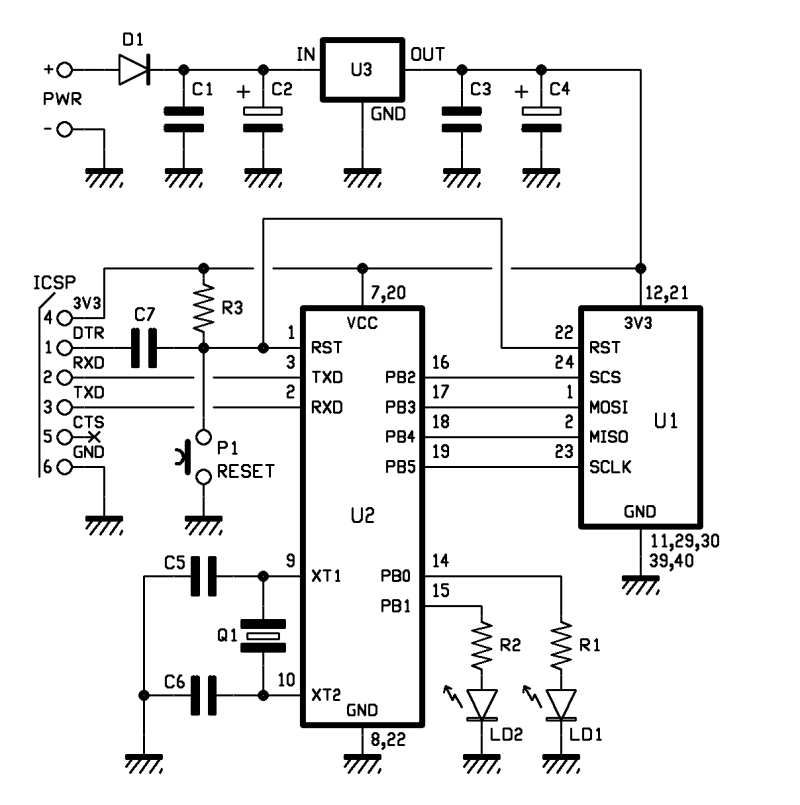
Step 1: Schematics
Our device is essentially a publisher of IP address. Everything is made from a circuit that incorporates an Ethernet interface WIZnet WIZ811MJ, managed by an Atmega328 microcontroller programmed with the Arduino bootloader, so it all works like an Arduino and you can use the Arduino IDE. The Atmega I/O PB2, PB3, PB4 and PB5 are dedicated to dialogue with the Ethernet module and provide a full four-wire SPI bus. The microcontroller is programmed using the special interface TTL / USB from SparkFun.
R1, R2: 470 ohm
R3: 10 kohm
C1: 100 nF
C2: 470 μF 25 VL
C3: 100 nF
C4: 470 μF 16 VL
U1: WIZNET
U2: ATMEGA328P (with Arduino bootloader)
U3: LD1086V33
P1: Microswitch
LD1: LED 3 mm yellow
LD2: LED 3 mm red
D1: 1N4007
power jack
Dip socket 14+14
Break away headers male 6 via
Break away headers female 2×10 via (2 pz)
Step 2: How works
The main program sends the request to the IP address http://checkip.dyndns.com/ site. Now prepare the process of submitting to the site www.dyndns.com, which provides for the opening of a session onthe web page on, where will send data strings containing user name and password, thena string containing the Current IP connection. Cyclically the microcontroller check the IP to see if the address is changed, then, if it’s true, sends the new IP to www.dyndns.com
We use a dedicated circuit but the project can be replicated using an Arduino UNO and a Ethernet Shield.
For more detail: Arduino DDNS (Dynamic DNS) by Open-Electronics.org
- What is the primary function of this device?
The device captures the IP address of your network and publishes it on site DynDNS.com to allow remote access to your LAN. - Can this device operate without a PC?
Yes, the device captures and publishes the IP address all without a PC. - How does the microcontroller communicate with the Ethernet module?
The Atmega I/O PB2, PB3, PB4 and PB5 are dedicated to dialogue with the Ethernet module and provide a full four-wire SPI bus. - Which website does the program request the current IP address from?
The main program sends the request to the IP address http://checkip.dyndns.com/ site. - Does the microcontroller check for IP changes cyclically?
Yes, the microcontroller cyclically checks the IP to see if the address is changed. - What happens if the IP address changes?
If the address has changed, the device sends the new IP to www.dyndns.com. - Can this project be replicated using standard Arduino hardware?
Yes, the project can be replicated using an Arduino UNO and a Ethernet Shield. - How is the microcontroller programmed?
The microcontroller is programmed using the special interface TTL / USB from SparkFun.
