
The Arduino reads temperature from a MCP9700 temperature sensor IC and displays the temperature in the Arduino IDE serial monitor window.
Also see the Arduino LCD thermometer tutorial (tutorial 14).
Prerequisites
Complete Tutorial 9: Using the Arduino Serial Port before attempting this tutorial.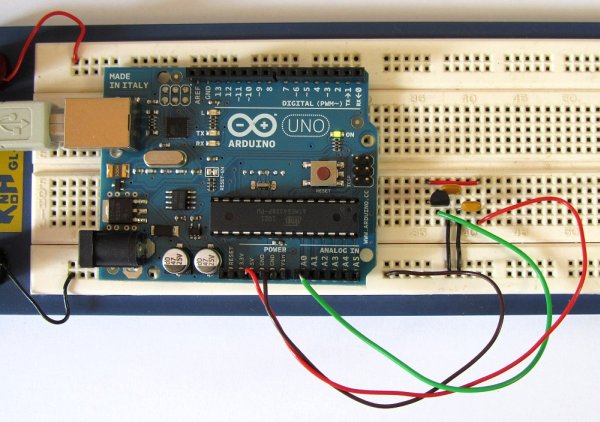
Components
Besides an Arduino Uno board, USB cable, wire links and a breadboard, you will need:
| Qty | Part | Designator | Notes | Type |
|---|---|---|---|---|
| 2 | 100n | C1, C2 | Non-polarized | Capacitor |
| 1 | MCP9700 | U1 | Linear Active Thermistor IC | Semiconductor |
Circuit Diagram
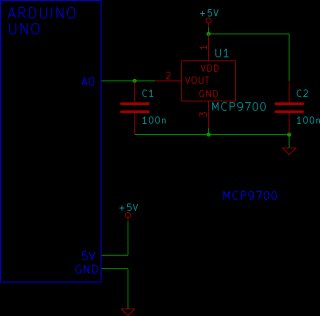
The schematic for the Arduino serial thermometer and pinout for the MCP9700 is shown below. The MCP9700 temperature sensor is packaged in a TO-92 case – it looks like a transistor.
Building the Circuit
The circuit is very simple to build, click the picture below for a bigger image of the breadboard circuit.
Programming the Arduino
The serial_temperature sketch is listed below. Copy the sketch and paste it into the Arduino IDE.
/*--------------------------------------------------------------
  Program:     serial_temperature

  Description:  Reads the voltage from a MCP9700 temperature
                sensor on pin A0 of the Arduino. Converts the
                voltage to a temperature and sends it out of
                the serial port for display on the serial
                monitor.

  Date:         15 April 2012

  Author:       W.A. Smith, http://startingelectronics.org
--------------------------------------------------------------*/

void setup() {
    // initialize the serial port
    Serial.begin(9600);
}

void loop() {
    float temperature = 0.0;   // stores the calculated temperature
    int sample;                // counts through ADC samples
    float ten_samples = 0.0;   // stores sum of 10 samples

    // take 10 samples from the MCP9700
    for (sample = 0; sample < 10; sample++) {
        // convert A0 value to temperature
        temperature = ((float)analogRead(A0) * 5.0 / 1024.0) - 0.5;
        temperature = temperature / 0.01;
        // sample every 0.1 seconds
        delay(100);
        // sum of all samples
        ten_samples = ten_samples + temperature;
    }
    // get the average value of 10 temperatures
    temperature = ten_samples / 10.0;
    // send temperature out of serial port
    Serial.print(temperature);
    Serial.println(" deg. C");
    ten_samples = 0.0;
}
Operating the Circuit
After loading the serial_temperature sketch to the Arduino, open the serial monitor window from within the Arduino IDE. The temperature will be displayed in the serial monitor window and will be updated approximately every one second. When heat is applied to the MCP9700 sensor (by touching it with a finger for example) the temperature reading will increase.
For more detail: Tutorial 15: Arduino Serial Thermometer
