
Summary of 3 LED Crossfade with PWM and Arduino
This article describes a simple Arduino project that creates a color spectrum by crossfading three LEDs (Red, Green, Blue) using Phase Width Modulation (PWM). The setup involves connecting each LED to a specific digital PWM pin through a resistor, with all negative terminals grounded. A provided sketch loops through brightness values from 1 to 255 for each LED sequentially, creating a smooth transition effect without complex coding.
Parts used in the 3 LED Crossfade Project:
- 3 LEDs (5mm Red, Green, and Blue)
- 3 Resistors (220 Ohm)
- Jumper wires
- Arduino board
- Breadboard
This ones quite simple, just mix/ crossfade 3 separate LEDs using Phase Width Modulation (PWM) and Arduino.
You will need 3 LEDs, I’m using a 5mm Red, Green and Blue so I can make the full light colour spectrum (When all combined they make white light). If you look at an LED you will see one pin is slightly longer of the 2, this is the positive (+) terminal, the shorter being negative. Make sure you get the LED the right way round.
You will also need 3 220 Ohm resistors to ensure that the LEDs dont get too much voltage/current. these have the following colour code: Red, Red, Brown, Gold. If you use a higher value such as 1 Kiloohm (1ooo Ohms) the LEDs will appear dim as they won’t get enough power. Unlike the LED it doesn’t matter which way round you use the resistors. I generally would recommend getting a kit of different types of resistors like this one here as its useful in the long run.
You will also need some jumper wires and you also need to have an Arduino board and know how to upload a sketch.
So a quick look at this basic circuit:
The Arduino board supplies the power to the LED via the digital PWM pins, meaning for this we don’t need to use the 5v pin. By using the chip and PWM to regulate the power, basically its a fancy way of saying we’re blinking the LED, we can effectively alter the brightness of the LED. So alot of the hardwork and potential coding we would need to do is taken care of for us.
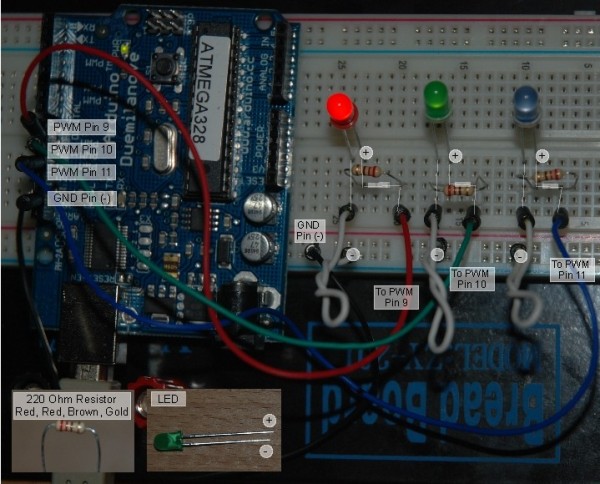
I connect each digital pin (9,10 & 11) to an LED – I’ve used corresponding coloured wiring for this, e.g. red wire, red LED. I’ve placed a resistor between the wire and the LED to ensure that it doesn’t get too much juice. I then connect the negative pin of each LED to the negative rail on the breadboard and then that goes to the GND pin on the Arduino board completing the circuit.
Here’s my final circuit below, I’ve added a few labels to show you where thigns are connected and the +/- for the LEDs I’ve also added a few lines so you see where things line up.
The only thing left is to upload the following sketch, this sets a value for each LED, assigning it to a pin, the code then loops through incrementing the values between 1 and 255 for each LED. The counter in the code starts at 1 and increments up to 762 (254×3 – 254 values for each LED) before reseting to 1 to start the loop again.
For more detail: 3 LED Crossfade with PWM and Arduino
-
How do I identify the positive terminal on an LED?
The positive terminal is the slightly longer of the two pins, while the shorter one is negative. -
What are the correct resistor values for this project?
You need 3 resistors with a value of 220 Ohms, which have a color code of Red, Red, Brown, Gold. -
Can I use a 1 Kiloohm resistor instead of 220 Ohms?
No, using a higher value like 1 Kiloohm will make the LEDs appear dim because they won't get enough power. -
Does the orientation of the resistor matter?
Unlike the LED, it does not matter which way round you use the resistors. -
Which Arduino pins should I connect the LEDs to?
You should connect each digital pin to an LED using pins 9, 10, and 11. -
Why don't I need to use the 5v pin on the Arduino?
The Arduino board supplies power via the digital PWM pins, which regulate the power effectively. -
How does the code loop handle the brightness values?
The counter starts at 1 and increments up to 762 before resetting to 1 to start the loop again.
