
Summary of WALNUT CASE SETS THIS CUSTOM ARDUINO-POWERED RPN CALCULATOR APART FROM THE CROWD
This article describes a custom Arduino-powered RPN calculator built by Shinsaku Hiura, featuring a reverse-engineered numeric keypad, custom PCB, 20×4 LCD, and a milled walnut case with acrylic window. Scientific functions are accessed via a repurposed secret silver key, enabling advanced features despite limited keys. The build includes prototyping with a 3D-printed test case and highlights the clean aesthetics and satisfying keyboard feel achieved.
Parts used in the Custom Arduino-powered RPN calculator:
- Numeric keypad (liberated from USB interface)
- Custom milled PCB
- Arduino (microcontroller)
- 20×4 LCD display
- Solid walnut block (for milled case)
- Acrylic window
- 3D-printed test case (for fitment checks)
- Various wiring and connectors (to link keypad, PCB, Arduino, and display)
- Fasteners and mounting hardware (for assembling case and components)
How many of us have an everyday tool that’s truly unique? Likely not many of us; take a look around your desk and turn out your pockets, but more often than not, what you’ll find is that everything you have is something that pretty much everyone else on the planet could have bought too. But not so if you’ve got this beautiful custom RPN calculator in a wooden case.
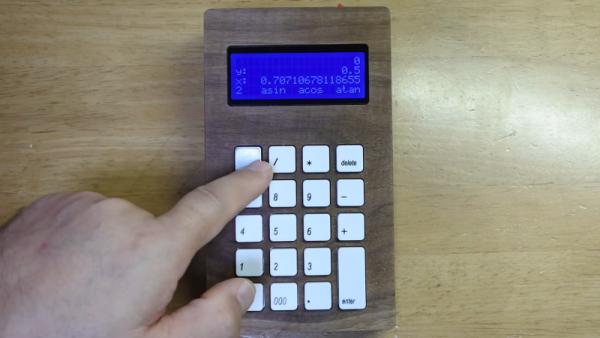
This one comes to us from [Shinsaku Hiura], who generally dazzles us with unique mechanical clocks and displays. This calculator solves a more practical problem — the dearth of RPN calculators on the market with the correct keyboard feel, specifically with the large keys and light touch he desired. Appropriately, the build started with a numeric keypad, which once liberated of its USB interface was reverse-engineered to figure out how the matrix was wired. Next up, a custom PCB to connect the keypad to an Arduino and a 20×4 LCD display was milled up, while a test case was designed and printed to check fitment. The final case was milled from a block of solid walnut and fitted with an acrylic window, for a sharp look with clean lines and pleasing colors.
As for the calculator itself, the demo below shows it going through its paces. The code is clever because it leverages the minimal number of keys available by hiding all the scientific and engineering functions behind a “secret silver key” that was once the equals key and obviously not needed in RPN. Hats off to [Shinsaku] for a handsome and unique addition to his desk.
Source: WALNUT CASE SETS THIS CUSTOM ARDUINO-POWERED RPN CALCULATOR APART FROM THE CROWD
- How was the numeric keypad adapted for the project?
The numeric keypad was liberated from its USB interface and reverse-engineered to determine the matrix wiring. - Can the keypad support scientific and engineering functions?
Yes; scientific and engineering functions are hidden behind a secret silver key repurposed from the equals key. - What microcontroller is used to run the calculator?
An Arduino microcontroller is used to connect the keypad, custom PCB, and LCD display. - What display does the calculator use?
The build uses a 20×4 LCD display. - How was the final case manufactured?
The final case was milled from a block of solid walnut and fitted with an acrylic window. - Was prototyping done before milling the walnut case?
Yes; a test case was designed and 3D-printed to check fitment before milling the final case. - Did the builder modify existing hardware or build everything from scratch?
The builder modified an existing numeric keypad and created a custom PCB, combining modified and custom components. - Why was a secret silver key used in the design?
The secret silver key, originally the equals key, was not needed in RPN and was repurposed to access additional functions with the limited number of keys.
