
Summary of Vacuum form an Arduino/Electronics Enclosure
This article guides users on creating a custom vacuum-formed enclosure for standalone electronics or Arduino projects. It details the necessary materials, including plastic sheets and molds, and provides a step-by-step process using a vacuum forming machine to shape the material around a mold. The guide covers heating, molding, separating the box halves, and finishing edges with tools like saws and files to create a functional case.
Parts used in the Vacuum Formed Electronics Enclosure:
- Material to vacuum form (acrylic, pvc, pet-g, styrene)
- Mold (wood, foam, rubber, box, tupperware)
- Vacuum form machine
- Hot glue
- Strong snips, hacksaw, or razorblade
- File or sander
- On/off switch
- Drill or drill press with appropriate bit
- Rubber (optional)
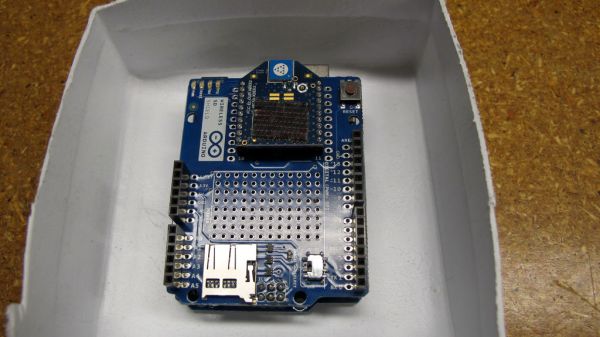
If you have access to a vacuum former, or have constructed a DIY one to use, simply vacuum form a compact case to house your standalone electronics or Arduino project.
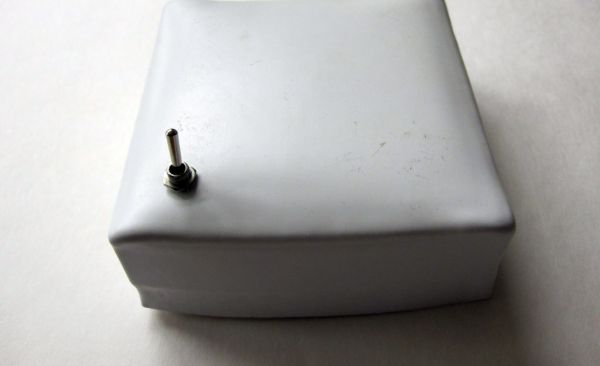
I made this at techshop! www.techshop.ws
Step 1: Bill of materials
Material to vacuum form (acrylic, pvc, pet-g, styrene…)
a mold (make one from wood, foam, rubber or whatever you want, but more easily and quickly, find a box, a tupperware, piece of wood, or anything that is around the size of your electronics.
a vacuum form machine
hot glue
strong snips, a hacksaw, or a razorblade depending on the thickness of your material
a file or sander
an on/off switch
a drill or drill press with a bit the size of your switch’s threads
rubber optional
Step 2: Make the vacuum form
once you have a mold or plug for the object, and you have the material you want the box to be made of, Vacuum form it!
here’s how:
NOTE: I am using the Vacuum Form at Tech Shop San Francisco. Models may vary. Also, there are specifications for the mold or plug that are worth practicing to get aware of (ie totally vertical walls will most likely cause the mold to get stuck. A small angle is preferable)
-Turn the Vacuum Forming machine on. Turn the left most knob, heating the center, to about 4 and turn the knob to the right of that one to about level 4, to heat around the edges. Depending on the size of the objects and materials you are using, you might need to turn some of the outer heaters on. Wait for about 20 minutes for it to warm up.
After this time…
-Place the object on the table of the vacuum form. Rotating the large pivoting arm on the side of the machine, bring the vacuum table all the way down.
-Put your material in the tray, and clamp it down.
-Set your timer to about 180 seconds.
-Bring the heater forwards all the way to cover the tray. This activates the timer and it will count down.
-Look at your material. It should heat up and eventually droop down evenly.
-Once it is drooping a few inches down, or about 1/2 the height of your mold, push the heater back, pull the large arm forwards, raising your object, then press MOULD (green button)
NOTE: You might need to heat for a second round if your timer runs out but the material drooping hasn’t happened yet
-Once the material is formed around the mold, press RELEASE.
Step 3: Take your mold out
Extract your mold from the material. If it is tough, try using a pliers, or a burst of air. Or knock it against the table.
Then do the whole last step (vacuum forming ) again, for the top of the box. I used a more flexible material and then I was able to slip one side of the box into the other side, to form a closing enclosure. But, you can get creative here: One way to do this is adhere a piece of fabric or tape to the mold where the lip is, for the second vacuum form, so the size will be slightly larger, just fitting over the lip. Another way is to form them both the same size then adhere a lip over one edge
Step 4: Cut your material
For a thicker piece, I used a combination of a hacksaw (with my piece clamped) and a heavy-duty snips. For the thinner piece, a razorblade worked well.
Cut out the box shape from your material.
Sand or file the edges.
a mold (make one from wood, foam, rubber or whatever you want, but more easily and quickly, find a box, a tupperware, piece of wood, or anything that is around the size of your electronics.
a vacuum form machine
hot glue
strong snips, a hacksaw, or a razorblade depending on the thickness of your material
a file or sander
an on/off switch
a drill or drill press with a bit the size of your switch’s threads
rubber optional
For more detail: Vacuum form an Arduino/Electronics Enclosure
- What materials can be used for vacuum forming?
You can use acrylic, pvc, pet-g, or styrene. - How do I prepare the vacuum forming machine?
Turn the machine on, set the center knob to about 4 and the edge knob to level 4, and wait about 20 minutes for it to warm up. - Can vertical walls be used for the mold?
Totally vertical walls will most likely cause the mold to get stuck, so a small angle is preferable. - How long should the timer be set for during the heating process?
Set your timer to about 180 seconds. - When should I press the MOULD button?
Press the MOULD button once the material is drooping a few inches down or about half the height of your mold. - What tools are best for cutting thicker vacuum formed material?
For thicker pieces, use a combination of a hacksaw and heavy-duty snips. - How can I ensure the two sides of the box fit together properly?
You can adhere fabric or tape to the mold lip for the second form to make it slightly larger, or form them the same size and add a lip over one edge. - What should I do if the mold is tough to extract?
Try using pliers, a burst of air, or knocking it against the table.
