
Summary of How to use infra-red (IR) sensor with Arduino
Infra-red (IR) is an invisible electromagnetic wave used in applications like night vision and remote controls. The article explains that IR transmitters resemble clear LEDs and require current-limiting resistors, while receivers are black and vary resistance based on detected IR levels. It details two detection methods: using a camera to visualize the signal or employing a comparator to convert analog readings into digital HIGH/LOW states.
Parts used in Infra-red Sensor Project:
- IR transmitter
- IR receiver
- Current limiting resistor
- Comparator
- Camera (phone or digital)
Infra-red Sensor (IR)
What is infra-red (IR)? Infra-red is an electromagnetic wave who wavelength is between 0.75 microns to 1000 microns (1 micron = 1µm). Since infra-red is out of visible light range, we can’t really see IR with naked eye. However, there is a method to “see” IR which will be shown later on. Some of the infra-red applications includes night vision, hyperspectral imaging, and communications. We also use IR daily in our TV remote or any device remote.
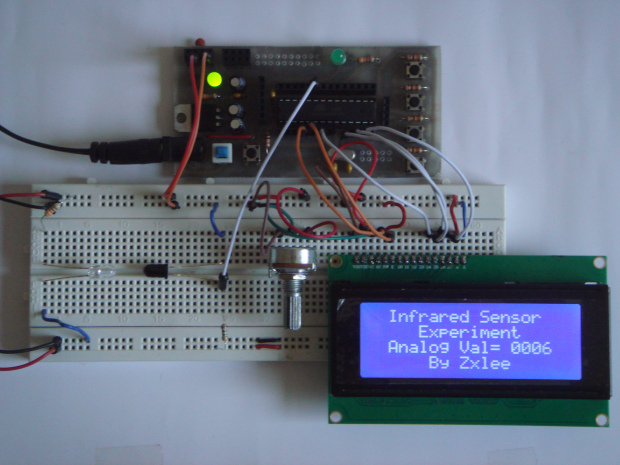
IR transmitter and receiver can be obtained at low price. Their shape is looks exactly the same as LED. To distinguish between transmitter and receiver, the transmitter always come in clear LED while receiver is black in colour. Other than that, there is also receiver that is used to pick up specific frequency IR, 38kHz. For your information, 38kHz frequency IR is commonly used in remote control.
IR transmitter will emit infra-red when powered. You can connect the IR transmitter like a LED together with a current limiting resistor. The current limiting resistor is used to prevent too much of current passing through the transmitter and burnt it. I am using 330 ohms resistor for the IR transmitter.
As mentioned before, there are ways to “see” the infra-red from the transmitter. All you need is a camera, be it from the phone camera or digital camera. Camera has sensor which can pick up infra-red, so you can use this technique to check whether your IR transmitter is working or not.
The IR receiver that I am going to discuss is the normal IR receiver instead of 38kHz IR receiver. IR receiver detects the amount of infrared received and varies the resistance across the receiver. Therefore, we can measure the voltage across the receiver to detect the amount of IR received.
I am going to show two methods of using IR receiver. The first method is using comparator which able to convert it to either HIGH or LOW. Comparator is a device that compares two signal and outputs a digital signal indicating which is larger. More info on comparator available here.
For more detail: Infra-red Sensor (IR)
-
What is infra-red?
Infra-red is an electromagnetic wave with a wavelength between 0.75 microns to 1000 microns. -
How can you distinguish between an IR transmitter and receiver?
The transmitter always comes in a clear LED shape while the receiver is black in color. -
Why is a current limiting resistor needed for an IR transmitter?
It prevents too much current from passing through the transmitter and burning it out. -
How can you see the invisible infra-red light from a transmitter?
You can use a phone or digital camera because their sensors can pick up infra-red. -
How does a normal IR receiver detect signals?
It detects the amount of infrared received and varies the resistance across the receiver. -
What is the function of a comparator in this project?
A comparator compares two signals and outputs a digital signal indicating which is larger. -
Can you measure voltage across an IR receiver?
Yes, you can measure the voltage across the receiver to detect the amount of IR received.
