
Summary of TRS-80 MODEL 100 GETS ARDUINO HEART TRANSPLANT
Stephen Cass salvaged a broken Tandy TRS-80 Model 100 by replacing its motherboard with an Arduino Mega 2560 to interface with the original display. Using detailed service manuals, he mapped the unique LCD zones and HD44102 drivers to modern hardware, enabling full pixel access via graphics libraries while retaining the vintage screen's functionality.
Parts used in the TRS-80 Model 100 Revival:
- Tandy TRS-80 Model 100 portable computer
- Arduino Mega 2560
- HD44102 driver IC
- Teensy 4.1
- Original LCD display (240×64 pixels)
- -5 V supply
- RC filter
- displayio library
When [Stephen Cass] found himself with a broken Tandy TRS-80 Model 100 portable computer, the simplest solution was to buy another broken one and make one working computer from two non-working computers. However, this left him with a dilemma — what to do with the (now even more) broken one left over?
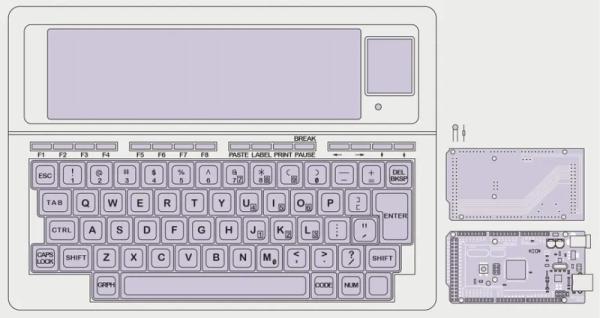
Naturally, he did what a lot of us would do and used modern hardware to interface with the original parts that still work. In this case it meant replacing the motherboard with an Arduino Mega 2560.
Luckily, the Model 100 has a substantial fanbase and there’s a lot of helpful information available online, including the detailed service manual, that helped [Stephen] to understand how to drive the unusual display. The LCD has a resolution of 240×64 pixels, which are broken down into eight zones of 50×32 pixels, and two zones of 40×42 pixels. Each zone is then further divided into four banks, eight pixels tall, so that each column of eight pixels corresponds to a single byte.
Every one of the ten zones is controlled by an individual HD44102 driver IC, connected to a 30-bit wide bus for selecting the correct chip, bank and column.
With the Arduino handling the data, the old LCD still needed a -5 V supply for contrast and an RC filter to smooth out the PWM signal [Stephen] is using to adjust the viewing angle.
With the new interface, [Stephen] is able to access all of the pixels on the original display, and to use modern graphics libraries such as displayio. With the display issue solved, he intends to use a separate Teensy 4.1 to connect with the keyboard matrix and provide a VT100 terminal interface.
Upcycling old, broken hardware can be a lot of fun and is always educational. Understanding why certain design decisions were made at a time when the engineering trade-offs were different can lead to insights that are directly relevant to modern designs when resources get tight. In this case, the quirky LCD drivers were a response to making the display of text as efficient as possible, so as not to overburden the processor.
The TRS-80 computers are ripe for hacking, with their “built-for-service” designs, and we’ve featured a few in the past. Some have replaced the motherboard with something newer, like [Stephen], whereas others have also replaced the display, or connected them to the cellphone network.
Have you found new ways to get old hardware working? Tell us in the comments below or send us a message on the Hackaday tips line.
Source: TRS-80 MODEL 100 GETS ARDUINO HEART TRANSPLANT
- How did Stephen Cass fix the broken TRS-80 Model 100?
He replaced the motherboard with an Arduino Mega 2560 to interface with the working original parts. - What is the resolution of the original LCD display?
The LCD has a resolution of 240×64 pixels divided into ten specific zones. - Which driver IC controls each zone of the display?
Each of the ten zones is controlled by an individual HD44102 driver IC. - Can modern graphics libraries be used with this setup?
Yes, the new interface allows access to all pixels using libraries like displayio. - Why was a -5 V supply needed for the display?
A -5 V supply was required to adjust the contrast of the original LCD. - What component will handle the keyboard matrix connection?
A separate Teensy 4.1 is intended to connect with the keyboard matrix. - What type of terminal interface does the project provide?
The system provides a VT100 terminal interface through the Teensy 4.1. - Why were quirky LCD drivers used in the original design?
The drivers were designed to make text display efficient so as not to overburden the processor.
