
Summary of The Arduino Gatekeeper
The Arduino Gatekeeper is an IoT device that monitors outdoor gates and doors using reed switches and enables keyless entry via RFID/NFC tags. It sends real-time alerts to Windows 10 devices, logs data to the Azure cloud, and allows remote authorization to retract locking rods. The system supports recurring visitor management through local microprocessor storage and can integrate with alternative locking mechanisms like Lockitron™ for enhanced security and convenience.
Parts used in the Arduino Gatekeeper:
- Arduino microprocessor
- Reed switches
- RFID/NFC readers
- Servos
- Locking rods
- Local bypass key switch
- Windows 10 devices
- Windows Azure cloud service
- Lockitron (optional replacement)
The Arduino Gatekeeper is an IoT-connected authenticator for outdoor gates and doors. No longer are keys required for secure backyards!
Story
Introduction
The Arduino Gatekeeper is an IoT-connected authenticator for outdoor gates and doors (or anything else that can be monitored with reed switches). The first function of the device is to remotely monitor when gates are opened or closed and send immediate alerts to Windows 10 devices as well as uploading this data to the Windows Azure cloud for logging and analytics. This might be useful for people who have gates or doors that are not easily monitored, such as an unoccupied property or a gate far away from the main house.
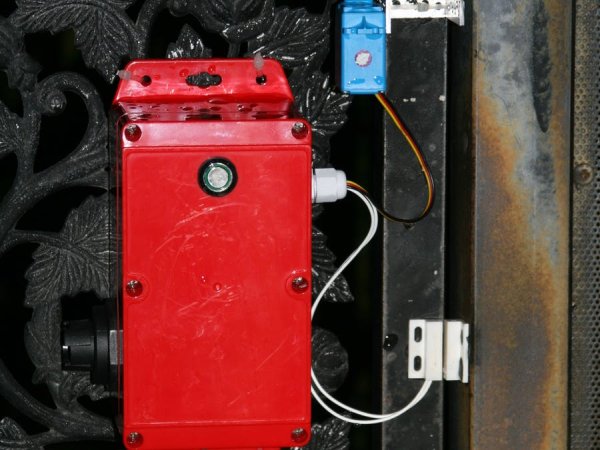
In addition, the device can read RFID/NFC tags that are presented by people attempting to gain access to the area secured and transmit the user’s unique ID to a Windows 10 device for authorization. The recipient of the alert can then choose either to open the gate, which will retract the locking rods and allow the gate to be opened, or prevent the gate from being opened. Tags can be stored in the local microprocessor for recurring visitors. This is useful in cases where, for example, a gardener may need access to your backyard every week, but you would prefer not making them duplicate keys. You could also use this to allow neighbors or family access to your backyard to check on pets or water plants while you are away on vacation.

Here is a high-level overview of the Arduino code:
1. The module polls Virtual Shields and/or Azure for instructions until a RFID tag is scanned.
2. Once a tag has been scanned, the Arduino will check the internal database to determine if a preset action has been configured for the tag.
3. If the tag is recognized, and configured with access permissions, the servo will retract the locking bars and the door will be allowed to open.
4. This action will cause an event to be logged to Azure recording the tag ID and the date and time the gate was opened.
5. Once the reed switch detects the gate has been closed, it will re-lock the gate using the servos after a preset delay to allow for de-bouncing of the reed switch.
- A local bypass key switch can also be configured, but this depends on the security level the end-user desires.
- The locking rods controlled by servos can be replaced with some other device such as a Lockitron™ if the gate’s configuration allows for this (some gates do not have deadbolts, but rather a single handle with an integrated lock. The Lockitron (TM) can be used to replace deadbolts that are independent from the handle).
Motives
I was interested in making this project because there were often times where I wondered whether or not the back gate to my house was locked. Therefore, I thought that an IoT-connected device would be great to check on its status. However, I also thought that the gate could be made keyless at the same time, using an RFID card instead of a key. Control by a phone would also be another plus. Therefore, I came up with this idea to make a connected device that would help monitor the status of my gate in addition to providing keyless entry.
Read more: The Arduino Gatekeeper
-
How does the device monitor gate status?
The module uses reed switches to detect when gates are opened or closed and immediately sends alerts. -
Can users open the gate remotely?
Yes, a recipient of the alert on a Windows 10 device can choose to retract the locking rods and allow the gate to open. -
What technology is used for keyless entry?
The device reads RFID/NFC tags presented by users to transmit their unique ID for authorization. -
Where is the access data stored?
Data is uploaded to the Windows Azure cloud for logging and analytics, while tag IDs can be stored locally in the microprocessor. -
Does the system support recurring visitors?
Tags for recurring visitors can be stored in the local microprocessor so they do not need duplicate keys. -
What happens after the gate is detected as closed?
The servos re-lock the gate after a preset delay to allow for de-bouncing of the reed switch. -
Can other locking devices be used instead of servos?
Yes, the locking rods can be replaced with devices like Lockitron if the gate configuration allows it. -
Is there a manual override option?
A local bypass key switch can be configured depending on the desired security level.
