
Summary of Temperature logger using arduino
Parts used in the Simple temperature logger using arduino:
- Arduino Uno
- LM35 temperature sensor
- USB cable
- PC
- Analog input pins A0, A1, and A2
Simple temperature logger using arduino (°C & °F).
This project is about a simple USB temperature logging system using arduino uno and the serial monitor function in the arduino IDE. The system monitors the temperature every 2 seconds and shows it on the arduino serial monitor. The temperature is shown in °Celsius and °Fahrenheit. The system is interfaced to the PC through the USB port. LM35 is used as the temperature sensor.
LM35 is three terminal linear temperature sensor from National semiconductors. It can measure temperature from-55c to +150C. The voltage output of the LM35 increases 10mV per degree Celsius rise in temperature. LM35 can be operated from a 5V supply and the stand by current is less than 60uA. The pin out of LM35 is shown in the figure below.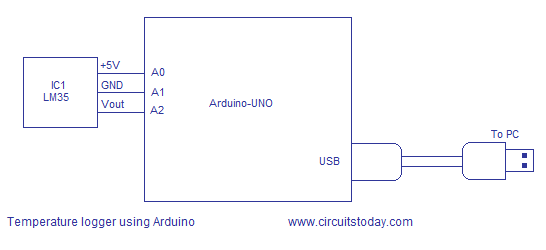
Temperature sensor LM35 is interfaced to the Arduino through the analog input pins A0, A1 and A2. Analog input pin A0 is made high and it acts as the 5V supply pin for the LM35. Analog input pin A2 is made low and it acts as the ground pin for the LM35. Analog input pin A1 is set as an input and the voltage output of LM35 is coupled to the arduino through this pin. This scheme is very useful because you can plug the LM35 directly into the analog input female connector and no external connection wires are needed. The arduino board is powered by the PC through the USB cable and no external power supply is needed in this circuit. The USB port also serves as the medium for communication between arduino and PC.
Read more: Temperature logger using arduino
- How often does the system monitor the temperature?
The system monitors the temperature every 2 seconds. - What range of temperatures can the LM35 measure?
The LM35 can measure temperature from -55°C to +150°C. - Does the voltage output of the LM35 change with temperature?
Yes, the voltage output increases 10mV per degree Celsius rise in temperature. - Can the Arduino board be powered without an external supply?
Yes, the Arduino board is powered by the PC through the USB cable. - Which analog pins are used to interface the LM35 with the Arduino?
Analog input pins A0, A1, and A2 are used for the interface. - What function in the Arduino IDE displays the temperature data?
The serial monitor function in the Arduino IDE shows the temperature. - Is external wiring required to connect the LM35 to the Arduino?
No, you can plug the LM35 directly into the analog input female connector without external wires. - What unit formats are displayed on the serial monitor?
The temperature is shown in both degrees Celsius and degrees Fahrenheit.
