
Summary of Temperature and Humidity Data Logger using Arduino
This project builds a temperature and relative humidity data logger using an Arduino Uno as the central controller. The DHT22 sensor captures environmental data, which the Arduino processes and stores on an SD Card via the SPI protocol. Users can later retrieve the SD Card to import the data into Excel for graphing analysis.
Parts used in the Temperature and Humidity Data Logger:
- Arduino Uno
- SD Card Module
- DHT22 Temperature and Humidity Sensor
- SD Card (Higher than 8GB)
- Breadboard
- Connecting wires
In this project, we are going to make a temperature and relative humidity data logger. Arduino is the brain of this project. DHT22 sensor is used for sensing temperature and relative humidity. Arduino Uno is programmed to read temperature, humidity values from DHT22 sensor and save it to a file in an SD Card. So whenever required we can take the SD Card for viewing data. Here we will take data from SD card and import it to excel to plot graphs.
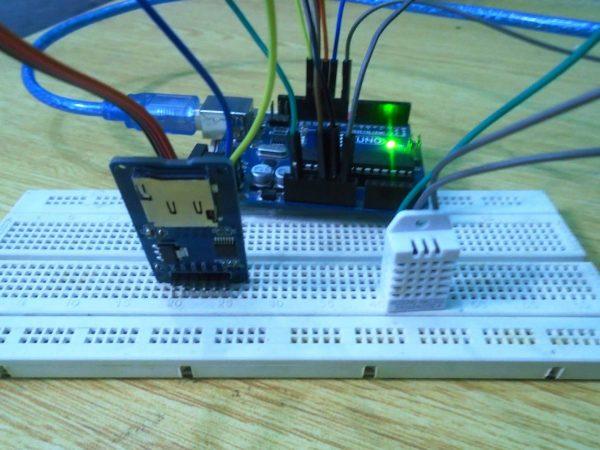
Components Required
- Arduino Uno
- SD Card Module
- DHT22 Temperature and Humidity Sensor
- SD Card (Higher than 8GB)
- Breadboard
- Connecting wires
Explanation
First of all, we will connect the SD Card module to the Arduino. Arduino can do read write operations on SD Card via SPI protocol. So we need to connect the SD card module to SPI pins of Arduino, which are pins 13, 12, 11 and 10. Since it is using SPI protocol, it won’t work if we connect SD card module to normal digital IO pins.
- SD Card Module Ground to Arduino Ground
- VCC of the module to 5V output of Arduino
- MISO of module to pin 12 of Arduino
- MOSI of module to pin 11 of Arduino
- SCK of module to pin 13 of Arduino
- CS of module to pin 10 of Arduino
Then we can connect the DHT22 to the Arduino.
- Connect VCC of DHT22 to 5V output of Arduino
- Ground to ground of Arduino
- Data pin of DHT22 to pin 8 of Arduino

Read More: Temperature and Humidity Data Logger using Arduino
-
What is the brain of this project?
Arduino is the brain of this project. -
How does the system save data?
The Arduino reads values from the DHT22 sensor and saves them to a file in an SD Card. -
Which protocol does the SD Card module use?
The SD Card module uses the SPI protocol for read and write operations. -
Can the SD card module connect to normal digital IO pins?
No, it will not work if connected to normal digital IO pins because it uses the SPI protocol. -
What are the specific SPI pins required for the connection?
The required pins are 13, 12, 11, and 10. -
Where should the Data pin of the DHT22 be connected?
The Data pin of the DHT22 connects to pin 8 of the Arduino. -
How can the stored data be viewed?
You can take the SD Card out and import the data to Excel to plot graphs. -
What voltage output should be used for the VCC connections?
The 5V output of the Arduino should be used for the VCC of both the SD Card module and the DHT22 sensor.
