
Summary of Digital Thermometer using Arduino and DS18B20 Sensor
This article details building a digital thermometer using an Arduino Uno, DS18B20 temperature sensor, and Nokia 5110 LCD. The DS18B20 measures temperature in Celsius with high precision, while the LCD displays readings. Connections involve specific pin mappings and resistors for both components to ensure proper communication and power supply.
Parts used in Digital Thermometer using Arduino:
- Arduino Uno
- DS18B20 Temperature Sensor
- Nokia 5110 LCD
- 1KΩ Potentiometer
- 10KΩ Resistors – 4
- 4.7KΩ Resistor
- 1KΩ Resistor
- 330Ω Resistor
- Connecting Wires
- Breadboard
In this project, we are going to make a Digital Thermometer using Arduino Uno. We will use DS18B20 temperature sensor to sense the temperature and Nokia 5110 LCD to display it. DS18B20 is a 1-Wire digital temperature sensor manufactured by Maxim Integrated and is capable of reporting degree celsius with 9 ~ 12 bit precision.

Components Required
- Arduino Uno
- DS18B20 Temperature Sensor
- Nokia 5110 LCD
- 1KΩ Potentiometer
- 10KΩ Resistors – 4
- 4.7KΩ Resistor
- 1KΩ Resistor
- 330Ω Resistor
- Connecting Wires
- Breadboard
Explanation
First we will connect Nokia 5110 LCD to Arduino as follows.
- Connect the GND pin of Nokia 5110 LCD to GND of Arduino.
- Connect the LED pin of Nokia 5110 LCD to middle pin of 1KΩ potentiometer through 330Ω resistor and connect other two pins of the potentiometer to VCC, GND.
- Connect the VCC pin of Nokia 5110 LCD to 3.3V output pin of Arduino.
- Connect the CLK pin of Nokia 5110 LCD to Pin 8 of Arduino through a 10KΩ resistor.
- Connect the DIN pin of Nokia 5110 LCD to Pin 9 of Arduino through a 10KΩ resistor.
- Connect the D/C pin of Nokia 5110 LCD to Pin 10 of Arduino through a 10KΩ resistor.
- Connect the SCE pin of Nokia 5110 LCD to Pin 11 of Arduino through a 1KΩ resistor.
- Connect the RST pin of Nokia 5110 LCD to Pin 12 of Arduino through a 10KΩ resistor.
Then connect DS18B20 temperature sensor to Arduino as follows.
- Connect left pin of DS18B20 to GND of Arduino.
- Connect right pin of DS18B20 to 5V output of Arduino.
- Connect middle pin of DS18B20 to Pin 2 of Arduino
- Connect a 4.7KΩ resistor from middle pin of DS18B20 to 5V as pull up.
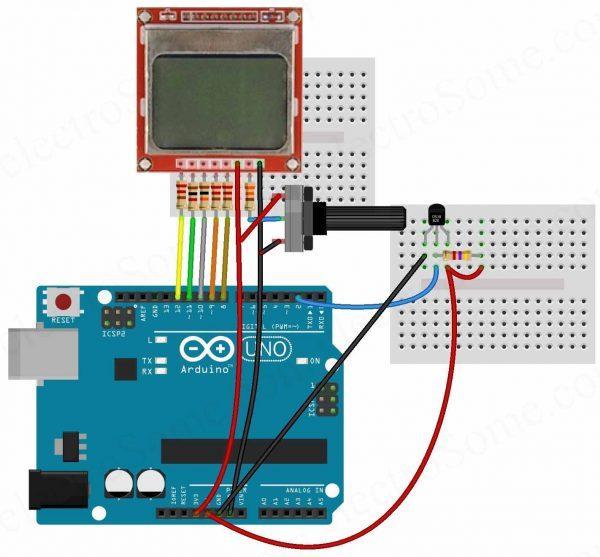
Read More: Digital Thermometer using Arduino and DS18B20 Sensor
- What sensor is used to sense temperature?
The DS18B20 temperature sensor manufactured by Maxim Integrated is used. - How does the DS18B20 report temperature?
It reports degree celsius with 9 ~ 12 bit precision. - Which display is used to show the temperature?
A Nokia 5110 LCD is used to display the temperature. - Can I connect the LCD LED pin directly to VCC?
No, it connects through a 330Ω resistor and the middle pin of a 1KΩ potentiometer. - Does the DS18B20 need a pull-up resistor?
Yes, a 4.7KΩ resistor must be connected from the middle pin to 5V as a pull-up. - Which Arduino pins are used for the LCD CLK signal?
Pin 8 of the Arduino is used for the CLK pin through a 10KΩ resistor. - What voltage powers the Nokia 5110 LCD VCC pin?
The VCC pin connects to the 3.3V output pin of the Arduino. - How many 10KΩ resistors are required for this project?
Four 10KΩ resistors are required for the connections.
