
Summary of Temperature Data Logger
This article describes a portable temperature data logger that records temperature readings every minute into a CSV file. The device utilizes an Arduino Nano, various sensors including LM35 and Hall effect sensors, an RTC module for timekeeping, and an SD card for data storage. It features an LCD display and is powered by dual lithium-ion batteries or USB, housed within a PVC enclosure.
Parts used in the Temperature Data Logger:
- Arduino Nano
- SD card Module
- SD Card
- RTC Module DS1307
- LCD 16*2
- LM35 temperature Sensor
- AH44E hall effect sensor (Qty=2)
- 2* 3.7 Volt Lithium Ion Battery
- Breadboard or PCB and wires
- PVC Electric Pipe and Box
- Female & male DC Power Connector
A temperature data logger, is a portable measurement device that is able to recording temperature over a defined period of time automatically. The data can be retrieved and viewed after it has been recorded.
in this device the temperature will record every one minutes in CSV file.
Step 1: You Will Need
1- Arduino Nano.
2- SD card Module.
3- SD Card.
4- RTC Module DS1307 (provide date and timekeeping) .
5- LCD 16*2.
6- LM35 temperature Sensor.
7- AH44E hall effect sensor (Qty=2).
8- 2* 3.7 Volt Lithium Ion Battery (I get it from used laptop battery).
9- Breadboard or PCB and wires.
10- PVC Electric Pipe and Box.
11-Female & male DC Power Connector.
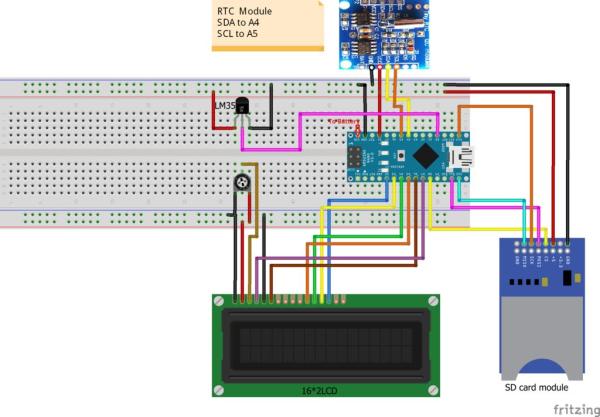
Step 2: Circuit Diagram and Sketch
Connect the circuit as shown in the picture and make sure that the SD and RTC library working probably.
I suggest you to not connect the battery till you finish all the test ,so instead of that use the power of USB port .
Remember the battery will provide the circuit with 7.4 volt (3.7 *2) ,so it should be connected to Vin pin in arduino and arduino module will provide 5 volt to other module.
the other pictures showing how to connect linear hall effect sensor ,it work like a switch but instead of pushing a button the output of the sensor will ramp up to the source 5v when the north side of a magnet approaches the face of the sensor and it will drop to ground when south pole of a magnet approaches the face of the sensor.
I connect two sensors ,one to reset arduino and the other one for LCD back-light.
Note that you can download the RTC library from below link and you can set the clock using library example.
https://github.com/adafruit/RTClib
The Code attached .
For more detail: Temperature Data Logger
- How often does the device record temperature?
The device records temperature every one minute. - In what format is the recorded data saved?
The data is saved in a CSV file. - Can I use a battery before testing the circuit?
No, you should not connect the battery until all tests are finished; use the USB port power instead. - What voltage do the two batteries provide to the Vin pin?
The two 3.7 Volt batteries provide 7.4 volts to the circuit. - How does the Hall effect sensor function as a switch?
The output ramps up to 5V when the north side of a magnet approaches and drops to ground when the south pole approaches. - What functions do the two Hall effect sensors control?
One sensor is connected to reset the Arduino and the other controls the LCD back-light. - Where can I download the RTC library?
The RTC library can be downloaded from the Adafruit GitHub link provided in the article. - How does the Arduino module handle power distribution?
The Arduino module receives 7.4 volts at the Vin pin and provides 5 volts to other modules.
