
Summary of Store Your Sensitive Data Safely When Sharing a Sketch
This article explains how to protect sensitive data like Wi-Fi credentials and API keys when sharing Arduino sketches. By using the `SECRET_` identifier in the `.ino` file, users can create a dedicated Secret tab in the Arduino Web Editor or Desktop IDE to store private values. These values remain hidden when the sketch is shared via URL or downloaded, ensuring security while allowing easy configuration for the user's own account.
Parts used in the Store Your Sensitive Data Safely When Sharing a Sketch:
- Arduino Web Editor
- Arduino IDE
- WiFi101 Library
- MKR1000 Board
- Wi-Fi Shield
If there is sensitive data that you want to keep private when sharing a sketch, add a secret tab and store your private info there!

Things used in this project
Software apps and online services |
||||||
 |
|
|||||
 |
|
|||||
Story
Often in your sketch, there is some sensitive data that you’d like to keep private, which could accidentally become public when published on GitHub or when you share your sketch with someone else via URL. This sensitive information may include Wi-Fi network names and passwords, API key, and so on. But now, you can add a secret tab to your sketch and store your private data there.
This feature has been designed specifically for the Arduino Create Editor. If you have yet to try it, follow this tutorial to get started — all you need is an Arduino ID.
How it works
Basically every time you type SECRET_SOMETHING in your sketch and save it, we will create a Secret tab for you to fill out.
Let’s start with an example, just so you can see how it works.
Go to the Libraries panel and type ‘Wifi101’ in the search tab, then click on the ConnectWithWPA example. You can also click on this link and add the example to your sketchbook.
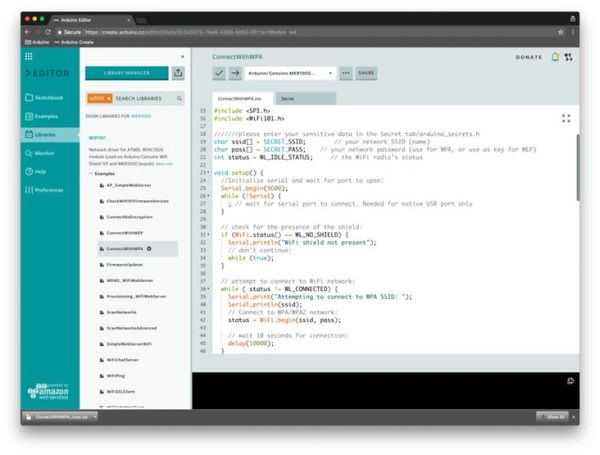
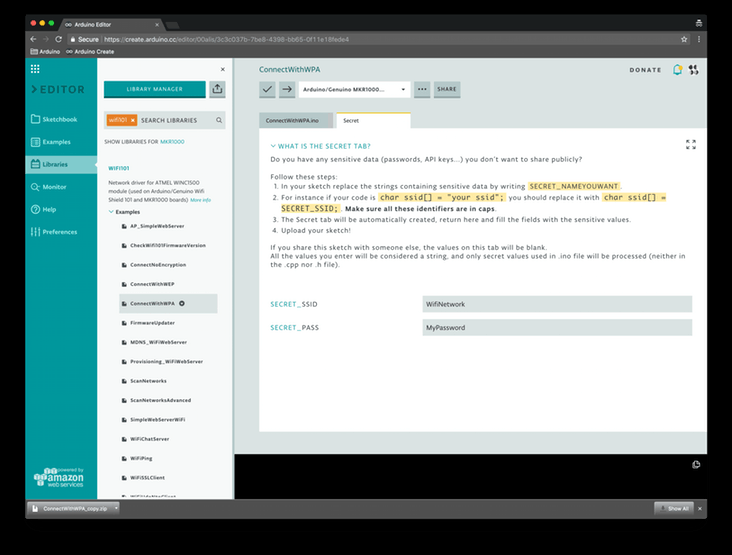
As you can see, there are some identifiers like SECRET_SIID and SECRET_PSW . If you now click on the tab called “Secret,” you will notice some input fields where you can fill in your data.
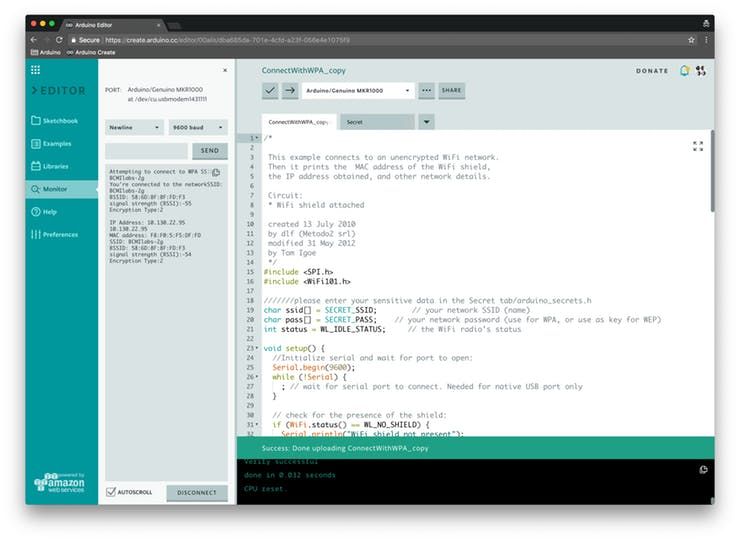
If you have a MKR1000 lying around, you can upload this sketch on it and watch your board connect to Internet (just make sure you join a 2GHz WiFi network).
How to Add Secret Values to Your Own Sketch
Write your sketch as you would normally.
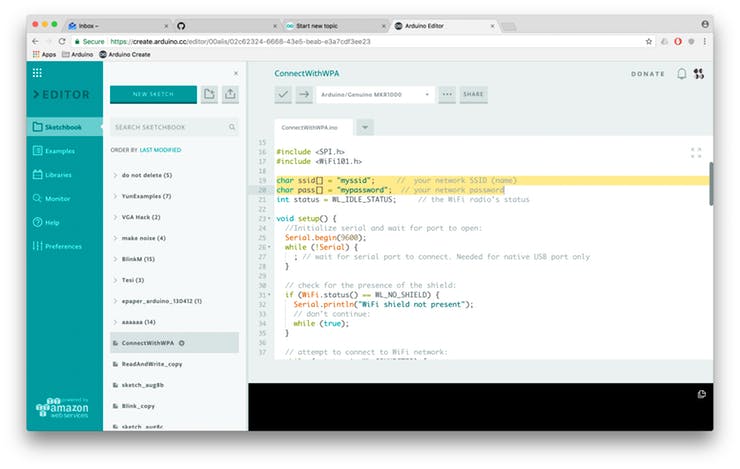
In your sketch, replace the strings containing sensitive data by writing SECRET_NAMEYOUWANT . For instance, if your string is "psw” , you should replace it with SECRET_PSW . Make sure all these identifiers are in caps.
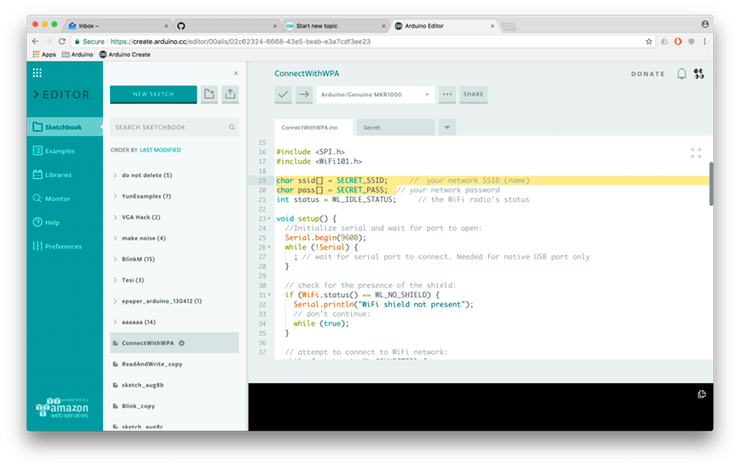
The Secret tab will be automatically created as soon as you type SECRET_SOMETHING. Go to Secret tab and fill out the fields with the sensitive values.
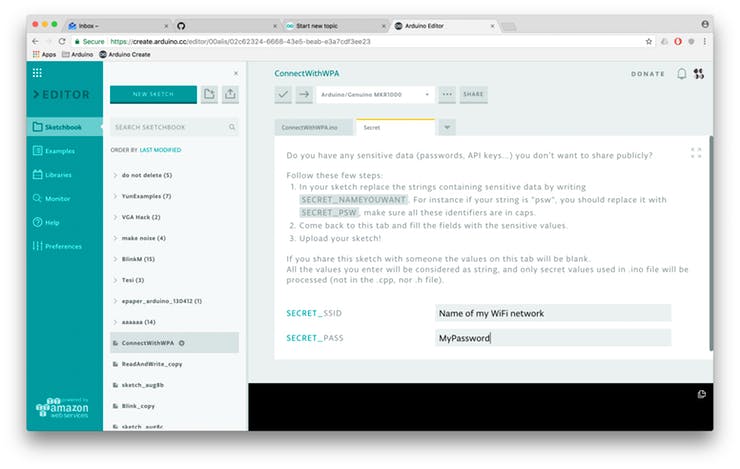
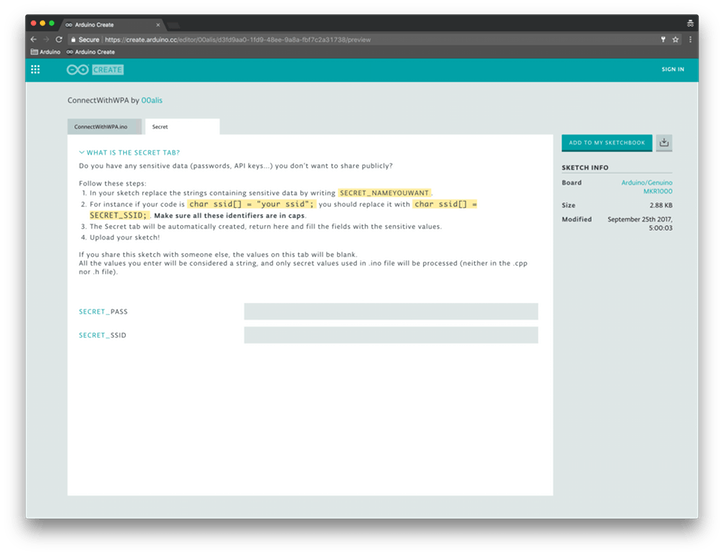
That’s it! If you share this sketch with someone via URL or if you download it, the values on the tab will be blank.
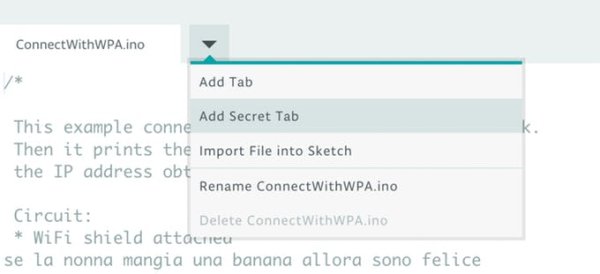
Alternatively, you can also click on the tab button and add the Secret tab directly from there. These instructions will be reported for quick reference.
If you download a sketch, we will automatically create a file called arduino_secrets.h and add it to the .zip file. If you open the sketch with the Desktop IDE, you will be able to fill up this tab with your secrets as usual.
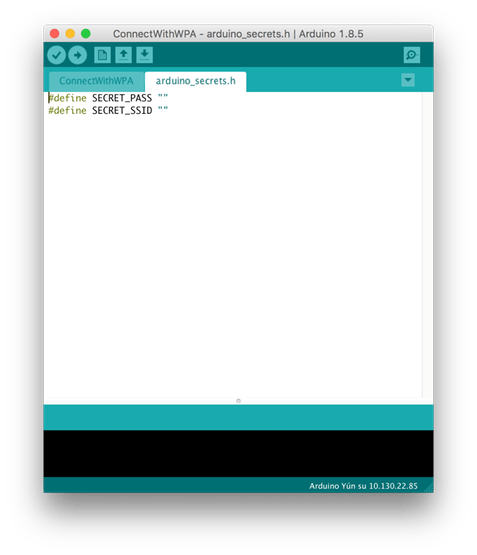
Tech Details
All the values you enter will be considered strings, and only secret values used in .ino file will be processed (neither in the .cpp nor .h file).
The secrets are stored as plain text values, and will only be available when the user logs in to his/her account and looks at their own sketches in their personal sketchbooks.
You will be able to delete the Secret tab simply by removing the SECRET_XXidentifiers from the .ino file.
Code
Source : Store Your Sensitive Data Safely When Sharing a Sketch
- How do I hide sensitive data in my Arduino sketch?
Replace strings containing sensitive data with SECRET_NAMEYOUWANT identifiers in your .ino file. - What software supports the Secret tab feature?
The feature is designed specifically for the Arduino Create Editor and the Desktop Arduino IDE. - Can I use the Secret tab with .cpp or .h files?
No, only secret values used directly in the .ino file will be processed. - What happens to my secrets if I share the sketch via URL?
The values on the Secret tab will appear blank to anyone you share the sketch with. - Does the system store secrets as encrypted text?
No, the secrets are stored as plain text values accessible only when logged into your personal account. - How do I remove the Secret tab from my project?
You can delete the Secret tab by removing all SECRET_XX identifiers from the .ino file. - What file is created when downloading a sketch with secrets?
Downloading creates a file named arduino_secrets.h inside the .zip archive. - Are there any specific requirements for the secret identifiers?
All identifiers must be written in capital letters, such as SECRET_SSID.
