
Summary of Smart Garage
This project is a smart garage door opener using an Arduino MKR1000, designed to replace lost remotes and enable remote access via Azure IoT Hub. The system integrates sensors for safety and status monitoring, aiming to run four tasks simultaneously despite the lack of a native RTOS on the MKR1000. Although the author encountered stability issues preventing full completion, the design offers a framework for DIY home automation with cloud connectivity and local display feedback.
Parts used in the Smart Garage:
- Arduino MKR1000
- GY-521 MPU-6050 3 Axis Gyroscope + Accelerometer Module
- Ultrasonic Sensor HC-SR04
- SSD1306 OLED I2C Display
- Relay (generic)
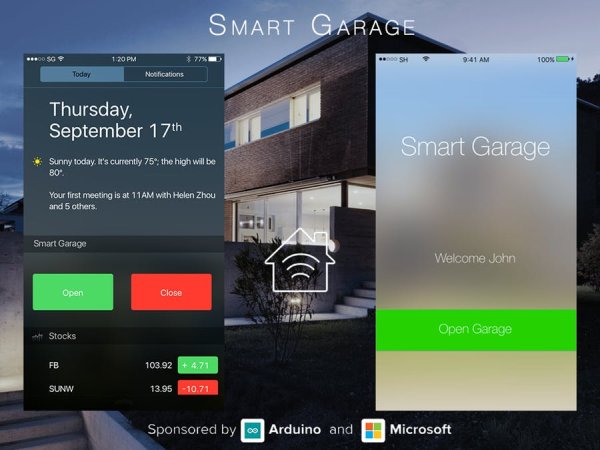
Change the way you operate your garage!
Things used in this project
Hardware components |
||||||
 |
|
× | 1 | |||
|
× | 1 | ||||
 |
|
× | 1 | |||
|
× | 1 | ||||
|
× | 1 | ||||
Software apps and online services |
||||||
 |
|
|||||
 |
|
|||||
 |
|
|||||
Hand tools and fabrication machines |
||||||
 |
|
|||||
Story
First of all project requires a bit of explanation on my side and the history behind it. Few months ago I faced problem of losing my remote to garage doors. This happened for the second time and I got really frustrated, also one more thing that always annoyed me was the need to pass remote to any family member who would need an access to garage door.
This inspired me to design my own system, I know there are some ready of the shelf solutions but they didn’t satisfy me and also it would be to easy? My first prototype that is still working is based on ESP connected to relay and HC-SR04, while it’s fairly good solution and reliable it has some issues. First of all during doors opening HC sensor gets crazy and gives false readings. Lastly the whole system lacks nice GUI and access from anywhere in the world it’s local only (you need to connect to the same WiFi).
Based on this improved version of the system would work following way:
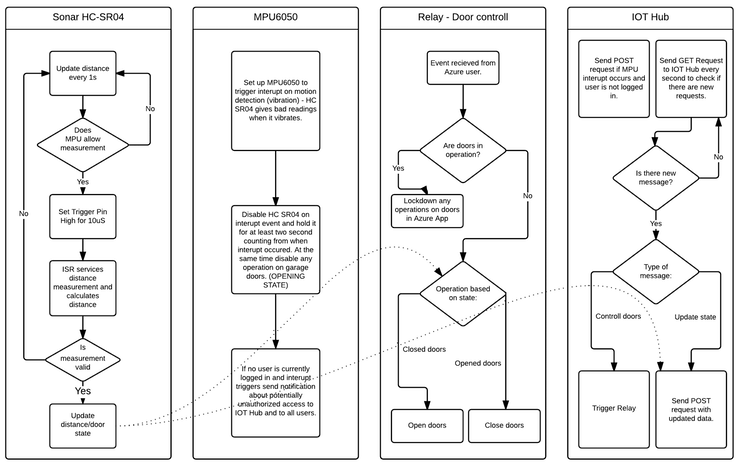
This is when we get to the major problem that affected my project and which didn’t allow me to finish it. We need all 4 tasks to run at the same time more or less. Multitasking usually is achieved on MCUs using RTOS, on MKR1000 we don’t have direct port of any RTOS at the moment. The only project that seems to be available is FreeRTOS for Arduino Zero but it has some issues and semi bricked my MKR1000. Because I was on holiday when trying to finish my project I ended up stocked in one point without the option to fix MKR1000 (you need JTAG/SWD debugger to flash MKR1000 directly with OpenOCD).
As I discussed it with WLAC people they advised me to upload project in current state as it might be good lesson to other people working on something similar. So if you want to replicate my idea more or less or further develop it lets start from the beginning.
First you need to set up Azure IOT Hub this can be done using following tutorial it’s great and it’s the same place I started, you need to configure your IOT Hub on Azure and get all necessary keys.
http://mohanp.com/mkr1000-azure-iot-hub-how-to/
http://mohanp.com/complete-reject-abandon-mkr1000-azure-iot-hub-how-to-part2/
After complete setup you can start using code attached in the post some things have comments, some doesn’t as it is in early stage. Please be advised that MKR1000 crashed when using this code as it’s most likely related to wrong config and some other issues. If you happen to own JTAG/SWD or are using Zero with on board debugger you should be good to go.
To connect HC SR04 please use voltage divider as below as MKR1000 uses 3.3v logic(GPIO pins can be defined in source).
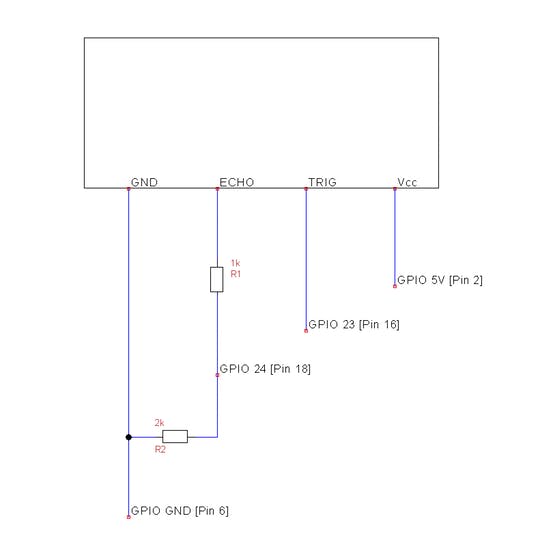
This is current stage of the project and as of today there is no UWA app available as I wouldn’t be able to test everything anyway. As soon as I will fix MKR1000 I will work further and update this project.
SSD1306 display is used to display some debug info as well as current time (uses RTC capability of MKR1000).
Schematics
Flowchart
Code
Source : ‘Smart Garage
- Why was this smart garage system created?
The project was inspired by losing a garage remote twice and the inconvenience of sharing physical remotes with family members. - What hardware components are required for the prototype?
You need an Arduino MKR1000, a GY-521 MPU-6050 module, an HC-SR04 ultrasonic sensor, an SSD1306 OLED display, and a generic relay. - How do you connect the HC-SR04 to the MKR1000?
Use a voltage divider because the MKR1000 uses 3.3v logic levels while the sensor may operate at higher voltages. - What software tools are needed for development?
The project utilizes Arduino IDE, Microsoft Visual Studio 2015, and optionally Microchip Atmel Studio 7. - Does the system support global remote access?
Yes, the improved version connects to Azure IoT Hub to allow access from anywhere, unlike the previous local-only prototype. - Can the MKR1000 run multiple tasks simultaneously?
The design aims to run four tasks at once, but the MKR1000 lacks a direct RTOS port, causing stability issues. - What happens if the code crashes on the MKR1000?
Fixing a bricked MKR1000 requires a JTAG or SWD debugger to flash it directly with OpenOCD. - What information does the SSD1306 display show?
The display shows debug information and the current time using the RTC capability of the MKR1000.
